How to Find All the Subscriptions You Are Paying For
No single list shows every subscription. The five ledgers that do, the exact menu paths, and the two hiding places where forgotten charges live.
Before you can cancel anything, you have to find it, and there is no single screen anywhere that lists every subscription you pay for. The money leaves through at least five separate ledgers: your card statements, and the subscription hubs at Apple, Google, Amazon, and PayPal, each of which only knows about its own charges. Here is the complete sweep, with the exact menu path for each ledger, and the two hiding places where the charges nobody remembers tend to live.
The quick answer
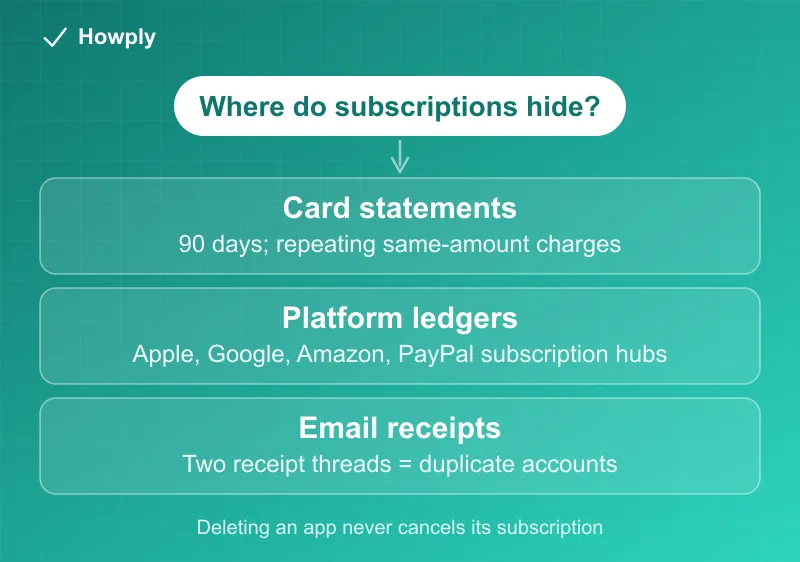
- Start with 90 days of card and bank statements and highlight every charge that repeats at the same amount. That is the ground truth the platform lists can only partially explain
- Then open the four platform ledgers: Apple (Settings > your name > Subscriptions), Google (play.google.com > Payments & subscriptions), Amazon (Your Account > Memberships & Subscriptions), PayPal (Settings > Payments > Automatic Payments)
- Search your email for “receipt”, “invoice”, and “your subscription”: two receipt threads for one service with different account emails is how duplicate accounts reveal themselves
- Check what your bundles already include before paying for anything separately; memberships like Walmart+ carry a streaming plan many people also pay for directly
- Then work the list: duplicates first, trials second, and the cancel guides on this site for everything you decide to drop
Key facts at a glance
| Ledger | Where the list lives |
|---|---|
| Card and bank statements | Repeating same-amount charges over 90 days |
| Apple | iPhone: Settings > your name > Subscriptions (cancel guide); full charge history at reportaproblem.apple.com |
| Google Play | play.google.com > Payments & subscriptions > Subscriptions (cancel guide) |
| Amazon | Your Account > Memberships & Subscriptions |
| PayPal | Settings > Payments > Subscriptions and saved businesses / Automatic Payments |
| Microsoft/Xbox | account.microsoft.com/services |
| Search “receipt from”, “invoice”, “your subscription” |
Step 1: the statement sweep
Pull 90 days of statements for every card and account you own, including the one you stopped carrying, and mark every charge that appears more than once at the same amount. Ninety days matters because it catches quarterly billing that a one-month glance misses.
Two things make this harder than it sounds. First, statement names rarely match service names: an app store charge names the store, not the app, so an “APPLE.COM/BILL” line could be any of a dozen subscriptions, which is exactly why the platform ledgers come next. Second, a charge that appears twice in one month is not automatically two subscriptions; pending authorizations and payment retries create doubles that resolve themselves, sorted out in our double charge guide.
Step 2: the four platform ledgers
Each of these lists every subscription billed through that platform, including ones whose apps you deleted long ago. Deleting an app never cancels its subscription.
- Apple: on an iPhone or iPad, Settings > your name > Subscriptions shows active and expired subscriptions. For the money view, reportaproblem.apple.com lists every charge your Apple Account has ever made, which also catches purchases by other family members on your shared payment method
- Google Play: play.google.com > Payments & subscriptions > Subscriptions (or the Play Store app > profile). Remember that Android signups since 2022 for services like YouTube Premium bill here, not at the service itself
- Amazon: Your Account > Memberships & Subscriptions covers Prime, channel add-ons, and app subscriptions billed by Amazon
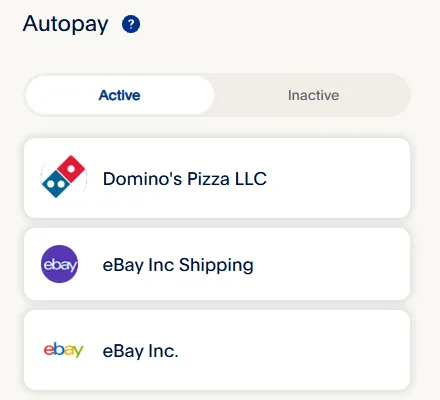
- PayPal: per PayPal’s official steps, go to Settings > Payments > Subscriptions and saved businesses (also labeled Automatic Payments), where every merchant with standing permission to charge you is listed, and can be canceled on the spot. This ledger is the one people forget entirely, and it is where the oldest surprises live
On the PayPal website the list is a page titled Autopay, split into Active and Inactive tabs. Here is what it looks like signed in:
Anything on your statement that none of these four explain is billed directly by the company, and cancellation happens on their site: our cancel guides cover the big ones from Netflix to Walmart+.
Step 3: the two hiding places
Duplicate accounts. Services that accept signup by email, phone, Apple, or Google will happily run two paying accounts for one person. Spotify documents this exact case: an account that looks free while charges continue means Premium lives on another login. The tell is in your inbox: search the service’s name and look for receipt threads addressed to different emails.
Bundles you already pay for. Memberships increasingly include the services people buy separately: Walmart+ includes a Paramount+ or Peacock plan, game subscriptions bundle other services, and carrier plans fold in streaming. Before keeping any standalone streaming subscription, check what your existing memberships already grant; the overlap is free money.
Step 4: work the list
With the full inventory, act in this order: kill genuine duplicates first (two accounts, two billers for one service), then anything in a trial that is about to convert (the 24-hour and end-of-trial deadlines reward acting early), then the subscriptions you simply do not use, each through its own cancel guide. Annual auto-renewals are the easiest to miss because they post once a year; antivirus plans are the classic case, and our Norton guide covers turning off renewal and the 60-day refund window. For anything that keeps charging after you cancel, the escalation path runs through the canceled but still charged guide and, as the last resort, the bank dispute process.
Step 5 (optional): letting an app or an AI agent do the sweep
The manual sweep above costs about an hour and nothing else. The alternative is a subscription-management app, and as of late August 2026 that category has a new shape: agents that act instead of listing.
On August 25, 2026, Rocket Money announced Rowan, described in the company’s press release as an AI agent that “watches spending around the clock. When it spots a way to save, it sends a text. The consumer replies in plain language and Rowan handles the rest. It can renegotiate recurring bills, cancel subscriptions and even create automated savings transfers.” It is “Powered by Anthropic,” ships in a new Premium Plus tier, and is “currently available to select Rocket Money subscribers with broader availability planned for later in 2026.” Pricing for the tier was not stated in the release.
What that trades against the manual method, from the release’s own description:
- Data access: an agent can only see accounts you connect to it, so the two hiding places in Step 3 (a second email account, a card you no longer use) stay invisible unless you connect those too. The manual sweep has no such blind spot
- Execution: the release’s example is a subscriber texting “cancel” and Rowan contacting the service and confirming “when it is done.” That removes the retention screens and phone holds documented across this site, which is the real time saver. It also means the cancellation happens on the agent’s account credentials and your instruction, so keep the confirmation email the same way you would after canceling yourself
- Cost: the sweep is free; the agent sits in a paid tier on top of a paid app. Whether that pays for itself depends on how many forgotten charges it finds, which is exactly what Steps 1 to 3 tell you in an hour
- Coverage gaps: agents cancel with the merchant. They do not reach app-store billing (Apple, Google Play), which only you can cancel from the store account, and they cannot undo a charge already made; that is still a refund request or, if it comes to it, a bank dispute
A reasonable order: run the free sweep once, cancel the obvious ones yourself using the guides linked from the list above, and consider an agent only if what is left is a pile of retention-screen cancellations you would rather not sit through. ChatGPT’s Finances feature, open to every US plan since October 2, 2026, lists recurring bills from the accounts you sync and has the same blind spot: it sees only what you connect. Our ChatGPT Finances guide covers what a bank link shares and how to disconnect it.
Once you have the list, our free Subscription Tracker totals it, flags announced price increases for the plans it knows, and sets a calendar reminder before each renewal. It runs in your browser and stores nothing on our servers.
Bottom line
No one list shows everything, so the sweep is the method: 90 days of statements for the ground truth, the four platform ledgers to put names on the store charges, the inbox search to expose duplicate accounts, and a bundle check before paying for anything twice. One hour, once, and every subscription you own is on a single piece of paper, which is the position every other guide on this site starts from. Step-by-step guides for app subscriptions you may find this way include Calm, Headspace, Grammarly, Patreon, and Discord Nitro.
Menu paths verified against the official Apple, Google, and PayPal support pages linked above as of August 12, 2026; the AI-agent section added September 1, 2026 from Rocket Companies’ official press release. Platforms move settings around; their official pages are the source of truth.