How to Cancel Walmart Plus Membership or Free Trial: Refund and Pause Rules
Cancel Walmart+ in five clicks. Paid members keep benefits to the end of the term, but canceling a free trial can end it at once, with no refunds either way.
Canceling Walmart+ takes five clicks, but two facts change the decision for most people. First, the membership fee is nonrefundable under the current terms, so timing beats negotiating. Second, Walmart quietly offers something better than canceling for a busy month: an official pause, free of charge, up to three times a year. Here is the exact cancel path, the pause rules nobody mentions, the trial trap, and what happens to the Paramount+ or Peacock plan riding on your membership.
The quick answer
- Cancel at: walmart.com account > Walmart+ > Manage membership > Manage > Cancel
- Refunds: the membership fee is nonrefundable per the current Terms of Use, so cancel before the renewal, not after. Benefits run to the end of the period you paid for
- The pause option: paid members can pause for one month at a time, up to three times per year, with no billing while paused
- On a free trial? Canceling can end benefits immediately, and no refunds are issued
- Your streaming plan dies with the membership: the included Paramount+ Essential or Peacock Premium is a Walmart+ benefit, not a separate subscription
- Annual is a one-way door: monthly can upgrade to annual anytime; Walmart states you cannot currently switch annual back to monthly
Key facts at a glance
| Question | Answer |
|---|---|
| Where to cancel | Account > Walmart+ > Manage membership > Manage > Cancel |
| Refund on the fee | Nonrefundable per current terms; benefits run to cycle end |
| Pause instead | 1 month at a time, max 3 times/year, no billing while paused |
| Pause limits | Not available on trials or with the Paramount+ Premium upgrade |
| Canceling during a trial | Benefits may end immediately, no refund |
| Streaming benefit | Included Paramount+ or Peacock ends with the membership |
| Plan switching | Monthly to annual anytime; annual to monthly not offered |
| Alternative to canceling now | Remind Me Later email, 3 days before renewal |
| Phone | (800) 924-9206 |
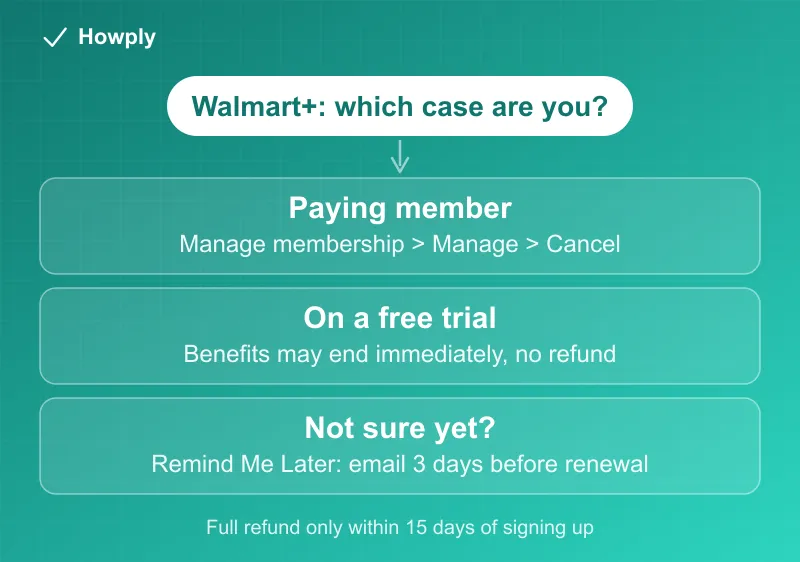
How to cancel
Walmart’s own help page lays out the click path:
- Go to your walmart.com account and sign in
- Select Walmart+
- Select Manage membership
- Select Manage beside your Walmart+ plan
- Select Cancel beside Cancel membership
- Choose Confirm cancellation on the final screen
Steps 5 and 6 are where Walmart offers alternatives: View exclusive offer (a retention discount), Keep membership, or Remind Me Later. Only “Confirm cancellation” actually cancels, so read the buttons rather than clicking the highlighted one out of habit.
The trial trap
This is the one that catches people, because it works backwards from most subscriptions.
Paid members keep benefits until the end of the billing cycle they already paid for. Trial members do not. Per Walmart’s terms, canceling during a trial can terminate the membership immediately, meaning you lose the trial benefits the moment you cancel, and no refunds are issued.
The practical consequence: if you started a 30-day trial and decide on day 5 that you do not want it, canceling right then throws away 25 days of free benefits. The better move is to use the Remind Me Later option, which sends an email three days before the renewal date. You get the full trial and a nudge before the charge lands.
The refund reality, and the pause that replaces it
An earlier version of Walmart’s rules included a short post-signup refund window; the current Terms of Use do not. Today the official position is blunt: the membership fee “is non-refundable except as expressly set forth in these Terms or as required by applicable law,” and Walmart’s billing help page says plainly that it is not able to offer refunds on Walmart+. Practical meaning: the money you save on Walmart+ is saved before the renewal posts, not after. Put the renewal date in your calendar or take the Remind Me Later email, and treat the cancel decision as one you make in advance. Costco works the opposite way and refunds its membership fee at any time, as our Costco membership guide explains.
What Walmart offers instead is genuinely useful and almost never mentioned: pausing. Per the official membership page, a paid member can pause for one month at a time, up to three times per year. While paused you are not billed and have no benefits; you can resume any time during the paused month, and the day you resume becomes your new billing date. Two exclusions: trials cannot pause, and neither can members carrying the Paramount+ Premium upgrade. For a travel month or a tight budget month, a pause beats a cancel-and-rejoin: three clicks, nothing to set up again.
One more one-way door to know before touching plans: monthly can upgrade to annual at any time, but Walmart states you cannot currently change from annual back to monthly. If you are debating between saving with the annual plan and keeping the exit easy, that asymmetry is the whole decision.
The streaming plan riding on your membership
The included streaming benefit makes cancellation more expensive than it looks. Per Walmart’s streaming benefits page, members choose either Paramount+ Essential or Peacock Premium with ads (one at a time, switchable every 90 days), and the benefit requires “an active Walmart+ membership.” Cancel Walmart+ and that streaming plan goes with it, so price the replacement into the decision.
The reverse direction is the money-saver most people miss: Walmart’s own page says that if you already pay for Paramount+ or Peacock separately, you can cancel that paid subscription, let it expire, and then connect the service through Walmart+ at no extra cost. If you hold both today, you are paying for something your membership already includes.
If you took the ad-free upgrade through Walmart ($5/month for Paramount+ Premium, $6/month for Peacock Premium Plus, per the current price list), note that it is billed through your Walmart+ account and that promotional upgrade trials end immediately if you cancel or downgrade them.
Changed your mind?
Walmart supports reactivating before the cycle actually ends:
- Sign in to your Walmart account
- Select Account, then Walmart+
- Select Reactivate membership
If reactivation fails, the usual cause is a payment method that expired; update the card first, then retry.
Quick answers to what people search
If I cancel my Walmart+ free trial early, can I keep using it until the trial ends? Not reliably. The terms say: “If you cancel during a trial period, Walmart may terminate your Walmart+ membership or any Plus Up benefit immediately, in which case you will lose the benefits of the trial immediately. No refunds will be issued.” To keep the free days and still avoid the charge, use the Remind Me Later option, which Walmart describes as an email “sent three days before your renewal date, so you don’t need to cancel immediately.”
When does the trial turn into a charge? At the end of the trial. The terms say you are charged for the first full month or year as soon as the trial period ends, so the reminder email or a calendar note needs to come before that date.
If I cancel Walmart+, do I get a refund? No. “The Walmart+ Membership fee and any Plus Up Benefit fee is non-refundable except as expressly set forth in these Terms or as required by applicable law.”
Does canceling a paid membership take effect right away, or at the end of my month or year? At the end. “If you cancel your Walmart+ Membership or any Plus Up Benefit… you can continue to use your Walmart+ Membership and any such Plus Up Benefit until the end of your relevant term.” That holds for annual plans too: you keep the benefits until the paid year runs out.
Can I cancel by phone? Yes. The terms list “calling Walmart Customer Care at (800) 924-9206” as well as the account page.
Can I reactivate after canceling, and cancel again later? Reactivation is offered “before the end of your billing cycle” from Account > Walmart+ > Reactivate membership, and a reactivated membership can be canceled again the same way. If the benefit you care about is a quiet month, pausing is the cleaner tool for paid members.
What you lose
Walmart+ benefits end with the membership: free shipping with no order minimum, free delivery from your store, fuel discounts, early access to deals, and the included Paramount+ Essential or Peacock Premium plan. Your Walmart account, order history, and saved addresses are untouched, so rejoining later is a single step. A paused membership loses the same benefits for the paused month but keeps your plan, price, and streaming selection waiting.
Bottom line
Account > Walmart+ > Manage membership > Manage > Cancel, then Confirm cancellation, and do it before the renewal because the fee is nonrefundable under the current terms. If the problem is one expensive month rather than the service, pause instead: free, official, three times a year. Mid-trial, do not cancel early; take the Remind Me Later email and keep the free days. And check whether you are separately paying for Paramount+ or Peacock that your membership already includes. The Paramount+ Essential plan that comes with the membership, and the $5.49 Premium upgrade, are explained in our Paramount+ plans guide. The return windows for things bought with the membership, including the 2-day appliance clock, are in our Walmart return policy guide. If you also pay for Instacart+, its 5-day refund rule for annual plans is in our Instacart+ cancel guide.
Steps, pause rules, streaming benefit terms, and the nonrefundable fee policy verified against Walmart’s official help center and Walmart+ Terms of Use as of August 9, 2026. The cancel path, pause and reactivation rules, trial and refund terms, and end-of-term access were re-checked on September 25, 2026 against the Manage Walmart+ Membership page and the Walmart+ Terms of Use (last updated September 24, 2026). An earlier refund-window rule no longer appears in the current terms. If the process changes, this guide will be updated with the revision noted.