Charged for a Free Trial? Why It Happened and How to Get It Back
Trials convert to paid automatically, Apple wants 24 hours of notice, and the refund path depends on who billed you. The free trial rules, decoded.
A free trial that ends in a charge is not a glitch, it is the default. Every major store runs trials the same way: sign up once, and the subscription starts billing itself the moment the trial expires, no second confirmation asked. Google Play’s own policy says it plainly: “at the end of your trial period, the first billing period begins and you automatically get charged.” The two questions that matter after the charge lands are who actually billed you, because that decides where the refund request goes, and how close to the deadline you cancelled, because the stores draw that line earlier than most people assume.
The quick answer
- The charge is automatic by design. No store asks again when a trial ends; cancelling is the only off switch
- Apple’s deadline is earlier than the trial’s end: cancel “at least 24 hours before the trial ends,” per Apple’s official guidance. Cutting it to the last evening can still bill you
- Google Play warns you by email before a trial converts, then charges at trial end unless you cancelled first
- The refund request goes to whoever billed you, not the app maker: Apple charges route through Apple, Play charges through Google, and direct signups through the company itself
- Match the charge before you file. Your App Store purchase history or Play order history tells you in seconds whether that store owns the charge
- Speed matters. Every refund path in this lane treats a request filed the same week far better than one filed after two more renewals
Key facts at a glance
| Question | Answer |
|---|---|
| Why was I charged | Trials convert to paid automatically at expiry |
| Apple cancel deadline | At least 24 hours before the trial ends |
| Google Play cancel deadline | Before the trial period expires |
| Advance warning | Google Play emails you before the trial ends |
| Who refunds an Apple-billed charge | Apple, via reportaproblem.apple.com |
| Who refunds a Play-billed charge | Google, via the Play refund flow |
| Direct signup with your card | The company first, your bank as the backstop |
| Best time to act | Immediately; unused time is the strongest argument |
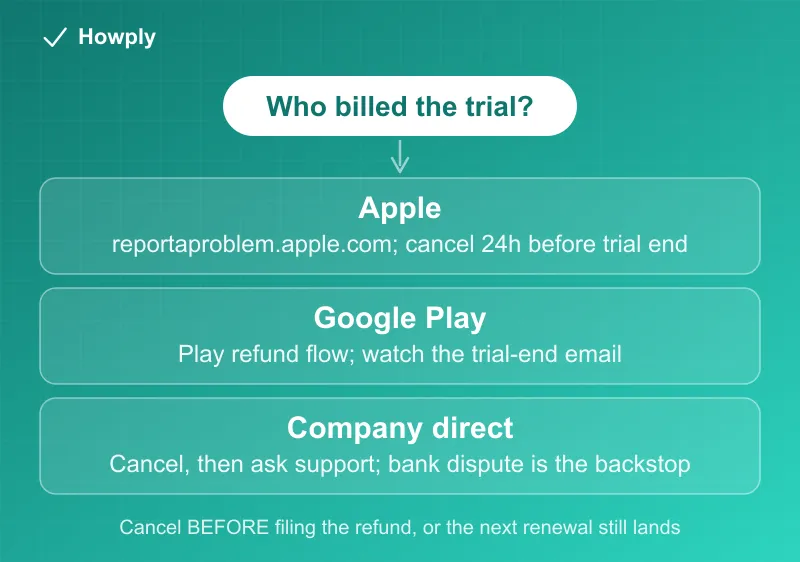
Why the charge landed before you expected
Two clocks run against you. The first is the conversion itself: a trial is a subscription from day one, and per Google Play’s policy, “to avoid charges, cancel the subscription before the trial period expires.” The second clock is the one that catches careful people: Apple’s cancellation deadline sits 24 hours before the trial ends. Apple’s official instruction is to cancel “at least 24 hours before the trial ends,” which means a 7-day trial is really a 6-day decision window. Cancel on the final evening and the renewal may already be locked in.
Google softens its version with a warning shot: “if you accept a trial offer, you’ll get an email when your trial is about to end.” That email is easy to lose in a promotions tab, but it is the single most reliable cancel reminder the stores provide, so it is worth a filter that stars it.
First, find out who billed you
The refund request goes to the biller, and the biller is often not the app’s maker. Before filing anywhere, open the purchase history that matches the charge:
- Apple: Settings, your name, Media & Purchases, Purchase History, or reportaproblem.apple.com, which lists every Apple-billed charge on your account
- Google Play: play.google.com, Payments & subscriptions, Budget & order history
- Neither shows it: the signup was direct with the company, on their site, and your card statement’s merchant name is the trail
Filing with the wrong desk is the most common way these requests die quietly. An app developer cannot refund an Apple-billed charge, and Apple cannot refund a signup you made on a company’s own website.
Getting the money back, by biller
- Apple-billed: request at reportaproblem.apple.com with the reason that fits. The full flow, timelines, and what to do when the money does not show up are in our Apple refund guide
- Play-billed: Google’s refund paths and their time limits are in our Google Play refund guide
- Amazon-billed: trial conversions from Prime or Amazon-billed subscriptions follow the flow in our Amazon refund guide
- Billed directly by the company: cancel first so the next renewal cannot land, then ask support for a refund of the fresh charge, in writing. Unused time since the charge is your argument. If the company stonewalls on a charge you never authorized to continue, the dispute path with your card issuer is the backstop, the same escalation covered in canceled but still being charged
One warning for all four paths: cancel before you file. A refund request against a subscription that is still active can be granted while the subscription rolls on and bills again next month.
Make the next trial safe
- Set the reminder at signup, 2 days before the trial ends. That clears Apple’s 24-hour deadline with margin and beats relying on Google’s email
- Cancel early when you have decided. For paid periods, Google Play states a cancelled subscription stays usable “for the time you’ve already paid.” For trials, what happens to access varies by store and app, so read the confirmation screen when you cancel: it states whether access ends now or at the trial’s end
- Screenshot the trial terms at signup: the end date, the price after conversion, the cancel path. Thirty seconds of evidence turns a he-said-she-said refund request into a documented one
Bottom line
A trial charge means the conversion clock beat your cancellation, and on Apple that clock ends a full day early. Figure out who billed you from the purchase history, file with that desk while the charge is fresh and unused, and cancel before you file so the subscription cannot bill again mid-request. Next time, the 2-day reminder at signup costs nothing and wins the whole game. Which streaming services still offer a true free trial, and which only offer a discounted first month, is tracked in our streaming free trials guide.
Apple’s 24-hour guidance and Google Play’s trial billing and cancellation wording verified against the official support pages linked above as of August 8, 2026. Store policies change; the official pages are the source of truth.