How to Cancel a Subscription on iPhone, and What to Do If It Isn't Listed
Settings > your name > Subscriptions cancels anything Apple bills. Red text means it is already canceled; a missing one is on another account or billed elsewhere.
Every subscription Apple bills you for, from Apple Music to a streaming or dating app you joined inside the App Store, cancels from the same screen on your iPhone. The trouble starts when the subscription is not on that screen, or the Cancel button is missing. Apple’s cancel page (updated September 14, 2026) explains both cases, and its Media Services terms, updated the same day, add the timing rule that decides whether you pay for one more month. Here is the path, the places a missing subscription hides, and the timing that matters.
The quick answer
- Cancel at: Settings > your name > Subscriptions > the subscription > Cancel Subscription. Apple notes you “might need to scroll down to find the Cancel Subscription button”
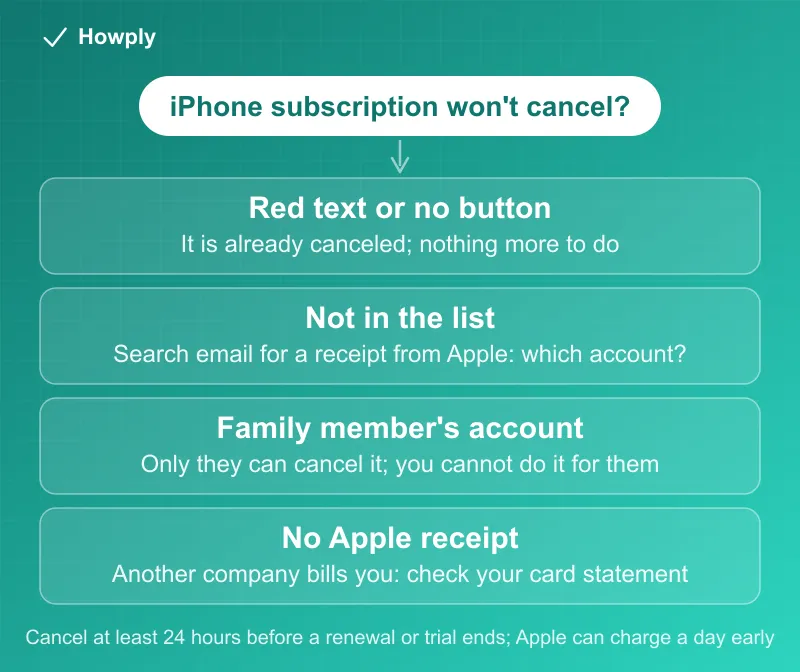
- No Cancel button, or red text? “If there is no Cancel button or you see an expiration message in red text, the subscription is already canceled”
- Cancel a day early, at least: Apple can charge a renewal “no more than twenty-four (24) hours prior to the start” of the next period, and for trials Apple says to “cancel it at least 24 hours before the trial ends”
- Not in the list? It is billed to a different Apple Account, to a family member (who must cancel it: “You can’t cancel a family member’s subscription”), by another company, or through your wireless carrier
- Canceling is not a refund. Refund requests go through reportaproblem.apple.com, with an update in 24 to 48 hours
Key facts at a glance
| Question | Answer |
|---|---|
| iPhone or iPad | Settings > your name > Subscriptions > the subscription > Cancel Subscription |
| Mac | App Store > your name (bottom of the sidebar) > your name again > Subscriptions |
| Windows PC | Apple Music or Apple TV app > your name > View My Account > Subscriptions > Manage |
| Android | Billed by Apple: account.apple.com. Billed through Google Play: the Google Play app |
| Already canceled? | No Cancel button, or an expiration message in red text |
| Timing | Renewals can be charged up to 24 hours before the new period starts |
| Missing from the list | Another Apple Account, a family member’s account, another company, or your carrier |
| A family member’s subscription | Only they can cancel it |
| Apple’s own free trials | A canceled trial cannot be reactivated |
| Refunds | reportaproblem.apple.com; update in 24 to 48 hours |
How to cancel on iPhone or iPad
- Open Settings and tap your name at the top
- Tap Subscriptions
- Tap the subscription you want to end
- Tap Cancel Subscription, scrolling down if the button is not visible
The same list holds Apple’s own services and third-party apps you subscribed to through the App Store, so one pass through it covers everything Apple bills. If a subscription shows an expiration message in red, it is already canceled and there is nothing more to do; Apple’s terms spell out the rest: “When your Subscription to any Service or Content ends, you will lose access to any functionality or Content of that Service that requires a Subscription.”
On a Mac, a Windows PC, or an Android phone
- Mac: open the App Store, click your name at the bottom of the sidebar (or Sign In), click your name again on the page that appears, then Subscriptions > the subscription > Cancel Subscription
- Windows PC: open the Apple Music or Apple TV app, click your name at the bottom of the sidebar > View My Account > next to Subscriptions, Manage > Edit > Cancel Subscription. Older iTunes for Windows uses Account > View My Account instead
- Android: a subscription billed by Apple cancels at account.apple.com after you sign in. If you subscribed to Apple Music or Apple TV on Android and are “being billed through Google Play,” cancel in the Google Play app instead, as our Google Play cancel guide shows
When the subscription isn’t on the list
Apple’s page gives one starting move for every missing subscription: search your email for “receipt from Apple” or “invoice from Apple,” then check which Apple Account the receipt names. What the receipt shows decides the next step.
- A family member’s account. Ask them to cancel it: “You can’t cancel a family member’s subscription.” The one thing an organizer can do is on the refund side: if a family member’s purchase went on the shared payment method, the organizer “can still request a refund on reportaproblem.apple.com,” where choosing All shows purchases charged to that payment method
- Another Apple Account you use. Sign in with that account and cancel from its Subscriptions list. Old accounts from a previous phone or a work device are the usual culprits
- No receipt from Apple at all. Then Apple is not the one billing you: “You might’ve bought the subscription from another company.” Find the merchant on your bank or card statement and cancel with that company. If the statement line reads APPLE.COM/BILL, it is Apple after all, and our guide to the APPLE.COM/BILL charge matches it to the purchase. For hunting down everything else, see how to find all your subscriptions
- Your wireless carrier or another provider. Subscriptions that came with a phone or internet plan are canceled with that provider. If the subscription is tied to the wrong Apple Account, Apple says to contact Apple Support first, then have the provider set it up again
- An AppleCare plan. If an AppleCare subscription does not appear, you may need to finish the plan setup and link it to your Apple Account first
Timing: the 24-hour rule, and what canceling changes
Apple’s Media Services terms set the rules behind the buttons:
- Renewals can post a day early. “You will be charged no more than twenty-four (24) hours prior to the start of the latest Subscription period.” Canceling on the renewal date itself can be too late, so cancel at least a day ahead
- Trials follow the same clock. To avoid the first charge, “cancel the Subscription at least twenty-four (24) hours before the free trial ends”
- Apple’s own trials are one-shot. For Apple services such as Apple Music or Apple TV, if you start a free trial “and cancel before it ends, you cannot reactivate the free trial.” How other services handle an early trial cancellation is in our guide to canceling a free trial early
- A failed card is not a cancellation. If Apple cannot charge your payment method “and you have not cancelled the Subscription, you remain responsible for any uncollected amounts.” Letting a card expire does not end a subscription; canceling does. Our guide to subscriptions that follow you to a new card covers the rest
- Price increases can end a subscription for you. Apple notifies you when a price goes up, and when your consent is required, the terms add: “We reserve the right to cancel your Subscription if you do not agree to material changes to the Subscription for which we require your consent.” If you want to keep it, respond to the notice; if you do not, our price increase guide covers the alternatives
Refunds are a separate step
Canceling stops the next charge; it does not return the last one. Apple’s refund page sends requests to reportaproblem.apple.com: tap “I’d like to,” choose “Request a refund,” pick the reason and the item, and submit. Then “wait 24 to 48 hours for an update on your request,” and allow more time for the money to reach your card if it is approved. A pending charge cannot be refunded until the email receipt arrives. Our full guide to getting a refund from Apple covers timing by payment method and what to do after a denial.
Quick answers to what people search
Why can’t I cancel my subscription on my iPhone? Usually because it is already canceled: “If there is no Cancel button or you see an expiration message in red text, the subscription is already canceled.” If it is missing from the list entirely, it is billed to another account, a family member, another company, or your carrier (see above).
I canceled but I was still charged. Why? Check the dates first: Apple can charge up to 24 hours before a renewal, so a cancellation on the last day can miss it. Otherwise the charge usually belongs to another Apple Account, a family member, or a company other than Apple. Our guide to a canceled subscription that is still charging walks through each case.
Can I cancel my child’s or partner’s subscription in Family Sharing? No. “You can’t cancel a family member’s subscription,” so the member has to do it on their own device. As organizer, you can still request refunds for their purchases charged to the shared payment method.
If I cancel an Apple free trial, can I start it again later? Not for Apple’s own services: after canceling a trial “before it ends, you cannot reactivate the free trial.”
How do I cancel an Apple subscription without an iPhone? On Android, sign in at account.apple.com. On Windows, use the Apple Music or Apple TV app. On a Mac, use the App Store.
How do I cancel a subscription I got through my phone company? Through that company. Apple’s page says to contact your wireless carrier or other provider for support.
Bottom line
Settings > your name > Subscriptions is the only list that matters for anything Apple bills, and a red expiration message there means you are done. Cancel at least a day before the renewal or trial end, since Apple can charge up to 24 hours early. If the subscription is not on the list, search your email for “receipt from Apple”: the receipt names the account that has to cancel it, and no receipt means another company is billing you. Refunds are their own request at reportaproblem.apple.com.
Steps and rules verified on September 27, 2026 against Apple’s Cancel a subscription page and Request a refund page, and the Apple Media Services Terms and Conditions (last updated September 14, 2026). If Apple changes the process, this guide will be updated with the revision noted.