How to Cancel Patreon: When Access Ends Depends on the Creator
Cancel in Settings > Memberships. Whether you keep access or lose it at once depends on the creator's billing model, and a last charge can still go through.
Canceling on Patreon takes a minute, but what you are left with depends on a choice the creator made, not you. Patreon’s help center says it directly: “What you can expect after canceling depends on the billing model the creator has chosen.” With one model you keep access until your next billing date. With another, access ends the moment you cancel, and a final charge for posts or for the current month can still go through. This guide covers the cancel steps on desktop and mobile, how to read your Billing history to find out which model you are on, what each model does, the 60-day refund path, and the free-trial rule.
The quick answer
- Cancel at: Settings > Memberships > View Details > Cancel membership, then confirm. In the app, open the creator’s page, tap the three dots, choose Your membership, then Edit membership and Cancel membership
- What you keep depends on the creator’s billing model: “If you cancel a charge upfront or subscription billing membership, you’ll retain access until your next billing date,” but “If you cancel a monthly (non-charge upfront) or per creation membership, you’ll lose access when you cancel”
- Timing rule: subscription billing is processed in UTC, so Patreon recommends “canceling at least 24 hours before your next billing date if you don’t want your bill to renew”
- A last charge can still happen: canceling “does stop future billing,” but Patreon will “process any pending bills on your account upon cancellation”
- Refunds: “Patreon doesn’t typically offer refunds since payments go directly to creators,” but you can request one from Billing history “within 60 days of the original payment”
- No pause for patrons: “Patreon doesn’t currently offer a pause feature,” so stopping payments means canceling and re-subscribing later
- Bought in the iOS app? Refunds for Apple in-app purchases go through Apple at reportaproblem.apple.com, not through Patreon
Key facts at a glance
| Question | Answer |
|---|---|
| Cancel on desktop | Settings > Memberships > View Details > Cancel membership |
| Cancel in the app | Creator’s page > three dots > Your membership > Edit membership > Cancel membership |
| Cancel a free membership | Settings > Memberships > More > Cancel membership (app: More > Your membership > Leave membership) |
| Pause | Not offered to patrons; cancel and re-subscribe later |
| Refund request | Billing history > three dots > Request refund, within 60 days of the payment |
| Per-creation charges | Not refundable through Billing history; contact Patreon Product Support |
| Refund timing | ”7-10 business days to process” once issued; “up to 28 days” in some cases |
| Free trial | 7 days, then a monthly subscription; not supported in the iOS in-app flow |
| Name on your statement | ”PATREON* Membership”, “CKO Patreon* Membership”, or “PAYPAL *PATREON IN”; creator names are not shown |
Step 1: find out which billing model your creator uses
Patreon calls your Billing history “your source of truth for payments we’ve processed,” and it is also how you learn the model. Open Settings > Billing history and compare the processing date with the month listed under Details:
| What the charge shows | Billing model |
|---|---|
| Processing date is any day of the month, and the Details month matches the processing month | Subscription billing |
| Processing date is the 1st, and the Details month matches the processing month | Monthly charge upfront |
| Processing date is the 1st, and the Details section lists the previous month | Monthly (non-charge upfront) |
| Processing date is the 1st or your cancel date, the Details section lists the previous month, and you can open each post you supported | Per creation |
Patreon’s own examples: August 10 bills that list August are subscription billing, August 1 bills that list August are charge upfront, and August 1 bills that list July are non-charge upfront. Your card or PayPal statement will not help here, because “The names of creators you support will not be included in your statement” and the charge appears as Patreon.
Step 2: cancel
On a computer, per Patreon’s cancel page:
- Log in and switch to your member profile if you also have a creator profile
- Click Settings, then the Memberships tab
- Find the membership and click View Details
- Click Cancel membership, then confirm
- Choose whether to stay connected as a free member, or toggle that off, and click Save and continue
- The anonymous exit survey is optional
In the app, open the creator from the list at the top of the Home screen, tap the three dots, select Your membership, choose Edit membership, tap Cancel membership, and confirm at the bottom. Patreon notes that creators “aren’t directly notified when you cancel, but they may notice changes in their membership count.”
If the creator’s membership is not listed, Patreon suggests that “You may have already canceled,” that “The creator may have removed your membership,” or that “You might have another account.” For the last case it says to reset your password using every email address you own, and our subscription sweep guide covers the same check for other services.
What canceling does, model by model
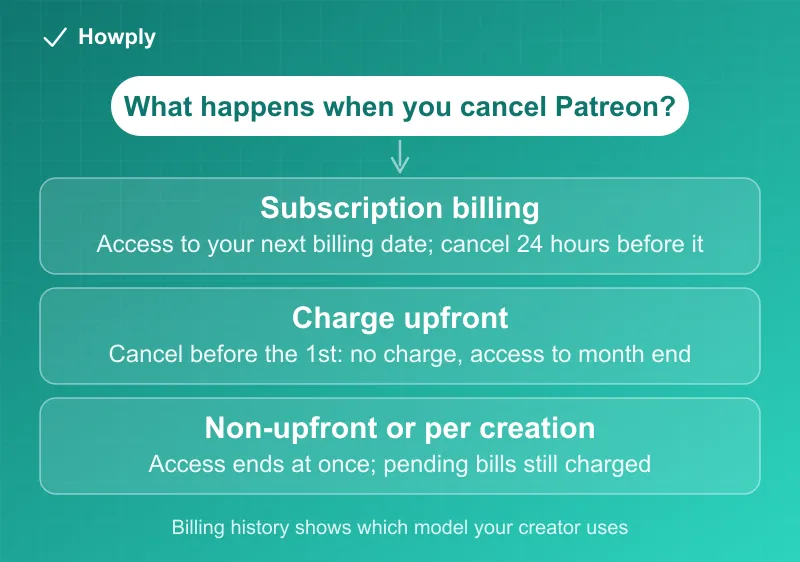
Patreon’s cancellation reference lays out one rule per model:
| Billing model | What happens when you cancel |
|---|---|
| Subscription billing | ”you retain your original membership access up to the next billing date, which is determined by your join date.” Example: sign up June 5, cancel December 1, keep access until “approximately the 5th of January” |
| Monthly charge upfront | ”If you cancel before the 1st of the month, you’ll retain your original membership access until the next 1st of the month.” But “Canceling on or after the 1st of the month will result in a charge for that month” |
| Annual membership | ”you’ll retain access until your next bill date,” when you are not charged again |
| Monthly (non-charge upfront) | “If you cancel before the 1st of the month, you won’t be billed and will lose membership access as soon as you cancel” |
| Per creation | ”When you cancel, we’ll process any pending bills on your account.” Example: a $5 membership with two paid posts before you cancel means a $10 charge |
One thing is easy to miss. The FAQ on the cancel page gives a general answer, “You’ll retain access to paid content until the end of your billing period,” while the dedicated cancellation page says access ends at once for non-upfront and per-creation memberships. When the two seem to disagree, the model-specific page is the one that describes your case, so check your Billing history first.
Why you can still be charged after canceling
Patreon’s page on charges after canceling names two situations that create a “pending bill” at the moment you cancel:
- Per creation: the creator made paid posts while your membership was active. With a $1 per post membership, a paid post on July 9 and a cancellation on July 20 means Patreon processes $1
- The renewal date had already passed: with a $5 membership charged on the 12th, “We will process your payment if you cancel on or after the 12th”
Failed payments add a third path. Patreon says “If our initial attempt to charge your membership payment is declined, we will reattempt,” and its billing page adds that for per-creation and monthly non-upfront memberships “we will retry your payment even if you cancel or decrease your membership.” For subscription billing, “Members whose payment retries repeatedly fail for ~30 days will be converted to free members.” If a charge appears that none of this explains, work through our guide to a canceled subscription that is still charging.
Refunds: 60 days, and the creator reviews first
Patreon’s stance is that “Patreon doesn’t typically offer refunds since payments go directly to creators,” but it has a defined path for web purchases. Per its refund request page:
- Go to Billing History in your settings
- Find the payment, click the three dots, and select Request refund
- Pick a reason or choose Something else, add written context, and submit
You do not need to message the creator first. The window is “within 60 days of the original payment,” and after you submit, “the creator will review it and decide whether to approve or decline it.” If a refund is issued, “it can take 7-10 business days to process,” and Patreon’s refund policy warns that “In some instances, it may take up to 28 days for a refund to be issued.”
Three exceptions matter:
- Outside 60 days, or a per-creation charge: “per-creation charges can’t be refunded through Billing History,” so you contact Patreon Product Support with “documentation showing that products, services, or benefits were not delivered”
- iOS in-app purchase: “For purchases made through Apple’s IAP functionality, fans should request a refund through Apple,” and our Apple refund guide walks through that form
- Bank disputes: orders “already been refunded or charged back/disputed by the fan’s or creator’s bank” do not qualify, so request the refund first and use a bank dispute only if Patreon does not resolve it
The refund policy lists situations that may qualify, including “Fan canceled membership renewal, but charge still occurred,” “Fan did not access any content & canceled membership within 48 hours,” and “Creator provided a refund for the prior month, but the fan forgot to cancel the membership.” It also states that “all decisions on fan refund claims are made at Patreon’s sole discretion.”
Free trials, free memberships, and pauses
Free trials exist only where a creator offers them. Patreon’s trial page says “Free trials are available for a 7-day period,” that “All free trials turn into monthly subscriptions at the end of the trial period,” and that “You will be charged at the end of your 7-day free trial period unless you cancel before that period ends.” Canceling mid-trial is safe: “You will still have access to your benefits through the end of your trial period.” Each account and payment form gets one trial per creator, and trials are not supported in the iOS in-app purchase flow. The comparison with other services is in our free trial cancel guide.
Free memberships cancel separately. Patreon says “You can keep your free membership as long as you’d like,” and the steps are Settings > Memberships > More > Cancel membership, with “you can rejoin whenever you’d like.”
Pauses are a creator tool, not yours. Patreon explains that “Creators can pause membership billing while their Patreon page remains accessible to members,” which is one reason a charge may be missing in a given month, and warns that “your payments will likely continue automatically next month.” If you want to stop for a while yourself, the options are in our guide to pausing instead of canceling.
What changes on November 1
Patreon’s billing page opens with a notice to creators: “All creators still on legacy billing must switch to subscription billing by November 1, 2026.” Legacy here means the charge upfront, non-upfront, and per-creation models above. As creators move over, the subscription-billing row, with access to your next billing date and the 24-hour UTC rule, will cover more of the memberships you hold. Until your creator switches, check your Billing history before you cancel.
Quick answers to what people search
How do I cancel my Patreon membership? Settings > Memberships > View Details > Cancel membership, then confirm. In the app, use the creator’s page > three dots > Your membership > Edit membership.
Will I lose access right away? It depends on the creator’s billing model. Subscription and charge upfront memberships keep access until the next billing date; non-upfront and per-creation memberships lose it when you cancel.
Why was I charged after I canceled? Patreon says it processes pending bills on cancellation: per-creation posts already made, or a renewal date you had already reached. Failed payments are also retried.
Can I pause Patreon? Not as a patron. Patreon says “To temporarily stop payments, you’ll need to cancel and re-subscribe later.”
Can I get a refund? You can request one from Billing history within 60 days, and the creator decides. Per-creation charges go to Patreon Product Support, and iOS in-app purchases go to Apple.
Does the creator know I canceled? Not directly, but Patreon says they “may notice changes in their membership count.”
Bottom line
Check your Billing history first, then cancel in Settings > Memberships, and do it at least 24 hours before the billing date if you are on subscription billing. Charge upfront memberships need the cancel to land before the 1st of the month, and non-upfront and per-creation memberships can still bill for what you already used. There is no pause for patrons, refunds start in Billing history within 60 days, and Apple handles in-app purchases. After November 1, 2026, expect most creators to be on subscription billing.
Cancel steps, billing-model rules, refund terms, and trial terms quoted from the Patreon Help Center articles linked above, verified on September 30, 2026; several were updated between September 28 and October 1. Patreon says the legacy billing models end for creators on November 1, 2026, and this guide will be updated if the rules change.
Official sources
- Patreon Help: Canceling a paid membership
- Patreon Help: What happens when I cancel?
- Patreon Help: Why was I charged after canceling?
- Patreon Help: Patreon's refund policy
- Patreon Help: How to request a refund
- Patreon Help: How membership billing works
- Patreon Help: Starting a Free Trial
- Patreon Help: Canceling a free membership
- Patreon Help: Why wasn't I charged this month?