How to Cancel Discord Nitro: Same-Device Rule and the 5-Day Refund Window
Cancel Nitro in User Settings > Subscriptions, on the same kind of device you bought it on. Discord refunds only within 5 days of purchase, once per category.
Discord Nitro cancels in a few taps, but one rule trips up people who switch devices: a subscription has to be canceled on the same kind of device it was bought on. A Nitro bought in the browser cannot be canceled from the phone app, and the reverse. Refunds are just as narrow: Discord’s policy says to ask within five days of the purchase, and you get one refund per purchase category, ever. Here is how to cancel on each device, how to find out which subscription you actually have, what happens to Server Boosts, what a free trial does when you cancel it, and the refund rules.
The quick answer
- Desktop or browser: the cogwheel next to your username opens User Settings > Subscriptions > Cancel on the Nitro or Nitro Basic banner, then follow the prompts
- Mobile: your avatar (bottom right) > the cogwheel > Billing Settings > Manage Nitro > cancel, or cancel in the iOS or Google Play subscription settings
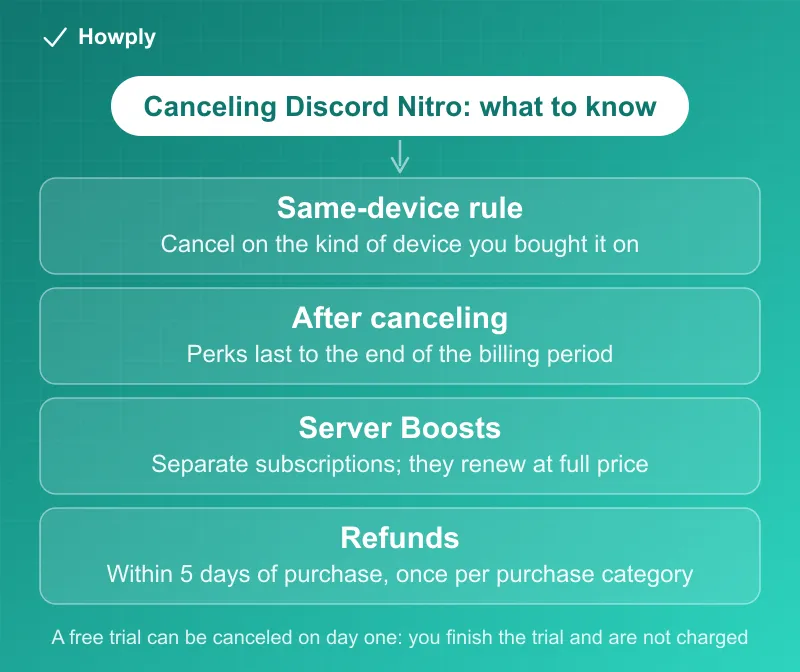
- Same-device rule: “Subscriptions need to be canceled on the same device type where the purchase was originally made”
- When it ends: “Once canceled, your subscription will end at the end of your current billing period”
- Refunds: ask Support “within 5 days of your initial purchase,” and per Discord’s policy you are “only eligible for one refund under each purchase category.” iPhone purchases are refunded by Apple
- Free trial: you can cancel it and “finish out your trial period,” with no charge on the renewal date
- Server Boosts are separate. Canceling Nitro does not cancel Boosts you bought; they renew at full price
Key facts at a glance
| Question | Answer |
|---|---|
| Where to cancel (desktop or browser) | User Settings > Subscriptions > Cancel on the Nitro banner |
| Where to cancel (mobile) | Avatar > cogwheel > Billing Settings > Manage Nitro |
| Bought on desktop or browser | Cancel on desktop or browser |
| Bought on a phone | Cancel on a phone (or in the iOS or Google Play settings) |
| After canceling | Perks last to the end of the billing period; the banner shows Pending Cancellation |
| Changed your mind | Re-subscribe before the period ends, or buy a new subscription |
| Refund window | Within 5 days of the initial purchase, at dis.gd/billing |
| Refund limit | One refund per purchase category |
| iPhone purchases | Refund and cancellation through Apple |
| Past-due subscription | 30 days to pay on desktop or Google Play, 60 on the iOS App Store; you can still cancel |
| Can’t log in | Billing Support can cancel it, except iOS purchases |
Step 1: which subscription do you have?
Discord sells four kinds of subscription, and each has its own cancel article. Per its overview page, “the steps to cancel depend on your subscription type”: Nitro (and Nitro Basic), Server Boost, Server Subscription, and Premium App. Nitro is the one most people mean. Your Subscriptions tab in User Settings lists every active subscription with its “renewal dates and amounts you’ll be charged,” per Discord’s billing FAQ, so check it before assuming you have only one.
Step 2: cancel on the right device
Discord’s Nitro cancel page states the rule plainly: “If you purchased Nitro through the desktop or browser app, you must cancel it through the desktop app or browser. If you purchased through a mobile device, you can only cancel through a mobile device.”
On desktop or in a browser:
- Click the cogwheel next to your Discord username to open User Settings
- Open the Subscriptions tab
- Click Cancel on the Nitro or Nitro Basic banner
- Follow the prompts
On mobile:
- Tap your avatar in the bottom right, then the cogwheel in the top right
- Scroll to Billing Settings and tap Manage Nitro
- Cancel the Nitro or Nitro Basic subscription and follow the prompts until the cancellation is confirmed
“Once the cancellation has been completed, your Manage Nitro settings will show the date on which your subscription will expire and you will lose your Nitro benefits.” On a phone you can also cancel in the device’s own subscription settings; our guides cover canceling a subscription on iPhone and canceling a Google Play subscription.
If you cannot log in: “you can reach out to our Billing Support team with the email address tied to your Discord account and request it to be canceled” through dis.gd/billing, for desktop, browser, and Android purchases. For an Apple purchase, Discord says “please reach out to Apple to cancel your subscription. The Discord Support team is not able to manage your iOS subscription.”
After you cancel, and if you change your mind
Canceling does not end access today: “You can cancel your Nitro or Nitro Basic subscription at any time. Once canceled, your subscription will end at the end of your current billing period.” To undo it, Discord says “you can always reactivate it,” but “make sure you do so before the billing period ends, otherwise you’ll just have to purchase a new subscription.” On desktop that is Re-Subscribe on the same banner; you will know it worked when “Pending Cancellation” is no longer shown. Canceling Nitro leaves the account itself untouched; disabling or deleting the account is a separate step, compared across 11 apps in our delete vs deactivate guide.
Free trials: cancel early and keep the trial
Discord’s trial rules are friendlier than most. Per the trial FAQ: “Yes, you may cancel at any time before the end of your trial. When this occurs, you’ll finish out your trial period, and we will not charge you on the renewal date.” So there is no reason to wait until the last day; cancel when you sign up and the free days still run out. That is the opposite of services that cut access the moment you cancel, compared in our guide to canceling a free trial early. Trials are promotional and have eligibility conditions, so the offer terms on the trial’s own page decide who qualifies.
Server Boosts: the part that keeps charging
Discord says all Nitro subscriptions, yearly and monthly, “include 2 Server Boosts,” per its Nitro overview, and extra Boosts are separate subscriptions. When you cancel Nitro, Discord warns that “you’ll no longer receive a 30% discount on Boost purchases, and your current Boosts will renew for their full amount on their renewal date.”
If you do not want to keep paying for Boosts, cancel them too. Per the Server Boost cancel page, on desktop open User Settings, go to the Server Boost tab, tap the three dots next to the Boost, and choose Cancel Boost Subscription; on mobile, use Manage Nitro and tap Cancel next to the Boost subscription. A confirmation shows the date the Boost will be removed. The same same-device rule applies.
If a payment failed: past due is not canceled
A failed renewal makes the subscription “past due” rather than ending it. Per Discord’s past-due page, you “will have 30 to 60 days to pay for your subscription depending on where you signed up”: 30 days from the renewal date on desktop and Google Play, 60 days on the iOS App Store. During that time you keep your perks, and if no payment succeeds “the subscription will automatically end and you’ll lose access to your subscription perks and related streaks.” You can still cancel in this state (“User Settings > Subscriptions > Cancel”), but “you won’t be able to change the plan you’re on until you pay for the past due payment.” If you pay late, your next renewal may be charged soon after, which is why people see two charges.
Refunds: five days, one time
Discord’s refund policy starts with the discretion: “all refund requests submitted under this Policy are reviewed by Discord on a case-by-case basis and eligibility is determined at our sole discretion.” The Nitro rules:
- The window: “you must reach out to our Support Team and provide all requested information associated with your purchase within 5 days of your initial purchase at dis.gd/billing”
- One per category: refunds “are one-time refunds only,” meaning “you are only eligible for one refund under each purchase category,” and “if you have previously received a refund for any Nitro subscription, you will not be eligible for any other Nitro subscription refund in the future”
- Promotion exception: if you redeemed or received a promotional item, such as a partner offer, “within 5 days of your Nitro membership renewing or becoming a new Nitro subscriber, you will not be eligible for a Nitro membership refund”
- Gifts: a self-claimed Nitro gift can be refunded, but “We are unable to provide a refund for a Nitro gift purchase once the gift has been claimed by another user”
- iPhone: “you will need to request a refund for those purchases via the iOS App Store.” Our Apple refund guide covers the request
To request one, Discord’s refund request page says to find your payment ID and submit it to Billing Support: “You can only locate your payment ID within the desktop app or browser,” under User Settings > Billing, and for mobile purchases it is in the confirmation email. Use the email address tied to your Discord account on the form. Android purchases can use the Google Play GPA number for a quicker turnaround.
Quick answers to what people search
How do I cancel Discord Nitro? User Settings > Subscriptions > Cancel on desktop or in the browser; avatar > cogwheel > Billing Settings > Manage Nitro on mobile. Do it on the same kind of device you subscribed on.
Why can’t I cancel Nitro on my phone? Because “Subscriptions need to be canceled on the same device type where the purchase was originally made.” If you bought it in the browser, cancel it there, or ask Billing Support if you cannot get in.
Do I keep Nitro after I cancel? Yes, to the end of the billing period. The Manage Nitro or Subscriptions screen shows the date it expires.
Does canceling Nitro cancel my Server Boosts? No. Boosts are separate subscriptions; after you cancel Nitro they renew at full price unless you cancel them too.
Can I get a refund on Nitro? Possibly, if you ask within 5 days of the initial purchase at dis.gd/billing, you have not had a Nitro refund before, and no promotion exception applies. Apple purchases go through Apple.
Why does my Nitro show as past due? The renewal payment failed. You have 30 to 60 days to pay, depending on where you signed up, and can still cancel.
Will a free trial charge me if I cancel it? No. Cancel before the trial ends and “you’ll finish out your trial period, and we will not charge you on the renewal date.”
Bottom line
Cancel Nitro in User Settings > Subscriptions (or Manage Nitro on mobile), on the same kind of device you bought it on, and expect to keep the perks until the billing period ends. Cancel any Server Boosts separately, because they renew at full price once Nitro is gone. If you want money back, move within five days of the purchase and remember you get one refund per category; iPhone purchases go through Apple. A free trial can be canceled on day one without losing the free days. For what Nitro costs next to the other paid social tiers, and why the App Store price runs above the web price, see our social subscriptions price comparison.
Cancellation steps, same-device rule, refund policy, trial terms, Boost rules, and past-due terms verified against the Discord Support articles linked above on September 30, 2026. If Discord changes the process, this guide will be updated with the revision noted. This is general information, not legal advice.
Official sources
- Discord Support: How to Cancel your Nitro Subscription
- Discord Support: How to Cancel your Discord Subscription
- Discord Support: Refund Policy
- Discord Support: How to Request a Refund from Discord
- Discord Support: Nitro Free Trial Offer FAQ
- Discord Support: How to Cancel your Server Boost Subscription
- Discord Support: Why is My Subscription Showing as Past Due?
- Discord Support: What are Nitro and Nitro Basic?
- Discord Support: Managing Subscriptions and Billing FAQ