How to Cancel Grammarly: Trials End at Once, Refunds Only if Required
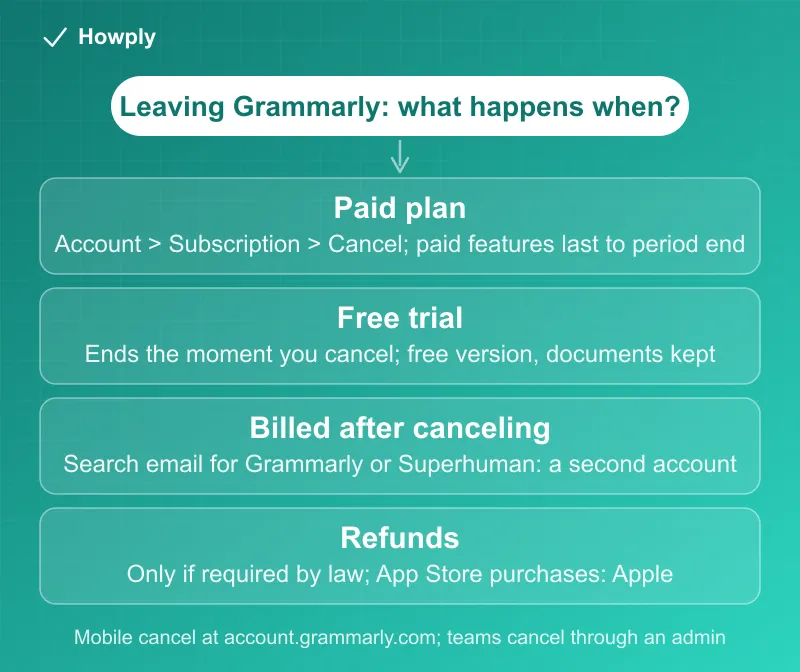
Cancel in Account > Subscription. A free trial ends the moment you cancel, a paid plan runs to the end of the period, and Grammarly refunds only if the law requires it.
Grammarly cancels in a handful of clicks, and two of its rules are worth knowing before you click. A free trial ends the moment you cancel, so there is no reason to keep it running, and a paid subscription runs to the end of the period you paid for. The third rule is the strict one: Grammarly says refunds “are issued only if required by law.” Here is the cancel path, the trial rules, what to check if you were billed after canceling, and what Grammarly’s help center says about refunds and the Superhuman suite it now belongs to.
The quick answer
- Cancel at: sign in > Account tab in the left sidebar > Your account > Subscription > Cancel Subscription at the bottom > Continue > pick a reason > Cancel Subscription
- On a phone: “you can cancel your subscription at account.grammarly.com”
- Paid plan: “Canceling a subscription stops its automatic renewal, but you will still have access to all paid features for the duration of your current subscription period”
- Free trial: “your free trial will end immediately, and your account will be converted to the free version without any charges. Your data will not be lost”
- Bought in the App Store? Grammarly sends you to Apple’s cancel page, and for refunds, “contact Apple to request a refund”
- Billed after canceling? The usual cause is a second account, often from a mistyped email address
- Refunds: per its Terms of Service, refunds “are issued only if required by law,” though a charge made in error can go to support
Key facts at a glance
| Question | Answer |
|---|---|
| Where to cancel | Account > Your account > Subscription > Cancel Subscription |
| On mobile | account.grammarly.com |
| Access after canceling a paid plan | To the end of the current subscription period |
| Cancel during a free trial | Ends the trial immediately; account becomes the free version, documents kept |
| Free trial length | Seven days for the trial Grammarly describes; no charge before it ends |
| Pending charge during a trial | A temporary verification charge, replaced or removed later |
| Refund policy | Only if required by law; mistaken charges can go to support |
| Billed again after canceling | Look for another account under a different email |
| Renewal | Same duration as the initial period, charged at the start of each cycle |
| Promotional price | Valid for one subscription period; renews at the standard rate |
| App Store purchase | Cancel and refund through Apple |
| Superhuman suite | Canceling through the Grammarly account applies across the Superhuman applications |
How to cancel
Per Grammarly’s cancel page:
- Sign in to your account and click the Account tab in the left sidebar
- Click Your account, then Subscription
- Click Cancel Subscription at the bottom of the page
- In the window that opens, click Continue
- Choose a reason and click Cancel Subscription
If the cancel button is missing, the page’s first suggestion is the account: “please make sure you’re logged in to the correct account.” If you cannot reach the paid account at all, Grammarly says to contact support.
Team and business plans are different: the renewal page lists that for Grammarly Pro, Plus, Business, and Superhuman plans the task is “Managed by: Admins,” from the same Subscription page. Changing the number of seats is a separate article, and members of an organization’s subscription cannot cancel it themselves.
Bought through the App Store: Grammarly’s cancel page points to Apple’s instructions instead of its own. Our guide to canceling a subscription on iPhone covers the path, including what to do when the subscription is not listed. Grammarly’s help center also covers a related App Store problem: if paid features do not unlock after paying, use Restore Purchases in the Grammarly companion app, with the same Apple ID that made the purchase.
Bought through Google Play: Grammarly’s pages on Google Play purchases cover access problems only. If the purchase did not finalize, “the purchase will go unacknowledged for three days after the purchase date, and then the payment will be automatically refunded.” Canceling a Google Play subscription follows Google’s rules, in our Google Play cancel guide.
Part of the Superhuman suite: Grammarly is now part of Superhuman, and the cancel page notes that “canceling your subscription through your associated Grammarly account will apply across all other applications in the Superhuman suite.” Superhuman’s subscription page uses the same Subscription page and the same last step, and adds a limit: “If you cancel, you may continue to use the service until the end of the term you paid for, but previous charges will not be refunded.”
The free trial: cancel on day one
The trial rules are the opposite of what most people fear. Per Grammarly’s trial page, canceling a free trial does not leave you paying for anything: “After canceling, your free trial will end immediately, and your account will be converted to the free version without any charges. Your data will not be lost, and you will maintain access to all of your documents.”
The trade-off is that canceling early ends the paid features early, so if you want the full trial period, cancel late in it. The charge side is spelled out on the trial charge page: “If you signed up for a seven-day free trial of a paid plan, you will not be charged before your free trial ends.” A pending line on your card during the trial is “most likely a verification charge,” meant to validate the payment method; “It is only temporary and should appear as ‘Pending’ on your statement,” and “it will either be removed if you cancel your subscription or replaced by the actual charge if you choose to keep your subscription.”
Compare how other services treat a canceled trial in our guide to canceling a free trial early, and what to do if a trial converted anyway in our guide to being charged for a free trial.
Billed after canceling? Look for a second account
Grammarly’s help page on this names the most common cause: “you might have another subscription associated with a different account. This can happen if you mistype your email address or unintentionally create another account.” To find it, “search through all your email inboxes for the words ‘Grammarly’ or ‘Superhuman’ to find any of our emails.” If an email shows a different address, reset the password for that address and cancel there. If that does not turn it up, Grammarly offers a “Look up a purchase” form to locate the paid account. Our guide to a canceled subscription that is still charging covers the other common causes, and our guide to finding all your subscriptions covers searching across accounts.
Two other billing facts explain surprises:
- Renewals repeat the same term. “Your subscription will automatically renew for the same duration as your initial subscription period unless you cancel before the current billing period ends,” so an annual plan renews for a year
- Charges come at the start of the cycle. Per the billing page, you are charged “monthly, quarterly, or annually on the date you purchased your subscription,” “billed at the beginning of your billing cycle,” and a date that does not exist in a month moves to the last day of that month. A charge “may take a few days to appear on your bank statement”
- A charge on a new card can be your bank. Grammarly notes that “your financial institution has automatically updated your billing details” when a new card is issued, which can let recurring charges continue on a replacement or even an expired card, and tells you to ask the bank if that worries you
If you do not recognize the charge at all, Grammarly’s unauthorized charge page says to “contact us immediately,” and that “We can immediately cancel any such subscription and block any further charges to your credit card or PayPal account.”
Refunds: only if required by law
Grammarly’s refund page is short and strict: “You can cancel your subscription at any time.” The catch is in the next sentence, which cites the Terms of Service: refunds “are issued only if required by law.” For App Store purchases, “contact Apple to request a refund”; our Apple refund guide covers that request.
There are two softer edges. The billing policy says that for a billing error, “please submit a support request detailing the issue” and that Grammarly “will review your case and assist you with your refund request,” and it warns that “Promo offers are valid for one subscription period only. If you upgrade at a promotional rate, your subscription will be set to renew at a standard rate.” So the renewal after a discounted first period can cost more, and it is the charge most worth putting on the calendar. Rights under consumer law in your country or state are separate from Grammarly’s policy, and a card issuer’s dispute process is the fallback covered in our guide to disputing a subscription charge with your bank.
Deleting your account is not canceling it
Grammarly’s delete page separates the two tasks: “If you only want to cancel a paid subscription to prevent any future payments, you can do so by following the steps in this article” (the cancel steps above), and “If you want to delete your account while your paid subscription is still active, please submit a support ticket.” Cancel first, then delete. Superhuman users have a different route: “please email care@superhuman.com to delete your account.” Deletion cannot be undone: it removes “any documents you may have saved in the Grammarly Editor.”
Quick answers to what people search
How do I cancel my Grammarly subscription? Account > Your account > Subscription > Cancel Subscription, then Continue and a reason. On a phone, use account.grammarly.com.
If I cancel Grammarly, do I keep Premium until the end of the month? For a paid plan, yes: “you will still have access to all paid features for the duration of your current subscription period.” For a free trial, no: it “will end immediately.”
Can I get a refund from Grammarly? Grammarly says “refunds are issued only if required by law.” A charge made by mistake can go to support, and App Store purchases go to Apple.
Why was I charged after I canceled? Most often a second account under a different email address. Search your inboxes for “Grammarly” or “Superhuman” and cancel on the account that is still paying.
Does canceling the free trial cost me my documents? No. “Your data will not be lost, and you will maintain access to all of your documents.”
Does deleting my account cancel my subscription? Grammarly treats them as separate tasks and tells paying users to submit a support ticket to delete an account with an active subscription. Cancel first.
Will the price change when my promotion ends? Yes: “Promo offers are valid for one subscription period only,” and the next renewal is “at a standard rate.”
Bottom line
Cancel in Account > Your account > Subscription, or at account.grammarly.com from a phone, and do it before the renewal date: a paid plan runs to the end of the period, a trial ends immediately with your documents kept, and refunds depend on the law rather than on a guarantee. If you were charged after canceling, search every inbox you use for “Grammarly” or “Superhuman,” because a second account is the usual cause. Teams cancel through an admin, and App Store purchases cancel and refund through Apple.
Cancellation steps, trial terms, refund and billing policies, and account-deletion rules verified against the Grammarly Support articles linked above on September 30, 2026. Grammarly’s help center now also serves Superhuman; if the process changes, this guide will be updated with the revision noted.
Official sources
- Grammarly Support: How do I cancel my subscription?
- Grammarly Support: How do I cancel my free trial?
- Grammarly Support: Why was I charged during a free trial?
- Grammarly Support: Can I get a refund?
- Grammarly Support: Subscriptions Billing Policy
- Grammarly Support: Why am I getting billed after I canceled?
- Grammarly Support: How am I charged for my subscription?
- Grammarly Support: Why was I charged again?
- Grammarly Support: I'm seeing charges that I did not authorize
- Grammarly Support: Cancel automatic renewal of my subscription
- Grammarly Support: Delete your Grammarly account
- Grammarly Support: Manage your Superhuman subscription
- Grammarly Support: I can't access the paid features after paying via the App Store or Google Play Store