ChatGPT Finances: What It Sees, Which Plans Get It, How to Disconnect
ChatGPT Finances opened to Free and Go users on October 2, 2026. What the Plaid bank link and Experian credit link share, what ChatGPT cannot do, and how to disconnect.
Since October 2, 2026, ChatGPT’s Finances feature has been open to every US plan, including the free one: OpenAI’s release notes say “Finances in ChatGPT is rolling out to Free and Go users in the U.S. on web, iOS, and Android.” It lets you link bank, card, and brokerage accounts through Plaid and a credit report through Experian, then ask questions about your own money. Before you connect anything, it helps to know exactly what ChatGPT receives, what it is barred from doing, and what disconnecting does and does not erase. This guide takes all of that from OpenAI’s own Finances in ChatGPT help article and release notes, read on October 6, 2026.
The quick answer
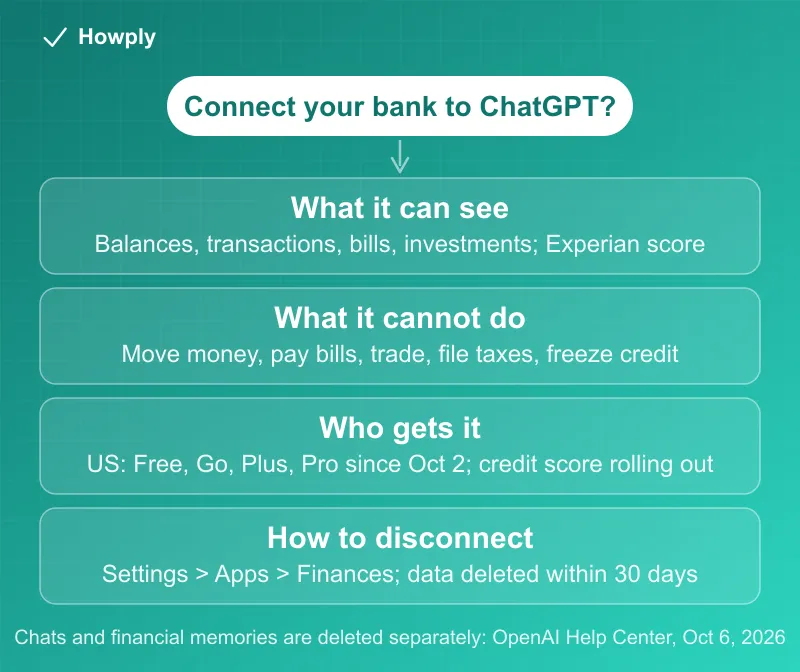
- Who has it: US users on Free, Go, Plus, and Pro, on web, iOS, and Android. The credit-score part was announced September 21 for Plus and Pro; the help article now lists no plan limit for it
- Two separate links: bank and card accounts go through Plaid, the credit report through Experian. “These are separate connections; you can use either or both.”
- What it can see: balances, transactions, bills and subscriptions, investment holdings, net worth, and an Experian VantageScore 3.0 with monthly updates
- What it cannot do: “Move money”, “Pay bills”, “Make trades”, “Open or close financial accounts”, “File taxes”, or act as your adviser
- Disconnecting: Settings > Apps > Finances, or the Finances page. Synced account data “is deleted from OpenAI’s systems within 30 days”; Experian report data likewise within 30 days
- What disconnecting does not erase: past conversations and “financial memories” stay until you delete them separately
- Training: Finances chats follow your global training setting in Settings > Data controls; temporary chats never touch the connected data
Key facts at a glance
| Question | What OpenAI’s pages say |
|---|---|
| Plans and region | ”Finances is available in the U.S. to Free, Go, Plus and Pro users on web, iOS, and Android.” |
| Bank and card data | Through Plaid; “You choose which accounts to connect.” |
| Credit data | Through Experian: VantageScore 3.0 and the report, updated monthly; a soft inquiry |
| Actions on your money | None: it “cannot take financial actions for you” |
| Disconnect path | Settings > Apps > Finances, or the Finances home page (Accounts tab for one account) |
| Deletion after disconnect | Synced account data within 30 days; Experian data within 30 days |
| Not deleted automatically | Conversation history; financial memories |
| Temporary chats | No access to connected accounts, no memories created |
| Model training | Follows your ChatGPT-wide setting in Settings > Data controls |
Who gets it, and since when
The feature opened in stages. The September 21, 2026 release note introduced credit scores in Finances and said “This feature is rolling out in Finances to Plus and Pro users in the U.S. on web, iOS, and Android.” The October 2 note widened the whole feature: “Finances in ChatGPT is rolling out to Free and Go users in the U.S. on web, iOS, and Android.” The help article, updated after that, now reads “Finances is available in the U.S. to Free, Go, Plus and Pro users on web, iOS, and Android.” and lists the credit-score connection without a plan restriction. If you are on Free or Go and do not see the credit option yet, the rollout wording (“Some eligible users may not see it right away.”) is the likely reason.
What ChatGPT can see once you connect
The article describes two independent connections: “You can connect financial accounts through Plaid and credit report data through Experian. These are separate connections; you can use either or both.” Through Plaid, which “builds and maintains connections to more than 12,000 financial institutions,” ChatGPT syncs the accounts you select and can show spending by category, bills, subscriptions, net worth over time, portfolio allocation, and daily changes in stock and ETF holdings. The data is only as complete as your bank allows: “ChatGPT can only show the financial data your institution makes available through the connection,” and “an institution may share balances but not full transaction history, investment holdings, loan details, APRs, due dates, or other fields.”
Through Experian, you get your report and a VantageScore 3.0, with the warning that “Your lender may not use VantageScore 3.0”. Identity verification happens on Experian’s form, and the article is specific about where to type: “Make sure to enter personal information and verification codes in Experian’s form, not in your conversation with ChatGPT.” Checking the score “is a soft inquiry and does not affect your credit score.”
There is a third source of data you create yourself. Anything you tell ChatGPT about your money in a finance conversation, a goal or a loan from a relative, can be saved as one of your “financial memories.” The article says “You can view or delete financial memories at any time from the Finances page via the three-dot menu.”
What ChatGPT cannot do with your accounts
The connections are read-only in effect. The article states “ChatGPT can help you understand, plan, and evaluate financial decisions, but it cannot take financial actions for you.” and lists what it cannot do: “Move money”, “Pay bills”, “Change account settings”, “Make trades”, “Change retirement contributions”, “Open or close financial accounts”, “File taxes”, and “Act as your financial, legal, tax, or investment adviser.” On the credit side, “ChatGPT cannot file a dispute, change your credit report, or freeze your credit for you.” OpenAI also draws its own line on advice: “ChatGPT is not a fiduciary, registered investment adviser, broker-dealer, tax preparer, or law firm.”
How to disconnect, and what survives
Two paths lead to the same place. “In Settings, you can disconnect Finances. Disconnecting Finances removes your connected financial data from ChatGPT.” For a single account, the Accounts tab on the Finances page lets you “remove an account.” The Plaid section gives the route and the clock: “You can disconnect Plaid accounts in Settings > Apps > Finances or from the Finances home page. When you disconnect Finances or remove a connected account, synced account data is deleted from OpenAI’s systems within 30 days, and data associated with that ChatGPT connection is deleted from Plaid within 30 days in accordance with Plaid’s policies.” Experian can be cut separately: disconnecting means “Experian will stop sharing credit scores and reports with ChatGPT, and OpenAI will also delete the underlying Experian credit report data from OpenAI systems within 30 days.” It “does not affect your credit file or any Experian services you use separately.”
Two things do not go away on their own. First, chat history: “Disconnecting a source does not delete information already in your conversation history; you can delete those conversations separately.” Second, the financial memories described above, which “You can view or delete them at any time from the Finances home page.” If you used Plaid with other apps, disconnecting ChatGPT “does not affect other Plaid connections you separately authorized”; those are managed through Plaid Portal or Plaid’s privacy request form.
Training and temporary chats
Finances does not get its own privacy switch. “Your conversations with Finances follow the same model training settings you choose across ChatGPT. You can change this setting any time in Settings > Data controls.” Our comparison of ChatGPT, Claude, and Gemini plans notes that ChatGPT lists training as an opt-out on every individual plan, so check that control before you connect, not after. For a one-off question, a temporary chat keeps the link out of it: “When you use temporary chats, ChatGPT won’t access your connected financial accounts, use or create memories for personalization.”
Where the documents disagree or leave gaps
Credit scores: Plus and Pro, or everyone? The September 21 note limited the credit-score connection to Plus and Pro; the October 2 note expanded “Finances” to Free and Go without mentioning credit; the help article now lists no plan restriction on the Experian connection. The safest reading is that the plan line has gone, but a Free or Go user who cannot find the option should treat it as rollout timing rather than a settings problem.
Deletion has three clocks and two leftovers. Account data and Experian data each clear “within 30 days,” Plaid’s copy clears “in accordance with Plaid’s policies,” and conversations and financial memories clear only when you delete them. A reader who expects one Disconnect button to erase everything will be wrong three times.
The dashboard can disagree with your bank app. The article says widgets “use the connected data available to ChatGPT,” that a credit widget reflects “your latest Experian report, not live account activity,” and that transfers or duplicate pending transactions can make a spending breakdown “look inaccurate.” The numbers are a view of what synced, not a statement.
A checklist before you connect
This is a procedure, not a recommendation to connect or not:
- Decide which of the two links you want. Bank accounts and the credit report are separate; you can connect one, both, or neither
- Set the training control first. Settings > Data controls applies to Finances chats too
- Connect only the accounts you need. Plaid lets you pick institutions and accounts; what your bank shares varies
- Type verification details into Experian’s form, not the chat, as the article instructs
- Know the exits. Settings > Apps > Finances to disconnect; the Accounts tab to remove one account; the three-dot menu on the Finances page for memories; delete old conversations yourself
- Use the subscription list as a cross-check, not a source of truth. Finances lists recurring bills from synced transactions; our guide to finding all your subscriptions covers the charges that hide under app-store and processor names, and our free Subscription Tracker keeps your list in your own browser, with no account link at all
Quick answers to what people search
Is ChatGPT Finances free? Yes in the US: the help article lists Free, Go, Plus, and Pro. Free and Go were added October 2, 2026.
Can ChatGPT move my money or pay bills? No. The article lists moving money, paying bills, trading, changing account settings, and opening or closing accounts as things it cannot do.
Does connecting hurt my credit score? The Experian check “is a soft inquiry and does not affect your credit score.”
How do I disconnect my bank from ChatGPT? Settings > Apps > Finances, or the Finances page. Synced data is deleted from OpenAI’s systems within 30 days.
Does disconnecting delete my chats? No. Conversation history and financial memories stay until you delete them separately.
Will my bank data train the model? It follows your ChatGPT-wide training setting in Settings > Data controls. Temporary chats do not use the connected data at all.
Which credit score does it show? Experian’s VantageScore 3.0, updated monthly. Your lender may use a different model.
Bottom line
As of October 6, 2026, ChatGPT Finances is available to every US plan, reads whatever your bank and Experian share through Plaid and Experian links you choose, and can act on none of it. Disconnecting clears the synced data within 30 days but leaves your conversations and financial memories in place until you delete them, and your training setting applies to these chats like any other. Decide the data controls before connecting, connect only what you need, and remember the three separate places to clean up afterward.
Wording quoted from OpenAI’s Finances in ChatGPT help article and ChatGPT release notes, read on October 6, 2026. Features roll out gradually and OpenAI changes these pages without notice, so the article is the authority for your account. This is general information, not financial advice.
Official sources
- OpenAI Help Center: Finances in ChatGPT (availability, what it can and cannot do, data and privacy, Plaid, Experian), read October 6, 2026
- OpenAI Help Center: ChatGPT release notes (October 2, 2026 "Finances expands to Free and Go users"; September 21, 2026 "Credit scores in Finances"), read October 6, 2026