How to Cancel Calm (Web, iPhone, Android) and Get the 30-Day Refund
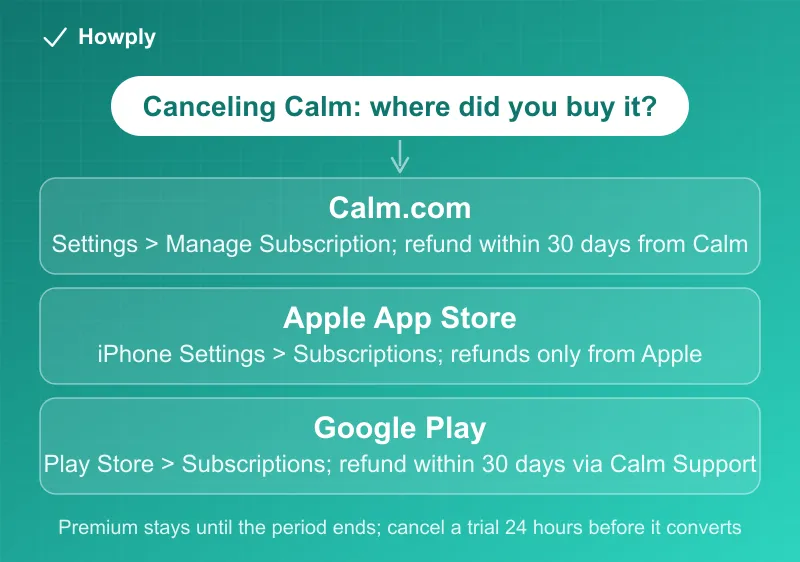
Cancel where you paid: Calm.com, the App Store, or Google Play. Premium runs to the end of the period, trials need 24 hours' notice, and Calm.com refunds within 30 days.
Calm sells the same Premium subscription through three checkouts, and the one you used decides where you cancel, who can refund you, and how long you have. Calm’s help center is unusually direct about the rules: you keep Premium until the paid period ends, a trial has to be canceled 24 hours before it converts, deleting the app changes nothing, and refunds exist only for Calm.com and Google Play purchases, within 30 days. Here is how to find your checkout, the steps for each, the two different free trials, and the refund request.
The quick answer
- Calm.com purchase: sign in at calm.com > profile icon > Settings > Manage Subscription > Cancel Subscription
- App Store purchase: iPhone Settings > your name > Subscriptions > Calm > Cancel Subscription
- Google Play purchase: Play Store > profile icon > Payments & subscriptions > Subscriptions > Calm > Cancel subscription
- You keep Premium. “Once you cancel, you’ll continue to have full Premium access until the end of your current billing or trial period”
- Trials convert to a full year. Cancel “at least 24 hours before the trial ends to avoid being charged”; the web trial converts “into a paid Annual Subscription ($79.99/year) on Day 15”
- Deleting the app does not cancel. Calm’s own guides say “uninstalling the app does not cancel it”
- Refunds: 30 days, not for Apple purchases. “Refunds are available within 30 days of your Calm.com purchase,” Google Play refunds go through Calm Support, and Apple purchases are refunded by Apple only
Key facts at a glance
| Question | Calm.com | Apple App Store | Google Play |
|---|---|---|---|
| Where to cancel | calm.com > Settings > Manage Subscription | iPhone Settings > Subscriptions | Play Store > Subscriptions |
| Who handles refunds | Calm Support, within 30 days | Apple, through reportaproblem.apple.com | Calm Support |
| Free trial length | 14 days | 7 days | Varies by offer |
| Trial converts to | Annual plan, $79.99 a year, on Day 15 | Annual plan | Annual plan on the offer shown |
| Question | Answer |
|---|---|
| Access after canceling | To the end of the current billing or trial period |
| Cancel deadline for a trial | At least 24 hours before it ends |
| Already canceled? | The subscription screen says “Expires on” instead of “Renews on” |
| Not listed in Apple or Google? | You used a different Apple ID or Google account, or bought on Calm.com |
| Refund processing | Typically 5 to 10 business days once approved |
| Partial refunds | No; full refunds only, for eligible Calm.com purchases within 30 days |
| Family Plan | Only the Family Admin can cancel, on the website; everyone keeps access to the end of the year |
| Lifetime membership | One payment, never renews |
Step 1: find out where you bought it
Calm’s cancel page says “How you cancel depends on where you bought your Calm subscription or trial,” and tells you how to check: “Check your purchase confirmation email or payment history. If you see ‘Apple’ or ‘Google’ listed, follow the steps for that platform.” Two more clues from the same page: “All subscriptions must be canceled through the original purchase platform,” so Calm Support will not cancel it for you, and a subscription missing from your Apple or Google list usually means “You may have used a different Apple ID or Google account when you subscribed.”
Step 2: cancel
Bought on Calm.com:
- Log in to your Calm account in a web browser
- Click your profile icon in the top-right corner
- Select Settings, then Manage Subscription
- Click Cancel Subscription and follow the prompts to the final confirmation screen
You can also do this from the app if you signed up on the website: Profile > gear icon > Manage Subscription > Cancel Subscription.
Bought through the App Store:
- Open iPhone or iPad Settings and tap your name
- Tap Subscriptions, then Calm
- Tap Cancel Subscription (or Cancel Free Trial)
Calm’s iPhone guide notes that “Apple manages all billing for in-app purchases. Calm cannot access or cancel subscriptions made through Apple.” If there is no Cancel button, read the text: when it says “Expires on” a date rather than “Renews on,” per Calm, “You have already canceled.” Calm Sleep is a separate app that appears under its own name in the same list.
Bought through Google Play:
- Open the Google Play Store app and tap your profile icon
- Tap Payments & subscriptions, then Subscriptions
- Select Calm, tap Cancel subscription, and confirm
Calm’s Android guide carries the same “Expires on” tip, and the Google-side rules are in our Google Play cancel guide. A Calm subscription activated through Samsung Health is managed from the Calm app inside Samsung Health, under the three-dot menu > Subscription.
Whichever you used: after canceling, “Your subscription will not renew at the end of your billing or trial period,” and “You’ll keep access to Calm Premium until that date.” Seeing Premium still unlocked after canceling is normal: “You’ll keep Premium access until your current billing or trial period ends.”
The two free trials, and the 24-hour rule
Calm runs different trials depending on where you start, per its web trial and Apple trial pages:
- Web trial (calm.com/freetrial): 14 days, card or Google Pay required, a $0.00 authorization at signup, and “If you do not cancel, the trial automatically converts into a paid Annual Subscription ($79.99/year) on Day 15”
- Apple trial (in the iPhone app): 7 days; “If not canceled before the trial ends, it will automatically renew into an annual subscription”
The deadline is the same for both: “You must cancel at least 24 hours before the trial ends to avoid being charged.” The good news is that canceling early costs nothing. For the web trial, “You can cancel immediately after signing up. You will keep your Premium access for the full 14 days, but you won’t be charged when it ends.” That is the opposite of services that end a trial the moment you cancel, compared in our guide to canceling a free trial early. One trial per person: “If you have previously completed a free trial for Calm Premium, you will not be eligible” for another.
Calm also warns about in-app promotions. The checkout screen “will always show your trial start date, your payment start date, the exact amount to be charged,” and “If you were charged immediately instead of receiving a free trial, it is likely that you were ineligible for that specific offer.”
Refunds: 30 days, and only for two of the three checkouts
Calm’s refund policy opens with “Refunds are available within 30 days of your Calm.com purchase,” then routes by platform:
- Calm.com: submit the Refund Request Form while logged in. “Once submitted, your refund is typically processed within 5–10 business days, depending on your payment provider”
- Google Play: Calm handles it. On the Contact Support page, “Select Managing my Subscription → Google Play Store” and submit the form; approved refunds take the same 5 to 10 business days
- Apple App Store: “Calm isn’t able to process the refund directly.” Request it at reportaproblem.apple.com; Calm’s Apple refund guide adds that a charge still showing as pending cannot be refunded yet, so “You must wait (usually 24 hours) for the charge to ‘Post’ or ‘Clear’.” Our Apple refund guide walks through the form
Three limits apply. “Calm offers full refunds only for eligible Calm.com purchases within 30 days,” so there are no partial refunds. Canceling does not refund on its own; the refund is a separate request. And the trial case is spelled out in the cancel page’s FAQ: “Refunds are available only for Calm.com and Google Play purchases within 30 days. For Apple subscriptions, please contact their support directly.”
Calm’s closest rival is stricter on refunds: Headspace describes App Store and Google Play sales as final and non-refundable and treats direct purchases as non-refundable apart from special circumstances, as our Headspace cancel guide explains.
Billing, renewal prices, and the Family Plan
Per Calm’s billing page, “all monthly and annual plans are set to automatically renew at the end of each billing period.” Annual plans are “one upfront payment (plus applicable taxes) for the entire year,” monthly plans bill “on the calendar date you initially subscribed,” and a Lifetime membership is “a single, one-time payment” that does “not auto-renew.”
Renewal prices can change. Calm’s pricing update says that “If you subscribed years ago at a lower rate, your price may have increased to the current standard upon your next renewal,” and shows where the exact renewal amount appears: in iPhone Settings under Calm (“Renews on [Date] for [Price]”), in the Play Store under Subscriptions, or on calm.com under Manage Subscription. Check it before the renewal date, because the 30-day refund window only covers Calm.com and Google Play charges.
The Family Plan has its own rules: “Only the Family Admin (the person who purchased the plan) can add/remove members or cancel the subscription,” and only on the website. After the admin clicks Cancel Plan, “You and all 5 members will keep Premium access until the current billing year ends.” Removing a single member is different: it “revokes their Premium access instantly.”
Quick answers to what people search
If I cancel Calm, do I lose Premium right away? No. You keep “full Premium access until the end of your current billing or trial period.”
Does deleting the Calm app cancel my subscription? No. Both the iPhone and Android guides say “uninstalling the app does not cancel it.” Cancel in the store or on calm.com.
I canceled my Calm trial on day one. Do I still get the trial? On the web trial, yes: you keep access for the full 14 days and are not charged. On Apple, the subscription screen tells you when access ends.
My trial ended and I was charged. Can I get a refund? For Calm.com and Google Play purchases, within 30 days, through Calm’s forms. For App Store purchases, only through Apple.
Why can’t I find Calm in my iPhone subscriptions? You may be signed in to a different Apple ID, or you bought it on calm.com or Google Play. Check your confirmation email for the seller.
Can Calm Support cancel it for me? No. “All subscriptions must be canceled through the original purchase platform.”
How do I cancel a Calm Family Plan? The admin logs in on the website: Profile > Settings > Manage Subscription > Cancel Plan. Everyone keeps access until the billing year ends.
Bottom line
Check your receipt for who billed you, then cancel there: calm.com, iPhone Settings, or the Play Store. You keep Premium until the paid or trial period ends, and a trial can be canceled on day one without losing the free days, as long as it is at least 24 hours before it converts. If a charge already landed, Calm refunds Calm.com and Google Play purchases within 30 days through its own forms, and Apple handles App Store purchases.
Cancellation steps, trial terms, refund windows, billing rules, and Family Plan rules verified against the Calm Support articles linked above on September 30, 2026 (most updated by Calm on September 29 or 30, 2026). If Calm changes the process, this guide will be updated with the revision noted.
Official sources
- Calm Support: How to Cancel Your Subscription or Free Trial
- Calm Support: Cancel Calm on iPhone (Apple Subscription Guide)
- Calm Support: Cancel Calm on Android (Google Play Subscription Guide)
- Calm Support: Calm App Refund Policy
- Calm Support: Calm Web Free Trial, Sign Up and Cancellation Steps
- Calm Support: How a Free Trial via Apple Works
- Calm Support: How Calm Subscriptions Are Billed and Renewed
- Calm Support: Manage Calm Family Plan
- Calm Support: Calm App Pricing Update
- Calm Support: Requesting a Refund from Apple After Being Charged