How to Get a Refund from Apple (App Store and In-App Purchases)
Apple refunds go through reportaproblem.apple.com, with an answer in 24 to 48 hours. The exact steps, the Family Sharing rule, and why some charges must wait.
Accidental in-app purchase, a subscription that renewed before you could cancel, a kid with your iPad: whatever the cause, Apple has one official refund door, and it is not inside the App Store app. Everything goes through reportaproblem.apple.com. Here is the exact flow, what the 24 to 48 hour window means, and the account mix-up that explains most “I can’t find the charge” dead ends.
The quick answer
- Where: sign in at reportaproblem.apple.com
- Path: “I’d like to” > Request a refund > pick a reason > Next > pick the item > Submit
- Answer time: 24 to 48 hours for a status update on your request
- Money back: store credit within 48 hours; cards and Apple Pay up to 30 days; carrier billing up to 60 days
- Not guaranteed: Apple reviews each request and decides; eligibility also varies by country
- Renewed subscription? Request the refund AND cancel the subscription, or it will bill again
Key facts at a glance
| Question | Answer |
|---|---|
| Where to request | reportaproblem.apple.com (any browser) |
| Decision time | 24 to 48 hours for a status update |
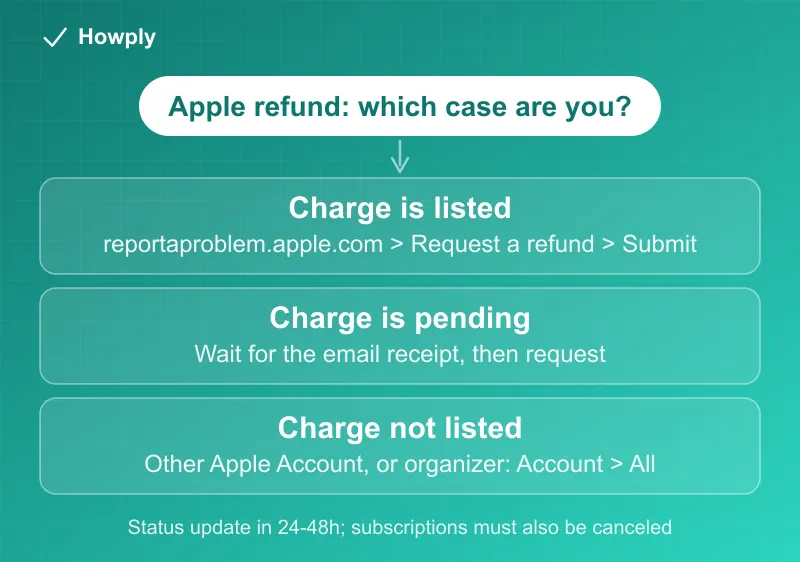
| Charge still “pending” | Cannot request yet; wait for the email receipt |
| Unpaid order | Must be paid before a refund can be requested |
| Family purchase, shared card | Family organizer: Apple Account button > All |
| Charge not listed | Almost always a different Apple Account; check your receipts |
| Published day/usage limits | None; every request is individually reviewed |
| Approved refund | You lose access to the refunded item |
| Consumer law rights | Kept in addition to Apple’s policy (varies by country) |
The refund request, step by step
Per Apple’s official instructions:
- Sign in to reportaproblem.apple.com with the Apple Account that made the purchase
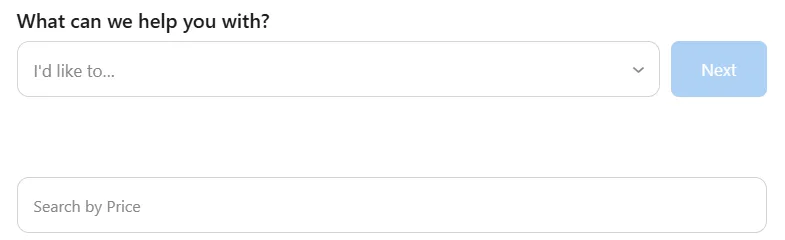
- Tap or click “I’d like to”, then choose “Request a refund”
- Choose the reason for the refund, then choose Next
- Choose the app, subscription, or other item, then choose Submit
This is the screen you land on after signing in: the “I’d like to” dropdown is the whole entry point, and the Search by Price box below it is the fastest way to find a charge when you only know the amount:
Below the form, every purchase is listed by date with its order number and total; a subscription line also shows its next renewal date, which is the date you are racing if you want to cancel instead of refund:

Then wait 24 to 48 hours for an update. You can check the status of the request on the same site. If Apple approves, the refund goes back to your payment method, which can take additional time on top of the approval.
What Apple’s refund policy actually says
People search for “the App Store refund policy” expecting a rulebook like Steam’s 14 days and 2 hours. Apple does not publish one. The official page commits to nothing more than “some purchases… might be eligible for a refund”: every request is reviewed individually, there is no stated day limit, no stated play-time or usage limit, and no published cap on how many refunds you can get. In practice that cuts both ways:
- An honest, specific reason filed soon after the charge has good odds; there is no clock you have already missed
- Nothing is automatic; the same request can be approved one time and denied the next
- Eligibility differs by country, and in the EU some in-app purchases are billed by the developer rather than Apple, which puts them outside this process entirely
That unpublished-rules design is unique among the big stores. Steam publishes hard numbers and Xbox publishes a 14-day standard; Apple reserves judgment, which makes the reason you select in the form matter more, not less.
Subscription refunds, specifically
A renewed subscription is the most common Apple refund case, and it has two moving parts:
- The charge that already landed. Request it at reportaproblem.apple.com like any other purchase. A renewal you forgot to cancel is a recognized reason in the form; file it quickly, because an unused billing period is your strongest argument
- The next charge, which is still coming. A refund does not cancel anything. Cancel at Settings > your name > Subscriptions on iPhone (our iPhone cancel guide covers subscriptions that are not listed), or during the refund flow itself when offered
For free trials the deadline is earlier than most people assume: per Apple’s cancellation page, cancel “at least 24 hours before the trial ends” or the first paid charge can lock in. A 7-day trial is a 6-day decision.
”I can’t find the charge”
This is the most common failure, and it is almost never a missing feature. In order of likelihood:
- Wrong Apple Account. Search your email for “receipt from Apple” or “invoice from Apple”, find the receipt matching the amount, and check which account it names. Sign in to reportaproblem.apple.com with that account
- Family Sharing purchase. If you are the family organizer and the purchase hit your shared payment method, you can still request it: on reportaproblem.apple.com, tap the Apple Account button, then choose All to show family purchases
- The charge is still pending. Apple does not accept refund requests on pending charges; wait until the email receipt arrives, then request
- An unpaid order. You have to pay the outstanding order first (which may mean fixing your payment method), then request the refund
How long the money takes, by payment method
Approval and arrival are two different clocks. Per Apple’s refund status page, once a refund is approved it goes back to the original payment method on this schedule:
| Payment method | Refund appears within |
|---|---|
| Apple Account balance (store credit) | Up to 48 hours |
| Credit card, debit card, Apple Pay, Apple Cash, everything else | Up to 30 days on your statement |
| Mobile phone (carrier) billing | Up to 60 days, and your carrier controls the pace |
Three official footnotes worth knowing: an approved refund means you lose access to the refunded item; calling or chatting with Apple “won’t help speed up your request”; and if a card refund has not shown after 30 days, the follow-up belongs with your bank, not Apple. If the money seems lost in transit, our Apple refund not received guide walks the recovery order.
Check the status, and the one move after a denial
On reportaproblem.apple.com, the Check Status of Claims option lists every pending request; if you do not see it, nothing is pending, which after 48 hours means the decision email may be sitting in your inbox already. A denial is per-request, not permanent: the charge type matters, the reason matters, and a request that describes a real problem (app broken, child purchase, double billing) reads differently from “changed my mind.” There is no formal appeal form; a denied one-time purchase is usually the end of that road, which is why the reason you pick on the first filing is the whole game.
What Apple does not promise
Two honest caveats straight from the policy:
- Approval is not automatic. “Some purchases… might be eligible” is Apple’s own wording. Accidental purchases and misbehaving apps have good odds; a game you finished last month does not
- Rules vary by country. In the EU, some digital purchases are not billed through Apple at all and follow the seller’s process instead. And consumer protection laws (Australia and New Zealand are named examples) apply on top of Apple’s policy, not instead of it
Bottom line
Go to reportaproblem.apple.com, request the refund with the honest reason, and expect an answer within 48 hours. If the charge is a subscription, cancel it too or it will renew. And if the charge is not listed, check your email receipts first: the purchase is almost certainly on another Apple Account in your household.
Steps, timelines, and payment-method schedules verified against Apple’s official support pages linked above as of August 8, 2026; the reportaproblem.apple.com screenshots are from our own Apple Account on August 25, 2026, with the order number removed. If Apple changes the process, this guide will be updated with the revision noted.