How to Cancel Headspace: Website, App Store, and Google Play, and Refunds
Direct purchases cancel in a browser at headspace.com/subscription/manage; store purchases cancel in Apple or Google Play. Most sales are final; here are the exceptions.
Headspace has one cancel page for each way you can pay, and the catch is in the first one: a subscription bought on headspace.com is canceled from a web browser, “not the mobile app.” Apple and Google purchases are canceled in the store, where Headspace has no access to your billing at all. The company also describes most sales as “final and non-refundable,” with a narrow door for direct purchases. Here is the path for each checkout, the Family Plan rule, what Headspace says about refunds, and how long an approved refund takes to show up.
The quick answer
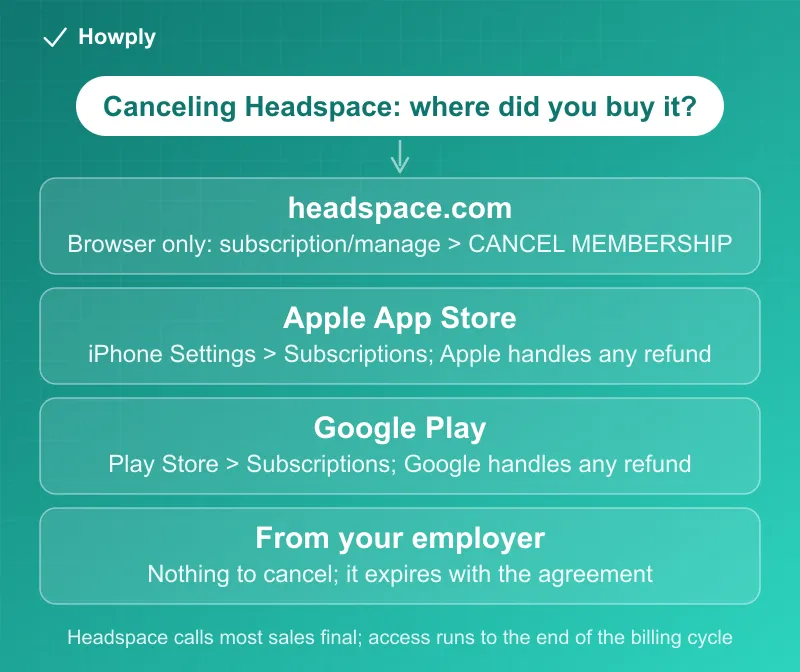
- Bought on headspace.com: log in “from a desktop or mobile browser (not the mobile app),” open headspace.com/subscription/manage, and click CANCEL MEMBERSHIP. “If the button is not there, please send an email to help@headspace.com”
- Bought in the App Store: iPhone Settings > your name > Subscriptions > Headspace > Cancel Subscription, which stops it “from auto-renewing at the end of the current billing cycle”
- Bought in Google Play: Play Store menu > Subscriptions > Headspace > Cancel subscription
- Refunds are the exception, not the rule. Direct purchases “are non-refundable,” but Headspace says to write in if “there are special circumstances.” App Store and Google Play sales are “final and non-refundable” and any refund comes from Apple or Google
- Family Plan: only the primary account holder can cancel, and members “will have full access to Headspace for the remainder of their subscription period”
- Subscription from your employer or school? “You do not need to cancel your subscription, it will automatically expire based on the date of the agreement”
Key facts at a glance
| How you paid | Where to cancel | Refund |
|---|---|---|
| headspace.com | Browser: headspace.com/subscription/manage > CANCEL MEMBERSHIP | Non-refundable, but special circumstances are reviewed by email |
| Apple App Store | iPhone Settings > Subscriptions > Headspace | Apple decides; Headspace cannot cancel or refund |
| Google Play | Play Store > Subscriptions > Headspace | Google Play Support decides |
| Organization-provided | Nothing to cancel; it expires with the agreement | Not applicable |
| Question | Answer |
|---|---|
| Access after canceling | To the end of the current billing cycle (auto-renew is turned off) |
| Can’t find the cancel button | Email help@headspace.com |
| Family Plan | Primary account holder cancels; members are emailed and keep access to the end of the period |
| Approved refund timing | PayPal 1 to 5 business days; card 3 to 10 business days |
| Refund still missing | After 10 business days, contact support with the charge date, amount, payment method, and confirmation |
| Mental health coaching subscription | Separate cancellation steps in its own help article |
Step 1: know how you paid
Headspace’s cancel page opens with the rule: “Cancellation steps can differ depending on where you subscribed (directly through us, Apple App Store, or Google Play).” Your receipt tells you which: an Apple or Google receipt means the store billed you, a Headspace receipt means Headspace did. If you are not sure, the cancel page links to instructions for viewing your subscription details in your account.
Step 2: cancel
Direct purchase on headspace.com:
- “Log in to your account from a desktop or mobile browser (not the mobile app) at www.headspace.com”
- Go to headspace.com/subscription/manage
- Click or tap the CANCEL MEMBERSHIP link
- If the button is missing, email help@headspace.com
Apple App Store:
- Open the Settings app and tap your name
- Tap Subscriptions
- Select the Headspace subscription
- Tap Cancel Subscription “to disable it from auto-renewing at the end of the current billing cycle”
If Headspace is not in that list, our guide to canceling a subscription on iPhone covers the other accounts and billers it could be on.
Google Play:
- Open the Google Play Store
- Tap Menu, then Subscriptions
- Tap the Headspace subscription
- Tap Cancel subscription and follow the on-screen instructions
Google’s rules on what happens next, including access for the time you already paid, are in our Google Play cancel guide.
Family Plan: per Headspace’s Family Plan page, “only the Headspace Family Plan’s primary account holder can cancel the Family Plan,” at the same headspace.com/subscription/manage page. “Once canceled, all Family Members will receive an email notification of the cancellation and will have full access to Headspace for the remainder of their subscription period.”
Mental health coaching: a Headspace coaching subscription has its own cancellation article, linked from the main cancel page, and is separate from the meditation subscription.
Refunds: what Headspace says, by checkout
Headspace’s position is stricter than most subscription services, and it is stated on the cancel page itself:
- Direct purchases: “While subscriptions purchased directly through Headspace.com are non-refundable, we understand that situations can vary. If you believe there are special circumstances surrounding your purchase, please reach out to us at help@headspace.com so our team can review your case individually”
- App Store purchases: “the sale is final and non-refundable,” and the purchase falls under Apple’s payment policy, “which also may not provide for refunds.” Headspace’s Apple refund page explains why it cannot help: “we don’t have access to Apple’s App Store’s subscription or billing details to cancel or refund these purchases.” The request goes to Apple, covered in our Apple refund guide
- Google Play purchases: also “final and non-refundable” on Headspace’s side; its Google Play refund page says “you will need to contact Google Play Support in order to get a potential refund,” and to turn off auto-renew in the Play Store meanwhile
In practice, the strongest cases are a charge right after a trial or renewal you did not intend. For Apple and Google purchases the store’s own windows apply, and both stores look more kindly on requests made within days of the charge.
If a refund is approved, Headspace’s refund timing page gives the clock: PayPal refunds “are usually received within 1–5 business days,” card refunds typically appear within “3–10 business days” depending on your bank or card issuer, and a charge that was still pending “may simply disappear from your account statement instead of posting as a separate refund transaction.” After 10 business days, contact support with the “Original charge date,” “Charged amount,” “Payment method used,” and any confirmation. General card timelines are in our guide to how long refunds take.
After you cancel
Canceling turns off auto-renewal; it does not end access early. Apple’s screen says the subscription stops “auto-renewing at the end of the current billing cycle,” and Family Plan members keep access “for the remainder of their subscription period.” After that, the account drops to the free tier. Headspace’s free content page lists what stays available without paying: its YouTube channel, the Radio Headspace podcast, articles, and the “Guide to Meditation” and “Guide to Sleep” series on Netflix for Netflix subscribers.
Headspace’s closest rival has a very different refund policy: Calm refunds Calm.com and Google Play purchases within 30 days, as our Calm cancel guide explains.
Quick answers to what people search
Why can’t I cancel Headspace in the app? If you bought it on headspace.com, Headspace requires a browser: “from a desktop or mobile browser (not the mobile app).” If you bought it through Apple or Google, cancel in that store’s subscription settings.
Can I get a refund from Headspace? For direct purchases, only if Headspace agrees after you email help@headspace.com about special circumstances. For App Store or Google Play purchases, only from Apple or Google.
Do I keep access after canceling? Yes, until the end of the current billing cycle. Canceling stops the renewal.
I got Headspace through my employer. Do I need to cancel? No. “It will automatically expire based on the date of the agreement.”
How do I cancel a Headspace Family Plan? The primary account holder cancels at headspace.com/subscription/manage; members are notified by email and keep access to the end of the period.
My refund was approved but hasn’t arrived. Allow 1 to 5 business days for PayPal and 3 to 10 for cards; after 10 business days, contact support with the charge details.
Bottom line
Cancel where you paid: in a browser at headspace.com/subscription/manage for direct purchases, or in your iPhone or Play Store subscription settings for store purchases, and do it before the renewal date, because Headspace treats most sales as final. You keep access to the end of the cycle either way. If a charge was a mistake, email help@headspace.com for a direct purchase or ask Apple or Google for a store purchase, and expect an approved refund within 1 to 10 business days depending on how you paid.
Cancellation steps, refund statements, Family Plan rules, and refund timing verified against the Headspace Help Center articles linked above on September 30, 2026. If Headspace changes the process, this guide will be updated with the revision noted.
Official sources
- Headspace Help: How do I cancel my subscription?
- Headspace Help: How do I cancel my subscription if I subscribed on Apple App Store or Google Play?
- Headspace Help: I purchased my subscription via the Apple App Store and I want a refund
- Headspace Help: I purchased my subscription via Google Play and I want a refund
- Headspace Help: Where is my refund?
- Headspace Help: How do I cancel my Family Plan?
- Headspace Help: What's included for free?