How to Cancel a Subscription When You Cannot Log In to the Account
Locked out of the account but the charges keep coming? Three routes that work without the login, and the one thing revoking payment does not do.
Every cancel guide starts with “sign in to your account,” which is useless advice when the account is exactly what you cannot reach: a dead email address, a lost password on a service that emails the reset link to that dead address, an account someone else created, or a login tied to a phone number you no longer have. Meanwhile the charge renews on schedule. There are three routes that do not need the login, and the CFPB is unusually direct about the strongest of them: “You have the right to stop a company from taking automatic payments from your account, even if you previously allowed them.” Here is the order to try them in, and the trap that catches people who stop at the payment side.
The quick answer
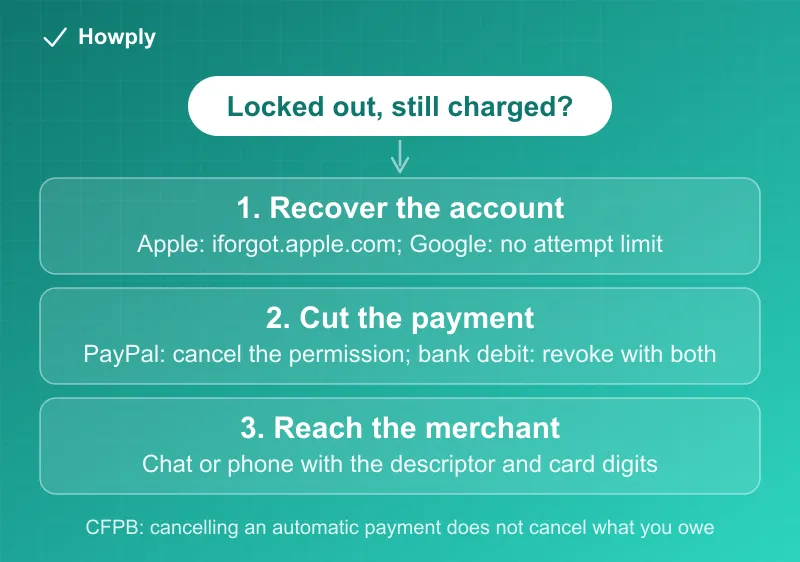
- Route 1, recover the account. Usually the fastest real fix. Apple resets at iforgot.apple.com or from a trusted device; Google says wrong guesses “won’t kick you out of the account recovery process” and there is “no limit to the number of times you can attempt”
- Route 2, cut the payment permission. If PayPal is the payment method, cancel the automatic payment on PayPal’s side. For bank debits, revoke authorization with the company and your bank, per the CFPB
- Route 3, reach the merchant without logging in. Many services cancel over chat or phone once you prove the charge; the statement descriptor tells you who to call
- The trap: stopping the payment is not canceling the subscription. Per the CFPB, “Cancelling an automatic payment does not cancel what you owe”
- After you revoke, any further charge from that company “would be errors, and you can contact your bank for a refund”
- A new card does not work. Card networks push your new number to merchants automatically, which is why the charge survives a replacement card
Key facts at a glance
| Situation | What actually stops the charge |
|---|---|
| Forgot password, still have the email or device | Account recovery, then cancel normally |
| Recovery email or phone is dead | Merchant support with proof of the charge, or cut the payment path |
| Paid through PayPal | Cancel the automatic payment in PayPal settings; no merchant login needed |
| Paid by bank debit (ACH) | Revoke authorization with the company and the bank; stop payment order if the bank suggests it |
| Paid by card | Cancel with the merchant; disputes are the fallback, not the first step |
| You replaced the card | Nothing; the card updater sends the new number to the merchant |
| Charges continue after you revoked | Per the CFPB they are errors; report them to the bank for a refund |
Route 1: recover the account, because it is the only clean fix
A recovered login ends the subscription the normal way, with a confirmation email and a clean end date. It is worth 20 minutes before anything else.
- Apple accounts: on a trusted iPhone or iPad, Settings, your name, Sign-In & Security, Change Password; on a borrowed device, the Apple Support app offers Reset Password, then Help Someone Else; on the web, iforgot.apple.com. Apple notes you “might be required to wait one hour before changing your Apple Account password or other critical security settings,” so start early rather than on renewal day
- Google accounts: go through the recovery flow at accounts.google.com. Google’s guidance is more forgiving than people assume, since “wrong guesses won’t kick you out” and there is no attempt limit. Answer every question you can, even approximately
- Everything else: try the reset flow with every email address you have ever used. The most common cause of a “dead” account is that the subscription lives on a different email than the one you are testing
If the recovery email and phone are both gone, stop here and move to Route 2 or 3; repeated failed attempts do not improve the odds.
Route 2: cut the payment permission
This is the route that works when nobody will let you in. What you can do depends on how the money moves.
Paid through PayPal. PayPal keeps the merchant’s standing permission on its own settings page, and canceling it there needs no merchant login at all: Settings, Payments, then the automatic payments list, select the merchant, and cancel. It is one-way, so reinstating means setting it up again with the merchant. The full path and its payment-method quirks are in our PayPal automatic payments guide.
Paid by bank debit. The CFPB spells out a two-step revocation, and both steps matter:
- Call and write the company. Tell them you are taking away permission to debit your account; there may be an online form. Follow up in writing, and say whether you are canceling the subscription itself or only the payment method
- Call and write your bank. Tell them you revoked the company’s authorization. The bank may have its own form, and it may suggest a stop payment order, an instruction not to pay that specific company. Note the CFPB’s caveat: “Banks and credit unions generally charge fees for stop payment orders”
The payoff is in the CFPB’s next line: once both have been told, “any additional payments initiated by that company would be errors, and you can contact your bank for a refund.”
Paid by card. There is no clean consumer-side revocation for a card the way there is for ACH; the practical levers are the merchant and, if they will not act, a dispute. What does not work is quietly replacing the card. Card networks push updated numbers to merchants automatically, which is why the charge reappears on the new card; the mechanics are in our new card, same charges guide.
Route 3: reach the merchant without logging in
Support agents can usually find an account from the charge itself. Bring: the statement descriptor exactly as written, the last four digits of the card or the bank account, the charge dates and amounts, and any email address the account might use.
Some services publish this path openly. Peacock, for example, documents canceling through chat for people who cannot sign in, which is in our Peacock cancel guide. Others will do it by phone once you prove ownership of the payment method. If you cannot identify the merchant behind a cryptic descriptor at all, work through our subscription sweep guide, which walks each biller’s list, and the Apple bill decoder for the most common mystery line.
The trap: stopping payment is not canceling
The CFPB is blunt about it: “To cancel an ongoing contract for a service, like cable or a gym, be sure to cancel your contract with the company as well as telling it to stop automatic payments,” and “Cancelling an automatic payment does not cancel what you owe.” A subscription whose payments you blocked but whose contract still stands can keep accruing what it thinks you owe, get sent to collections, or come back the moment a payment method reattaches.
So treat Route 2 as a tourniquet, not a cure. Use it to stop the bleeding, then keep pushing on Route 1 or 3 until you have something in writing that says the subscription is canceled. Gym and long-term memberships are the sharpest version of this, where the contract terms outlive the payment method entirely; our gym membership guide covers those written-notice rules.
After you cut it off
- Watch the next two statements. A charge that lands after you revoked authorization is, in the CFPB’s words, an error; report it to the bank promptly
- Keep the paper trail: dates of the calls, copies of the letters or emails, the confirmation of any cancellation. It is what makes a dispute quick
- If charges continue, the escalation ladder is in our canceled but still charged guide, and the formal card route, including the 60-day billing-error deadline, is in our bank dispute guide
Bottom line
Try account recovery first, because only a real cancellation ends the contract cleanly, and both Apple and Google make recovery cheaper to attempt than people expect. If the account is genuinely unreachable, cut the payment permission: PayPal from its own settings, bank debits by revoking authorization with the company and the bank. Then keep going until the subscription itself is canceled in writing, because the CFPB’s warning is the whole point, stopping the payment does not stop what you owe. If the account belonged to a family member who has died, the official bereavement routes are in our deceased family member guide.
Revocation rights, stop-payment guidance, and the “does not cancel what you owe” rule are quoted from the CFPB’s official guidance; recovery steps are from Apple’s and Google’s official support pages, all linked above and verified August 28, 2026. Individual services set their own cancellation policies; the linked guides cover the major ones.