How to Pause a Subscription Instead of Canceling (Who Allows It, How Long)
Hulu, YouTube TV, YouTube Premium, Sling, Audible, and Peloton all let you pause. The limits, what you keep, who is excluded, and when canceling is the better move.
Canceling a subscription you plan to come back to has a hidden cost: the promo rate you were on, the DVR library, the credits, sometimes the price itself. A pause keeps the account intact and stops the billing, and six of the services people most often step away from offer one. The catch is that every pause has a ceiling, a start date you do not choose, and an exclusion list that quietly removes most people on a deal or billed through Apple. Here is each official pause policy, and the cases where canceling is actually the smarter move.
The quick answer
- Hulu: up to 12 weeks. Starts on your next billing date, resumes automatically. Not available on annual plans, promotions, gift cards, or most third-party billing (Amazon and Roku excepted)
- YouTube TV: 4 weeks to 6 months. Recordings are saved through the pause; no access while paused. Cannot be extended, but you can resume and re-pause
- YouTube Premium / Music Premium: 1 to 6 months. Annual plans cannot pause, and “pausing and resuming your paid membership is not available to users who are billed through Apple”
- Sling TV: standard pause up to 6 months, keeps your DVR recordings and free Freestream channels. Pause Extra (1 to 3 months, $5 monthly refundable deposit) keeps DVR playback and Paramount+ with Showtime. No pause on day passes, promos, gift-card-only, or Apple/Google Pay billing
- Audible: 30, 60, or 90 days, up to 90 days total per 12 months, monthly plans only. Existing credits stay usable; no new credits. Requires 30 days of paid membership first
- Peloton All-Access: 1, 2, or 3 months, no access while paused. Peloton itself says: if you will be away longer than 3 months, cancel and reactivate instead
- Every pause begins at the end of the current billing cycle. None of them refund the days you have already paid for
Key facts at a glance
| Service | Max pause | What you keep | Who cannot pause |
|---|---|---|---|
| Hulu | 12 weeks | Account and profiles; no streaming | Annual, promo, gift card, on-hold accounts, most third-party billing |
| YouTube TV | 6 months (min 4 weeks) | Recordings saved through the pause | Not specified on the pause page |
| YouTube Premium | 6 months (min 1 month) | Downloads stored but locked | Annual plans, Apple-billed |
| Sling TV | 6 months (Pause Extra: 3 months) | DVR saved; Freestream free channels; Pause Extra adds DVR playback + Paramount+ | Day passes, promos, gift card or BitPay only, Apple/Google Pay billing |
| Audible | 90 days per 12 months | Existing credits and library; no new credits | Annual plans, trial members (30 days max), under 30 days paid, Apple-billed (limited) |
| Peloton All-Access | 3 months | Account and history; no classes | Not specified; Peloton recommends canceling if away longer than 3 months |
Hulu: 12 weeks, and a long exclusion list
Per Hulu’s pause page, “when you pause your subscription, it takes effect on the first day of your next billing cycle,” and you can pause “for up to 12 weeks before we automatically attempt to resume your subscription using the payment method you have on file.” Resuming early is allowed: hit Restart Subscription, and “you will be billed immediately,” with streaming back once payment clears. If you decide to cancel while paused, “you will not be charged.”
The footnote is the important part. The pause “is not available for annual subscribers, subscribers billed by a third party (excluding Amazon and Roku), subscribers with an account on hold, subscribers using gift cards, or subscribers on a promotion.” If you are on the Disney bundle billed through Disney, or on a first-year promo, the pause button will not be there. The cancel path for those cases is in our Hulu cancel guide.
YouTube TV and YouTube Premium: up to 6 months, different floors
YouTube TV: “you can choose the length of this paused state, from 4 weeks up to 6 months,” and “your membership will be paused after the end of your current billing cycle.” While paused, “YouTube TV can’t be accessed and no new programs will be recorded,” but “your previous recordings will be saved until the end of the paused state” (still subject to the standard 9-month recording expiry). When it ends, “you’ll automatically be charged at your normal monthly price, and that date becomes your new billing date.” Two rules to plan around: “paused memberships cannot be extended, but you can resume and re-pause memberships as needed,” and you can resume “at any time before the scheduled resume date.” If you decide to cancel instead, what happens to recordings, refunds, and an NFL Sunday Ticket Season Pass is in our YouTube TV cancel guide.
YouTube Premium and Music Premium work the same way with a shorter floor: “from 1 to 6 months,” paused after the current cycle, no charge “until you’ve resumed your membership.” Downloads stay on the device but are locked. The two exclusions are explicit: “Annual plans cannot be paused,” and “pausing and resuming your paid membership is not available to users who are billed through Apple.” Apple-billed members are stuck with cancel, covered in our YouTube Premium cancel guide.
Sling TV: the only pause with a paid upgrade
Sling offers two tiers. “A standard pause can be applied to your account for up to 6 months,” and “pause periods match your existing billing cycle and will begin on the date of your next scheduled bill.” During a standard pause, “we’ll save your DVR recordings for you” and “you’ll still be able to watch over 600 free channels with Sling Freestream.”
Pause Extra is available “for 1, 2, or 3 months” at “a $5 monthly deposit,” and adds the ability to “keep watching content you’ve already recorded to your DVR” and “watch live channels and on demand content from Paramount+ with Showtime,” with the deposit returned “when your Sling subscription restarts.” Sling’s exclusion list mirrors Hulu’s: no pause for “1 Day, 3 Day, or 7 Day Passes,” “customers using promotions (prepay bundles, free trials),” “those paying only with a gift card or BitPay,” or “subscriptions made through Apple Pay, Google Pay or other third party billing services.”
Audible: 90 days a year, credits protected
Per Audible’s pause page, monthly members can pause for 30, 60, or 90 days, “for a total of up to 90 days every 12 months.” “Pausing your membership will also pause your payments.” Premium Plus members keep access to existing credits during the pause but “you won’t receive new credits”; Standard-plan monthly listens lock until you resume.
The restrictions: “Annual memberships are not eligible for pause,” trial members can pause for 30 days only, you need 30 days of paid membership before your first pause, and Apple-billed memberships have limited pause options. This is the pause to use if you are sitting on unused credits: canceling forfeits them, pausing does not. Details on the credit rules are in our Audible cancel guide.
Peloton: 3 months, and an honest recommendation
Peloton lets you “pause your All-Access Membership for 1, 2 or 3 months.” While paused, “you will be unable to access any Peloton content on your Peloton Bike, Tread, or Row, or the Peloton App.” The pause “starts at the beginning of your next billing cycle and then billing automatically resumes at the end of the pause,” and you can unpause at any time from the equipment or the website.
Peloton then says the thing most companies avoid: “If you expect to be unable to use your Peloton All-Access Membership for longer than 3 months, we recommend cancelling your Membership and reactivating when you’re able to do so.” Cancellation keeps access through the end of the paid period, and reactivation is a login away. The full path is in our Peloton cancel guide.
When to cancel instead of pause
Pausing is not free of trade-offs. Cancel instead when:
- You are on a promotional rate. Most services exclude promos from pause entirely, and where a pause is allowed, resuming at “your normal monthly price” (YouTube TV’s phrasing) can mean the promo is gone anyway. The math is in our price increase guide
- The break is longer than the ceiling. 12 weeks at Hulu, 90 days at Audible, 3 months at Peloton. Past that, the service resumes billing on its own, and an auto-resumed charge on a card you forgot about is how canceled but still charged tickets start
- You are billed through Apple or Google. Nearly every pause above excludes app-store billing. Cancel through the store instead; the route is in our Apple subscription guide
- You will not miss anything a pause protects. No DVR library, no credits, no annual-plan pricing to preserve: cancel, and resubscribe later if you want
Pause when the opposite is true: a defined break inside the ceiling, a library or credit balance you want to keep, and direct billing on a monthly plan.
Bottom line
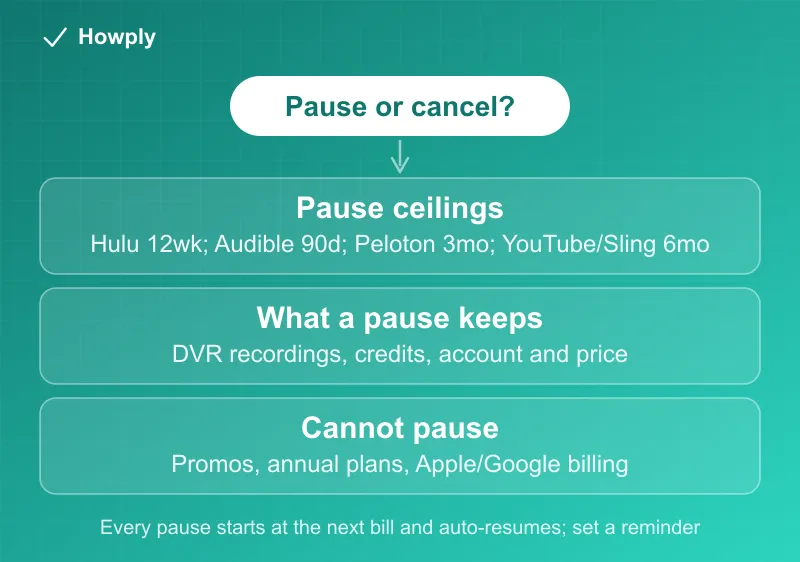
Six services, six ceilings: 12 weeks (Hulu), 90 days (Audible), 3 months (Peloton, Sling Pause Extra), 6 months (YouTube TV, YouTube Premium, Sling standard). All of them start at your next bill and resume charging on their own. Check the exclusion list before you count on it, because promos and Apple billing knock most people back to the cancel button, and set a reminder for the resume date so the first charge is not a surprise.
Pause durations, start dates, and exclusions quoted from each service’s official help page linked above, verified August 30, 2026. Companies change pause terms without notice; the option shown in your own account page is the one that applies.
Official sources
- Hulu Help Center: Can I put my Hulu subscription on pause?
- YouTube TV Help: Cancel or pause your YouTube TV membership
- YouTube Help: Pause or resume your Premium membership
- Sling TV Help: Pause or cancel your subscription
- Audible Help: Pause your membership
- Peloton Support: How to Manage Your All-Access Membership