Subscription Price Increase: What You Can Do Before the Next Renewal
Price increases hit at your next renewal, not mid-cycle. Apple needs consent for big jumps, Google Play may cancel for you, and direct billers email a month ahead.
A subscription price increase never hits the cycle you already paid for; it lands on your next renewal. That gap between the announcement and the renewal date is your decision window, and what you can do inside it depends entirely on who bills you. The app stores have formal consent rules that most people have never read, and direct billers work on a simple email-then-renew clock. Here is each rulebook, and the options in the order worth trying.
The quick answer
- Nothing changes mid-cycle: the time you already paid for stays at the old price. The new price applies at the next renewal
- Billed through Apple: you get an email, a push notification, and an in-app notice. For big jumps (roughly more than $5 and 50% on a monthly plan, or $50 and 50% on an annual plan), Apple requires you to opt in; if you do nothing, the subscription simply does not renew
- Billed through Google Play: increases are either opt-in (at least 30 days to agree, and if you do not, the subscription is canceled before the first higher charge) or opt-out (30 or 60 days of notice, then the new price unless you cancel)
- Billed directly (Netflix and most others): expect an email about a month before the renewal that carries the new price, then it applies automatically
- Your levers, in order: drop to a cheaper tier, walk through the cancel flow to surface a retention offer, or cancel more than 24 hours before the renewal and resubscribe later if you miss it
Key facts at a glance
| Biller | The rule |
|---|---|
| Apple | Email + push + in-app notice; big increases need your opt-in or the plan lapses |
| Google Play | Opt-in: no agreement = auto-canceled before the higher charge; opt-out: 30 or 60 days notice |
| Direct (Netflix) | Email about one month before the billing date the increase applies |
| Grandfathering | Do not count on it: Netflix states new plan prices apply to everyone once announced |
| Timing | Act more than 24 hours before renewal on app-store billing |
| Mid-cycle | Never: the paid period always finishes at the old price |
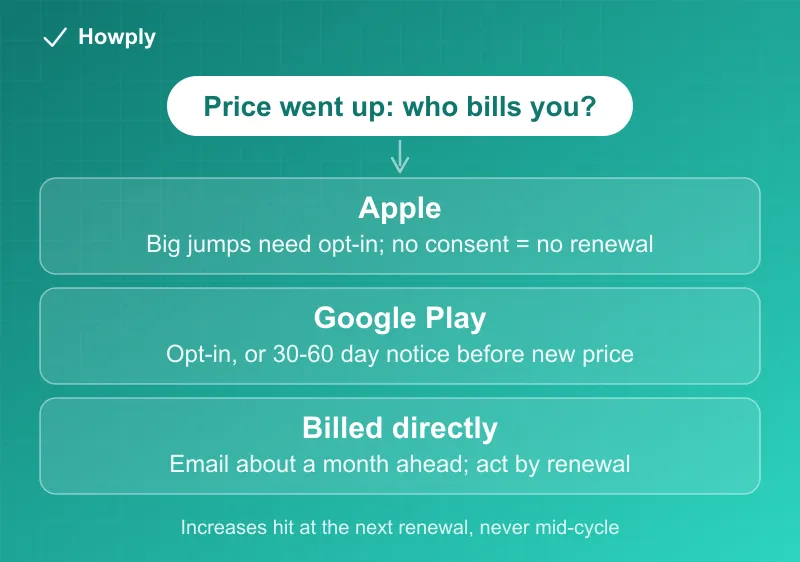
Step 1: check who actually bills you
The rules below differ so much that this is the first fact to establish. The charge on your statement or the receipt email tells you, and if you are not sure, the full subscription sweep puts a biller next to every subscription you own in a few minutes.
If Apple bills you
Apple’s official price-change rules are the most protective of the three. Before any increase you get an email, a push notification, and a message inside the app itself. Then the size of the increase decides what happens:
- Smaller increases (up to about $5 and 50% for monthly plans, or $50 and 50% for annual plans, and not more than once a year) can proceed with notice alone, where local law allows it
- Anything bigger, or any increase where the law requires consent, needs your explicit opt-in. If you never tap agree, the subscription does not renew at the next billing period
That second rule cuts both ways. A big increase can never silently charge you, but ignoring the prompts does not preserve your service either: the plan quietly ends. If you want to keep it at the new price, you have to say yes; if you want out, you can simply do nothing or cancel properly to be certain.
If Google Play bills you
Google Play’s price-change system runs in two modes, and the notice you receive tells you which one you are in:
- Opt-in increases: you get at least a 30-day window to agree. If you do not agree, Google cancels the subscription automatically before the first charge at the higher price. Doing nothing means losing the service, not paying more
- Opt-out increases: you get 30 or 60 days of advance notice depending on the country, and then the new price applies at renewal unless you cancel first
Either way, the decision deadline is printed in the notification email. Remember that anything you subscribed to on Android since 2022 for services like YouTube Premium may bill through Play rather than the service itself, which is exactly the who-bills-you trap from Step 1.
If the company bills you directly
Direct billers set their own notice practice, and Netflix’s official policy is the useful benchmark: an email with the new price arrives about one month before the billing date on which it takes effect, and then the increase applies automatically. There is no consent screen, and no grandfather clause to wait for; Netflix states plainly that once a price change is announced, the new plan prices apply to everyone.
One caution while that email is in your inbox: price-increase notices are a favorite costume for phishing. If a message asks you to click through and confirm payment details, close it, sign in to the service directly, and check the plan page there instead.
The fall 2026 wave: Peacock and ESPN both land on September 17
Two direct billers raised prices this summer with the same grandfathering shape, which makes them a clean worked example of the rules above.
Peacock raised every plan on August 18, 2026. Per its official notice, new and returning subscribers pay the new price immediately, while existing subscribers keep the old price until their first billing date on or after September 17, 2026. Premium moved from $10.99 to $12.99 monthly, Premium Plus from $16.99 to $19.99; the full table and the cancel path are in our Peacock cancel guide.
ESPN followed with its streaming plans. The official plans page now lists ESPN Select at $13.99 a month or $139.99 a year and ESPN Unlimited at $31.99 a month or $319.99 a year, up from $12.99 and $29.99 monthly according to press reports. The grandfathering line is explicit: “Anyone who subscribed prior to August 20, 2026, will retain that price until their first billing date after September 17, 2026.” Disney bundle pricing (Disney+, Hulu, ESPN) is set separately on the Disney+ help center.
What that means in practice: if you were already subscribed before the cutoff, the higher charge is not on September 17 itself but on your first renewal after it, so an account that bills on the 5th pays the old rate on September 5 and the new rate on October 5. Check the billing date on the account page, and if you plan to downgrade or cancel, do it before that renewal, not before September 17. Every confirmed increase this month, with old and new prices per plan, is tracked in the September 2026 price-increase tracker, and the current official price of every major streaming plan is in the 2026 streaming price table.
Your options, in order
- Downgrade a tier. Most services apply plan changes at the next renewal, so switching to a cheaper tier before the date sidesteps the increase without losing the account
- Walk into the cancel flow. Retention offers live behind the cancel button, and a price increase is prime time for them: our SiriusXM guide documents how canceling is ironically the way to a cheaper rate. Start the cancellation and see what appears before you confirm
- Cancel before the renewal. On app-store billing, do it more than 24 hours before the renewal date. You keep access until the end of the period you already paid for
- Resubscribe later if you change your mind. Cancellation is rarely permanent: the account and history usually survive, and win-back pricing sometimes beats the price you left. The exception is a grandfathered plan the company no longer sells: Disney’s legacy bundle, for example, cannot be switched back into once you cancel or change it, per Disney’s plans page
If a higher price ever lands without the notice these rules require, or after you canceled in time, that is not a price dispute but a billing error: work through the canceled but still charged guide and, if the biller will not fix it, the bank dispute process.
To see which announced increases apply to your price, add your plans to our free Subscription Tracker. It compares the price you enter with the higher price a company has announced.
Bottom line
A price increase is an appointment, not an ambush: nothing changes until your next renewal, and the notice arrives weeks ahead. Establish who bills you, read which regime you are in (Apple consent, Google Play opt-in or opt-out, or a direct biller’s one-month email), and spend the window on the ladder above. The only losing move is deleting the notification and deciding at renewal time, because by then the charge has already happened. For a news subscription, our New York Times cancel guide shows how to use the retention offers before you leave.
Rules verified against the official Apple, Google Play, Netflix, Peacock, and ESPN pages linked above as of August 13, 2026 (Peacock and ESPN pricing added August 31, 2026). Notice periods and consent thresholds are set by the platforms and can change; their official pages are the source of truth.