How to Cancel Hulu (and the Disney Bundle Catch to Know First)
Hulu cancellation only works from a web browser, and bundle subscribers cancel everything at once. The exact steps, the pause alternative, and every billing path.
Canceling Hulu takes two minutes once you know two things: the mobile app cannot do it, and if you are on the Disney Bundle, canceling Hulu cancels everything in the bundle. Here is the exact path for every billing setup, plus the pause option that fits better than canceling for a lot of people.
The quick answer
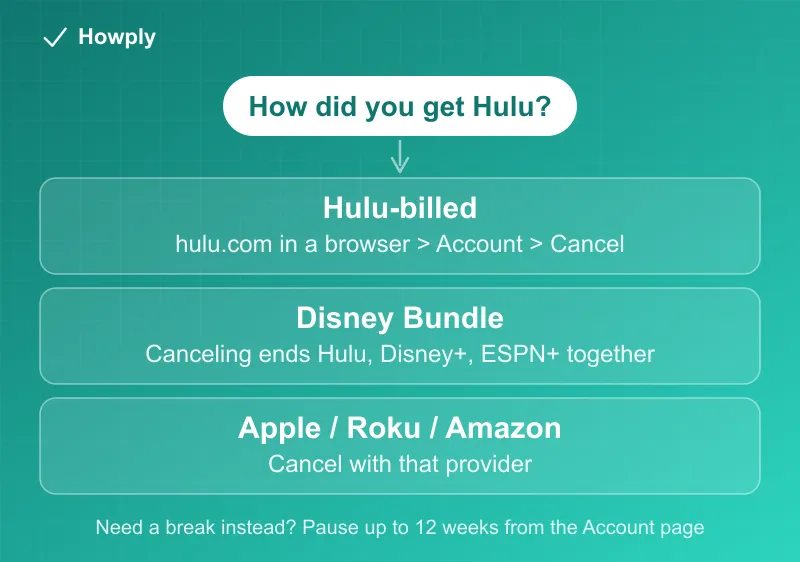
- Cancel at: hulu.com in a web browser > profile > Account > Your Subscription > Cancel
- The app has no cancel button: iOS and Android apps cannot cancel a subscription
- Disney Bundle warning: the bundle is one subscription; canceling it ends Hulu, Disney+, and ESPN+ together
- Billed through Disney+: manage the subscription from your Disney+ account instead
- Billed through Apple or Amazon: cancel with that provider, not Hulu
- Billed through Roku: cancel on hulu.com. Hulu’s Roku page says so, and the Roku menu will not do it
- Access: streaming continues until the end of the current billing cycle
- Prices rise from October 21, 2026 for current subscribers: Hulu with ads $11.99 to $12.49, Hulu Premium $18.99 to $21.49, and Hulu + Live TV up $10. Hulu’s page says existing subscribers “will see a price change in your billing cycle on or after October 21, 2026”
Key facts at a glance
| Question | Answer |
|---|---|
| Where to cancel | hulu.com in a web browser > Account > Your Subscription > Cancel |
| In the mobile app? | No; the iOS and Android apps cannot cancel a subscription |
| When it takes effect | End of the current billing cycle; access continues until then |
| On the Disney Bundle | Canceling ends Hulu, Disney+, and ESPN+ together |
| Billed through a third party | Cancel with that provider (Roku-billed accounts cancel on hulu.com); 12 possible billers, named on your Account page |
| Live TV free trial | Ends immediately when you cancel, unlike regular trials |
| Pause instead | Up to 12 weeks; starts on the first day of your next billing cycle |
| Who cannot pause | Annual plans, gift cards, promos, and third-party billing except Amazon and Roku |
| Your Hulu/Disney account | Survives cancellation; only the subscription ends |
| Next price change | Your billing cycle on or after October 21, 2026, if you signed up before September 23 |
Method 1: Cancel a Hulu-billed subscription
- Sign in at hulu.com in any browser (a phone browser works fine)
- Click your profile icon, then Account
- Under Your Subscription, select Cancel
- Hulu will offer alternatives (a pause, a cheaper plan). To proceed, choose Continue to Cancel
- Pick a reason, then confirm with Cancel Subscription
- Keep the confirmation email until your final billing date passes
You keep full access until the period you already paid for runs out, so canceling right after a renewal costs nothing extra. Free trials work the same way, with one sharp exception straight from the official page: Hulu + Live TV free trials “end immediately upon cancellation.” On a Live TV trial, cancel on the last day, not the first, or you forfeit the remaining free days. Fubo’s website trial ends the same way (Fubo cancel guide).
Also worth knowing: canceling the subscription does not delete your Hulu account or the Disney account behind it. Profiles and watch history stay attached to the account, and Hulu’s restart path is simply signing up again with the same login.
The Disney Bundle catch
If your Hulu came as part of the Disney Bundle, there is no way to drop just one service. The bundle is a single subscription, and canceling it ends Hulu, Disney+, and ESPN+ at the same time. If you want to keep one of them:
- Cancel the bundle
- After the billing period ends, subscribe directly to the service you want to keep
Two more bundle mechanics from the official page that decide what survives:
- If you had a standalone Disney+, ESPN+, or HBO Max subscription before upgrading to a bundle, canceling that original subscription leaves the bundle running (though any ESPN+ price credit ends with it). Canceling the bundle instead leaves the original subscription running at its then-current price, billed by whoever you originally signed up with
- Where you signed up decides where you cancel: a bundle started through Disney+ is managed in Disney+, and one started through HBO Max is managed there. Hulu’s page can only cancel what Hulu bills
Check who bills you in one place: Account page > Payment Information names your billing party.
Billed through a third party?
Hulu’s official list of possible billers is longer than most people expect: Amazon, Apple, Comcast Xfinity, Disney, Google, Kroger, HBO Max, Optimum, Roku, Spotify, T-Mobile, and Verizon. If any of them bills you, Hulu generally cannot stop the charges, so you cancel with that provider. Roku is the exception, handled on hulu.com. The common paths:
- Apple: Settings > your name > Subscriptions > Hulu > Cancel Subscription
- Roku: cancel on hulu.com, not on the Roku. Hulu’s Roku-billed account page states: “If you’re billed for Hulu through Roku, you can cancel your Hulu subscription on Hulu.com,” and Roku’s support article sends Hulu subscribers to Hulu “even if you’re billed through Roku.” The bundle cases are in our Roku billing guide
- Amazon: Your Account > Memberships & Subscriptions
- Spotify (student bundle) and the rest: the subscription page of the account you originally signed up with
The charge name on your card statement, or Hulu’s Payment Information section, settles who actually bills you.
If a price increase is why you are cancelling
Hulu raised prices again on September 23. Its plans page says: “The following prices are for new subscriptions as of September 23, 2026. If you signed up for a Hulu subscription prior to this date, you will see a price change in your billing cycle on or after October 21, 2026.”
| Plan | Before | New (September 23 for new, October 21 for existing) |
|---|---|---|
| Hulu (With Ads) monthly / annual | $11.99 / $119.99 | $12.49 / $124.99 |
| Hulu Premium (No Ads) | $18.99 | $21.49 |
| Disney+, Hulu Bundle (With Ads) | $12.99 | $12.99, unchanged |
| Disney+, Hulu Bundle Premium | $19.99 | $21.99 |
| Disney+, Hulu, HBO Max Bundle (With Ads) / (No Ads) | $19.99 / $32.99 | $21.99 / $34.99 |
| Hulu + Live TV, Disney+, and ESPN Select / Hulu Premium + Live TV version | $89.99 / $99.99 | $99.99 / $109.99 |
One row is worth a second look before cancelling. By our arithmetic, the Disney+, Hulu Bundle with ads now costs 50 cents more than Hulu with ads alone, $12.99 against $12.49, and it includes Disney+ with ads, which on its own now costs $12.49. Hulu’s plans page says “you’re able to change plans and add-ons at any time,” so if Hulu with ads is what you keep, the bundle adds Disney+ for $0.50 a month. On a monthly plan billed on the 5th, the old price applies on October 5 and the new one on November 5; billed on the 25th, the new price starts October 25. Every increase reaching October bills, across services, is in our October price-increase tracker.
The August round is separate and already in effect. Disney’s plans and prices page lists the legacy Disney+ Premium, Hulu, ESPN Select bundle at $27.99 a month and warns: “Please note this plan is no longer available to purchase or switch into on Disney+. Existing subscribers will be able to keep their plan so long as they do not cancel or change it.” If you hold that plan, cancelling is one-way, and downgrading to a current bundle means the current bundle’s price. The Disney+, Hulu Bundle with ads is listed at $12.99 a month, and Hulu-only plans are on your Account page. Compare before you press Cancel, and act before the renewal date, because Hulu bills through the end of the cycle and does not refund the remainder. All of this month’s increases are in our price increase tracker.
Consider pausing instead, with the fine print
If the issue is a busy month rather than the service, Hulu lets you pause for up to 12 weeks from the same Account page (the cancel flow also offers it). The official pause terms worth knowing before you rely on it:
- The pause starts on the first day of your next billing cycle, not the moment you click, so you keep what you paid for
- After the chosen duration, billing resumes automatically on the card on file; you can resume early anytime, and early resumption bills you immediately
- You can still cancel during a pause, and you will not be charged
- Who cannot pause: annual subscribers, accounts on hold, gift card and promo subscribers, and anyone billed by a third party, with Amazon and Roku billing as the two exceptions
After you cancel
Confirm the state on your Account page: it should read “Your subscription will be canceled,” and Hulu sends a confirmation email worth keeping until the final billing date passes. Then watch your next card statement. If a charge appears after your confirmed end date, Hulu’s own help center has an article titled “I thought I canceled but I’m still seeing charges,” which tells you how common the situation is; the usual causes and the escalation order are in our canceled but still being charged guide.
Bottom line
Browser, hulu.com, Account, Cancel, and confirm through the retention screens. Bundle subscribers should know the whole bundle ends together, Disney-billed accounts cancel through Disney+, and app-store subscribers cancel where they pay. If you just need a break, the 12-week pause keeps everything in place without the monthly charge. If a different tier would do instead of cancelling, every Hulu plan, bundle and add-on price is in our Hulu plans guide.
Steps, pause terms, biller list, and the Live TV trial exception verified against Hulu’s official Help Center documentation as of August 11, 2026. The September 23 price increase and its October 21 date were added on September 25, 2026 from Hulu’s plans page; the old prices are from Hulu’s and Disney’s sign-up pages as captured by the Internet Archive on September 19 to 22, 2026, and from Hulu’s plans page as checked on September 8, 2026. If the process changes, this guide will be updated with the revision noted.