How to Cancel Match: Turn Off Auto-Renewal, and Why a Trial Ends at Once
Cancel in Manage Subscription, not by deleting the account. A paid plan runs to its end date, a free trial stops at once, and Match calls subscriptions non-refundable.
Match handles cancellation in a different place from account deletion, and mixing them up is the usual reason people keep getting billed. Per Match’s help center, “Canceling a subscription turns off auto-renewal,” and that is a separate step from canceling your membership or deleting your account. Two other rules are worth knowing before you click: a paid plan keeps working until its end date, but a free trial “immediately ends your access,” and Match says “generally our subscriptions are non-refundable.” Here is the cancel path, what each kind of cancellation does, how to check your end date, and what to do if you bought through Apple.
The quick answer
- Cancel at: log in > gear icon > Manage Subscription (you may be asked for your password) > Subscription Status > turn off auto-renewal. Match: “You can cancel your subscription, free trial, or add-on features via Manage Subscription in your account settings on the app, mobile web, or desktop”
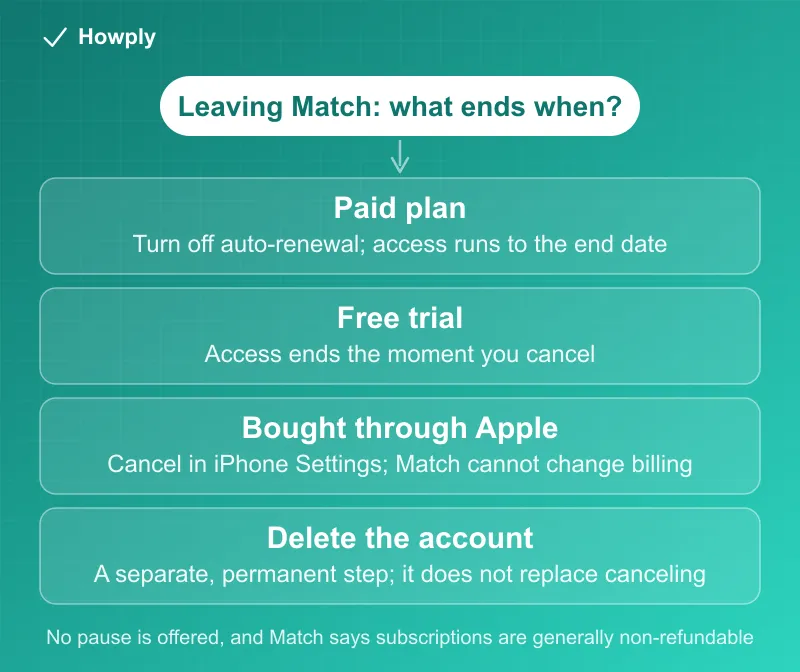
- Paid plan: canceling turns off auto-renewal; the subscription stays active to its end date, shown on the Subscription Status page
- Free trial: “canceling a free trial immediately ends your access,” so cancel on the last day if you want the full trial
- Bought through the Apple App Store? Apple manages it: “we won’t be able to make any changes to your billing, like turning off auto-renewal or issuing refunds”
- Refunds: “Please note that generally our subscriptions are non-refundable,” with the full policy in section 8d of the Terms of Use
- Changed your mind? Click Reactivate before the subscription expires; after that you must buy a new one
Key facts at a glance
| Question | Answer |
|---|---|
| Where to cancel | Gear icon > Manage Subscription > Subscription Status |
| Does canceling end access now? | Paid plan: no, it runs to its end date. Free trial: yes, immediately |
| Cancel vs delete | Canceling stops billing; deleting the account is permanent and does not email you a confirmation |
| Pausing | Not offered: “We do not offer subscription pauses once a package is active” |
| Downgrading from Platinum | Not possible after canceling Platinum, to Silver or Bronze |
| Apple App Store purchase | Cancel in iPhone Settings > Subscriptions; Apple handles billing changes |
| Reactivating | Reactivate button, only before the subscription expires |
| Promotional price | Applies to the first subscription period only |
| Add-ons (such as Private Mode) | Deactivate separately; they stay active until their end date |
| Refunds | Generally non-refundable; see Terms of Use section 8d |
How to cancel
Match’s cancel page covers three kinds of cancellation, and each one does something different. For a subscription bought on the website or in Match’s own app payment flow:
- Log in and click or tap the gear icon
- Open Manage Subscription and enter your password if prompted
- Open Subscription Status and turn off auto-renewal, following the prompts
On mobile web, you may have to tap Manage Account first and then Manage Subscription.
Bought through Apple (iPhone app): Match’s page gives the iPhone path: open the App Store, tap your profile icon, tap Subscriptions, then Cancel Subscription and Confirm. The reason is spelled out on the payment options page: “your subscription and billing information will be managed by Apple. This means we won’t be able to make any changes to your billing, like turning off auto-renewal or issuing refunds.” If Match is not in your list, see our guide to canceling a subscription on iPhone.
Add-on features: Match sells features such as Private Mode separately. They have their own Deactivate link on the Subscription Status page, and Match notes that “These steps cancel only add-ons, not your main subscription.” After you deactivate one, “the feature stays active until its end date,” and the link changes to Reactivate if you want it back.
What canceling does, and what it does not
- A paid subscription keeps working. Canceling turns off auto-renewal; your access continues, and the renewal and end date page says “Your subscription End Date and Renewal Status will be displayed” on the Subscription Status page. If you paid but nothing is listed, “make sure you’re signed in to the correct Match account”
- A free trial does not. Per the cancel page, “canceling a free trial immediately ends your access.” Match’s trial page puts the deadline plainly: “If you decide you don’t want to be charged, simply cancel your subscription before the free trial period ends.” The trade-off is the opposite of services that let you keep the trial after canceling, compared in our guide to canceling a free trial early. You can turn the trial back on before it ends, “but auto-renewal will also be re-enabled”
- Platinum cannot step down. After canceling a Platinum subscription, “you won’t be able to downgrade to Silver or Bronze at this time”
- There is no pause. Match says “We do not offer subscription pauses once a package is active.” Packages run 1, 3, 6, or 12 months and are “charged in full at the time of purchase,” so the 1-month package is the one to pick if you want monthly billing
- Canceling your membership is another step. If you are not subscribed, or have already turned off auto-renewal, you can cancel your membership under Manage Subscription; “Your profile and photos are hidden,” you can “Reactivate your account at any time by signing in,” and “Your data is retained in accordance with our Privacy Policy”
- Deleting the account is permanent. Per Match’s deletion page, you can instead “hide your account,” and if you delete it “all your matches, messages, and profile information will be removed” with no confirmation email. Turn off auto-renewal first, and check the Subscription Status page afterward
Other dating apps differ on this point: deleting a Tinder account does not cancel a subscription (Tinder guide), on Hinge it does only for Hinge’s own payment method (Hinge guide), and Bumble warns that subscriptions may not cancel automatically (Bumble guide).
Auto-renewal, promos, and reactivating
Every package renews on its own. Match’s auto-renewal page says “All Match subscriptions include auto-renewal to ensure uninterrupted access,” and you can turn it off “at any time via your Subscription Status page to prevent future charges.” The line that causes surprise renewals: “Discounts and promotional rates only apply to the first subscription period and do not carry over after renewal.” A cheap first month renews at the standard price.
If you turned off auto-renewal but the subscription has not run out, the reactivation page says to click Reactivate in the top navigation bar. “You won’t be charged immediately”; the charge comes when the renewal happens. Once the date passes, “your subscription has expired and your account is now in ‘free member’ mode,” the button disappears, and getting benefits back means buying a new subscription.
Match also offers a four-payment option: “Pay your first installment today, then the remaining three payments every two weeks,” and “Your subscription renews with installment payments.” If you used it, check Subscription Status for what is still scheduled before assuming a cancellation covers it.
Refunds
Match’s refund page is short: “Please note that generally our subscriptions are non-refundable. To review our full refund policy, you can locate it in section 8d. of our Terms of Use.” The same page repeats the cancel steps and says Apple subscribers “need to cancel through Apple.” For an App Store purchase the refund request goes to Apple; our Apple refund guide covers it. If you were charged after canceling, the usual causes are in our guide to a canceled subscription that is still charging, and a second Match account is worth ruling out with our guide to finding all your subscriptions.
Quick answers to what people search
How do I turn off auto-renewal on Match? Gear icon > Manage Subscription > Subscription Status, then follow the prompts. Match says you can do it “at any time after purchasing your subscription to prevent future charges.”
Will I lose Match right away if I cancel? A paid subscription stays active to its end date. A free trial ends immediately.
Can I pause my Match subscription? No. Match does not offer pauses once a package is active.
Can I get a refund from Match? Match says subscriptions are generally non-refundable and points to section 8d of its Terms of Use. App Store purchases are refunded, if at all, by Apple.
Does deleting my Match account cancel my subscription? Match treats them as separate steps and tells you to turn off auto-renewal first; deleting is permanent and sends no confirmation email.
I turned off auto-renewal by mistake. Can I undo it? Yes, while the subscription has not expired: click Reactivate. You will be charged when the renewal occurs, not immediately.
Why did Match renew at a higher price? Promotional rates “only apply to the first subscription period.”
Bottom line
Cancel in Manage Subscription (or in iPhone Settings if Apple bills you), and do it before the renewal date: turning off auto-renewal lets a paid plan run to its end date, while canceling a free trial stops it immediately, so time that one for its last day. Match offers no pause, treats subscriptions as generally non-refundable, and renews promotional prices at the standard rate. Deleting your account is a different, permanent step; turn off auto-renewal first and confirm the end date on the Subscription Status page.
Cancellation steps, trial and add-on rules, auto-renewal and reactivation terms, refund statement, and account-deletion details verified against the Match Help Center articles linked above on September 30, 2026. Match’s full Terms of Use were not available for review; section 8d governs refunds. If Match changes the process, this guide will be updated with the revision noted.
Official sources
- Match Help: Canceling a Match Subscription
- Match Help: Refund Policy
- Match Help: Subscription Was Automatically Renewed
- Match Help: Reactivating a Paid Subscription
- Match Help: Checking My Renewal or End Date
- Match Help: Subscription Package Options
- Match Help: How to Subscribe and Payment Options
- Match Help: Does Match offer Free Trials?
- Match Help: How To Delete Your Match Account