How to Cancel Fubo: Website vs Roku, Trial Rules, and Refunds
Cancel at fubo.tv > My Account > Subscription, or with Roku if it bills you. A web trial ends at once, paid plans run to cycle end, and prepaid months are not refunded.
Fubo has two cancel paths, and picking the wrong one is the usual reason people keep getting billed. Fubo says the steps “vary based on how you signed up, and you must complete all steps before your subscription is cancelled.” The other detail worth knowing first is what a free trial does: cancel one on Fubo’s website and it ends immediately, but cancel one that Roku bills and it runs to its end. This guide covers both paths, what you keep after canceling, the no-refund rule, why a charge can appear after you cancel, and how to come back.
The quick answer
- Signed up on fubo.tv: sign in, click the settings icon, choose My Account, then Subscription, scroll to the bottom, and select Cancel
- Signed up through Roku: cancel at my.roku.com or on the Roku device. Fubo says “the cancellation process will need to be completed directly with that provider”
- Paid subscription: “you will continue to have service until the end of your current billing period”
- Free trial on fubo.tv: “your trial will expire immediately, and another free trial period will not be given.” Through Roku, the subscription “will terminate at the end of your free trial”
- Refunds: “we do not provide refunds for prepaid or partial months of service”
- Pause: “Fubo does not offer the ability to pause or suspend subscriptions”
- Retention screen: a discount offer can appear, and “If you see this screen, your subscription isn’t canceled yet”
Key facts at a glance
| Question | Answer |
|---|---|
| Where to cancel (web) | fubo.tv > settings icon > My Account > Subscription > Cancel |
| Where to cancel (Roku) | my.roku.com > Unsubscribe, or Roku device > Manage subscription > Cancel subscription |
| Not sure how you signed up | fubo.tv/subscription; a Roku-billed account says “Roku Subscription” |
| Access after canceling a paid plan | Until the end of the current billing period |
| Cancel a web free trial | Trial ends immediately; no second trial |
| Cancel a Roku free trial | Subscription ends when the trial ends |
| Cancellation fee | Most plans none; a promotion with a commitment period may have an early cancellation fee |
| Pause | Not offered; cancel and reactivate later |
| Billing | Monthly unless you chose a quarterly or annual plan, charged in advance of each cycle |
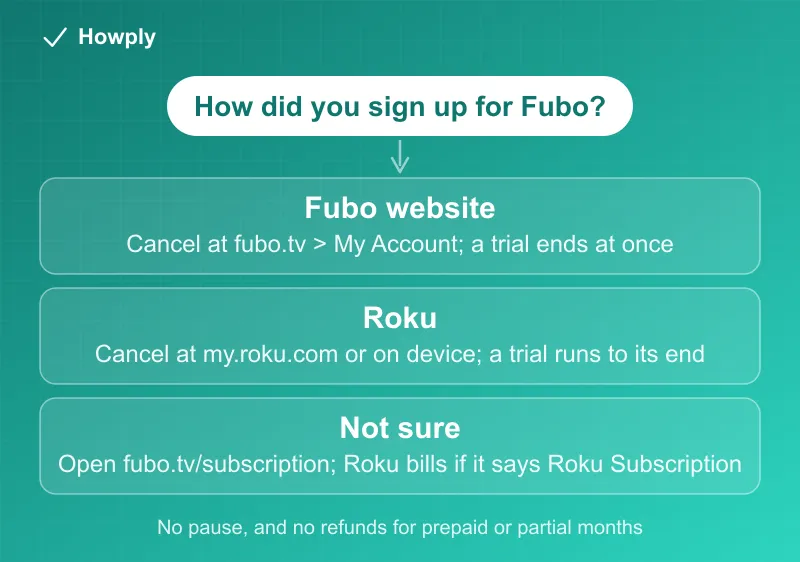
Step 1: find out how you signed up
If you are not sure, Fubo’s cancel page says to log in at fubo.tv/subscription. A subscription created through Fubo shows “your subscription details along with your next billing date.” A Roku subscription says “Roku Subscription” under the details. Another clue is the plan menu: Fubo’s change-subscription page says “If you don’t see a Change Plan or Manage Add-Ons option in My Account, your account is most likely billed through Roku.”
Step 2: cancel on the website
Per Fubo, for an account created on fubo.tv:
- Sign in at fubo.tv and pick any profile on the Who’s Watching? screen
- Click the settings icon, then select My Account
- Select Subscription
- Scroll to the bottom and select Cancel
- If Fubo offers a discount to stay, choose CANCEL SUBSCRIPTION to continue, because “You may be offered the option to keep your subscription and receive a discount”
- Dismiss the confirmation page with OK
The confirmation page is the proof. If you never reach it, nothing has been canceled.
Step 2 for Roku: cancel with Roku
If Roku bills you, Fubo says “your Fubo subscription automatically renews each month and is managed through your Roku subscription.” You have two options:
- Online: go to my.roku.com, click Unsubscribe next to the Fubo plan, and confirm with Yes, Unsubscribe. You will see the option to renew until the service period expires
- On the device: press Home, highlight the Fubo app, press the Star button, select Manage subscription, then Cancel subscription, and confirm
Roku-billed subscriptions follow Roku’s rules for what happens next, which are covered in our guide to canceling Disney+, Hulu, or Sling billed through Roku.
Free trials: where you signed up decides what you lose
Fubo says “some plans include a free trial,” that a card is required, and that “At the end of the trial period, your subscription will automatically transition to a paid plan, and your card will be charged for your first billing cycle.” Checkout shows the end date: “You will not be charged until your free trial ends on (date) at (time).” What canceling does depends on the path:
| Where you signed up | If you cancel during the trial |
|---|---|
| Fubo’s website or sales team | ”your subscription will be terminated immediately and you will lose access to Fubo” |
| Roku | ”your subscription will terminate at the end of your free trial” |
So on the website, cancel on the last day if you want the whole trial. Fubo’s trial page is blunt about the cost of canceling early: “any remaining trial days will not be accessible.” The trial is also a one-time offer: “No, the free trial is only available to new customers.” Our guide to canceling a free trial early compares this with other services. Hulu + Live TV trials also end immediately on cancellation, per our Hulu cancel guide, so the same cancel-on-the-last-day habit applies there.
What you keep after canceling a paid plan
Fubo’s policy page opens with “With Fubo, you can cancel at any time,” and says your paid subscription “will continue through the end of your current billing cycle.” Its page on lingering access gives the example: “If your subscription is set to renew on the 15th, and you canceled on the 5th, you’ll still be able to watch your content until the 15th.”
Two follow-ups:
- Check the date. The Account Information page shows when the subscription will expire. If it says canceled and shows “welcome back,” your paid subscription has expired
- Some channels may still play. After expiry, “any channels you’re seeing are a part of Fubo Free,” a limited ad-supported tier, not your old plan
Fubo also notes that “just logging in won’t reactivate anything,” so checking the status is safe.
Refunds and cancellation fees
Fubo’s position is plain: “Note that we do not provide refunds for prepaid or partial months of service.” Because “As a paid Fubo subscriber, you will be billed in advance of each billing cycle,” canceling the day after a renewal still pays for that whole cycle, with access until it ends.
On fees, Fubo says “Most Fubo plans don’t include cancellation fees. However, if you signed up for a promotional offer with a commitment period, an early cancellation fee may apply if you cancel before that period ends.” The offer terms and Fubo’s Terms of Service are the place to look before you cancel a promotion early; Fubo’s pages do not list the amount.
Charged after canceling
Fubo’s page on charges after canceling lists four causes:
- Incomplete cancellation: “Your account will remain active if cancellation steps were not fully completed.” Confirm the status shows canceled in your settings
- Billing cycle timing: “Fubo will charge for the full billing period if your cancellation was completed after you were billed for service”
- Multiple accounts: “You may have more than one Fubo account,” for example under a different email
- Third-party billing: if you subscribed through a provider such as Roku, “the cancellation process will need to be completed directly with that provider”
Two separate things can also look like a charge. Fubo says “you may see a temporary $1.00 authorization charge on your statement,” which is “automatically refunded within 7-10 business days.” And if you “don’t know what Fubo is and have been charged for Fubo service,” Fubo asks you to contact it right away with the date and amount, the last four digits and expiration date of the card, and any email address you think is tied to an account. For anything Fubo does not fix, see our guides to a canceled subscription that is still charging and to disputing a charge with your bank.
Pausing and coming back
Fubo has no pause. Its page says “If you need to take a break from Fubo, you can cancel your subscription; you’ll continue to have access through the end of the billing period you’ve currently paid for,” and “When you’re ready to come back, you can easily reactivate your subscription.” Our pause guide covers services that do offer one.
The cost of coming back depends on timing, per Fubo’s restart page:
- Still active but set to cancel: reactivate from the reminder at the top of the Subscription & Billing page, and “Your billing cycle date will remain the same as it was prior to scheduling your subscription to cancel”
- Already terminated: “You will not receive a free trial when reactivating a terminated subscription,” and “You will be billed immediately for the full amount of your chosen plan, plus any applicable taxes and fees.” The reactivation date becomes your new billing date
- Roku-billed accounts: “once reactivated, your subscription will be billed by Fubo instead of Roku” if you reactivate through Fubo
Quick answers to what people search
How do I cancel Fubo? At fubo.tv, go to My Account > Subscription > Cancel and finish on the confirmation page. If Roku bills you, cancel in your Roku account instead.
Will I lose Fubo right away? On a paid plan, no: service runs to the end of the billing period. On a free trial started on fubo.tv, yes: it ends immediately.
Can I pause Fubo? No. Cancel and reactivate when you want it back.
Can I get a refund after I cancel? Fubo does not refund prepaid or partial months of service.
Why was I charged after canceling? Usually the cancellation did not finish, it came after the renewal charge, there is a second account, or a provider such as Roku is the biller.
What is the $1 charge? A temporary authorization that Fubo says is refunded automatically within 7-10 business days.
Can I change my billing date? Fubo says “billing date changes can only be made once per the lifetime of your account,” and you ask support for it.
Bottom line
Check how you signed up at fubo.tv/subscription, cancel in the matching place, and keep the confirmation. Cancel before the renewal date, because Fubo bills in advance and does not refund prepaid or partial months. A web free trial ends the moment you cancel, so time it for the last day, while a Roku trial runs to its end. There is no pause, and coming back after a full cancellation means no new trial and an immediate full charge.
Cancel steps, trial rules, refund and fee statements, and billing details quoted from the Fubo Help Center articles linked above, verified on September 30, 2026. Plans, promotions, and terms change; if Fubo changes its process, this guide will be updated with the revision noted.
Official sources
- Fubo Help: How do I Cancel My Fubo Subscription?
- Fubo Help: What Is Fubo's Cancellation Policy?
- Fubo Help: Can I pause my Fubo subscription?
- Fubo Help: I Canceled My Subscription, But I Still Have Access to Channels
- Fubo Help: Why am I still being charged after canceling my Fubo account?
- Fubo Help: How am I billed for Fubo?
- Fubo Help: How does the free trial work?
- Fubo Help: How do I restart my Fubo subscription?
- Fubo Help: What is this $1 charge on my credit card?
- Fubo Help: How do I report an unauthorized charge from Fubo on my credit/debit card?