How to Cancel Tinder Gold, Plus, or Platinum (Deleting the App Won't)
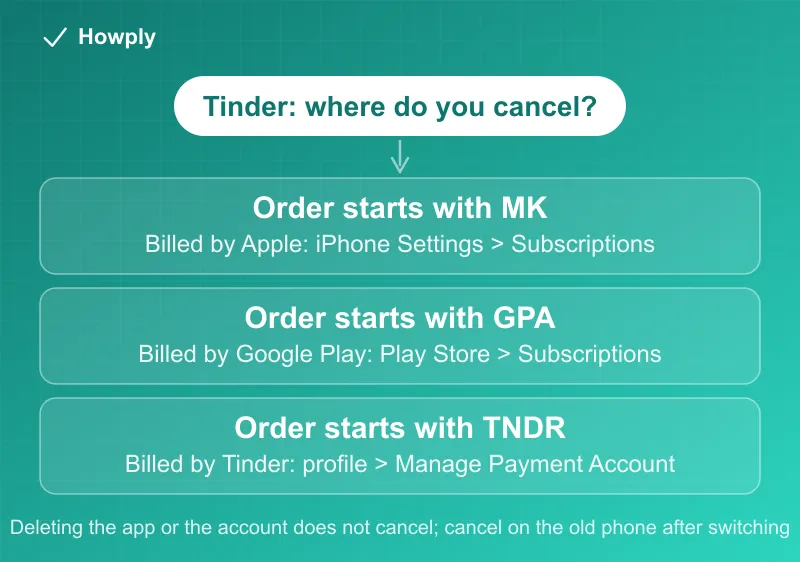
Your order number tells you where to cancel: MK is Apple, GPA is Google Play, TNDR is Tinder.com. Deleting the app or account does not stop billing. Refund rules too.
Tinder subscriptions are canceled wherever you bought them, and Tinder has three different checkouts: Apple, Google Play, and its own website or app payment. That is why canceling and still getting charged is so common with Tinder Gold, Plus, and Platinum. Tinder’s cancel page gives the shortcut: the first letters of your order number tell you who is billing you. It also closes the two exits people try first: “Uninstalling or deleting the app won’t cancel your subscription,” and deleting the account itself “won’t cancel an active subscription” either. Here is how to find your billing channel, the exact steps for each, refunds, downgrades, and the device-switch trap.
The quick answer
- Check the order number on your purchase receipt. Starts with MK: billed by Apple. GPA: billed by Google Play. TNDR: bought on Tinder.com or with a card in the Android app
- Apple (MK): iPhone Settings > your name > Subscriptions > Tinder > Cancel Subscription
- Google Play (GPA): Google Play app > profile icon > Payments & Subscriptions > Subscriptions > Tinder > Cancel subscription
- Tinder.com or card in the Android app (TNDR): Tinder profile icon > Manage Payment Account > Cancel Subscription
- Deleting does nothing for billing: not the app, not the account. Cancel first, then delete if you want to
- Switched phones? “Subscriptions don’t transfer between platforms,” so the old platform keeps billing until you cancel there
- Refunds: Tinder handles only its own TNDR and COSU orders, for purchases in the last 14 days; Apple and Google handle theirs
Key facts at a glance
| Order number starts with | Who bills you | Where to cancel |
|---|---|---|
| MK | Apple (Tinder app on iOS) | iPhone Settings > your name > Subscriptions |
| GPA | Google Play (Tinder app on Android) | Google Play > Payments & Subscriptions > Subscriptions |
| TNDR | Tinder (tinder.com, or a card in the Android app) | Tinder > profile icon > Manage Payment Account |
| COSU | Tinder (consumables such as Boosts) | Refund requests go to Tinder |
| Third-party purchase | The merchant you bought from | Cancel with the steps above; refunds from the merchant |
| Question | Answer |
|---|---|
| Does uninstalling cancel? | No |
| Does deleting the account cancel? | No |
| Changed from iPhone to Android (or back)? | Cancel on the old platform; subscriptions do not transfer |
| Refund window with Tinder | Purchases in the last 14 days, for TNDR and COSU orders |
| Apple or Google refunds | Handled by Apple or Google under their policies |
| Downgrade on Android or tinder.com | Not supported; cancel, let it expire, subscribe again |
Step 1: find out who bills you
Tinder sorts every purchase by its order number prefix:
- MK means “you made your purchase on the Tinder app for iOS and are being billed by Apple”
- GPA means “you signed up through the Tinder app on Android and are billed by the Google Play Store”
- TNDR means “you purchased on Tinder.com or through the Android app using a credit card”
One wrinkle on iPhones: Tinder notes that “Apple Pay and Web payment options are rolling out in select markets.” If you paid that way instead of through the App Store, you follow the Tinder.com steps below, not the iPhone Settings steps.
Step 2: cancel on that channel
Billed by Apple (MK):
- Open Settings on your iPhone
- Tap your name at the top
- Tap Subscriptions
- Select Tinder
- Tap Cancel Subscription
If Tinder is not in that list, it is billed to another Apple Account or by someone else; our guide to canceling a subscription on iPhone walks through each case.
Billed by Google Play (GPA):
- Open the Google Play app
- Tap your profile icon in the top right
- Go to Payments & Subscriptions > Subscriptions
- Select Tinder
- Tap Cancel subscription
Google’s own rules for what happens next, including access for the time already paid, are in our Google Play cancel guide.
Paid with a card or PayPal in the Android app: open the Tinder app, tap your profile icon, choose Manage Payment Account, find the subscription, and tap Cancel Subscription.
Bought on Tinder.com (TNDR): go to tinder.com and log in, tap your profile icon, select Manage Payment Account, find the subscription, and tap Cancel Subscription.
Bought from a third party (a promo code or a partner offer): Tinder says to cancel with one of the sets of steps above, but for a refund, “You’ll need to contact the merchant directly.”
The three mistakes that keep the charges coming
- Deleting the app. “Uninstalling or deleting the app won’t cancel your subscription”
- Deleting the account. Tinder’s account deletion page repeats it: “Deleting your account won’t cancel an active subscription.” Cancel first, then delete. If you only want a break, Tinder suggests “hiding your profile instead”
- Switching phones. “If you’ve changed devices (such as from iOS to Android), you must cancel your subscription on your old device as subscriptions don’t transfer between platforms.” An Apple-billed subscription keeps renewing through Apple even if you now use Tinder on Android. If the old phone is gone, you can still cancel an Apple-billed subscription from any device signed in to that Apple Account
Two more rules from the same page: subscriptions “renew automatically until they’re canceled,” and a subscription “can only be associated with 1 Tinder account at a time,” so a second account does not share or replace it.
Other dating apps treat deletion differently. On Hinge, deleting the account cancels a subscription only if you paid through Hinge’s own checkout (Hinge cancel guide), and Bumble warns that subscriptions may not cancel automatically when you delete (Bumble cancel guide). Match’s rules differ again, starting with a free trial that ends the moment you cancel (Match cancel guide).
Refunds
Tinder’s refund page starts with “most in-app purchases are nonrefundable, some exceptions apply,” and splits by who billed you:
- TNDR or COSU orders (card, PayPal, or Google CC): Tinder can help with “a purchase made in the last 14 days.” Contact Tinder “from the same email address used to make the purchase” and include the order number, which “starts with TNDR or COSU, depending on whether it’s a subscription or consumable”
- Apple or Google orders: “Refunds are reviewed at each platform’s discretion and are subject to their refund policy.” Apple and Google handle “all refunds and cancellations for Tinder subscriptions and consumables (like Boosts and Super Likes).” For Apple, that means reportaproblem.apple.com, covered in our Apple refund guide; for Google Play, requests within 48 hours go to Google
Canceling does not refund the current period on any channel; it stops the next renewal.
Downgrading instead of canceling
If Platinum or Gold is more than you want but Plus is fine, Tinder’s downgrade page says it depends on where you pay:
- Apple: change the plan in your Apple subscription settings; “changes to your subscription will occur once your existing subscription expires,” and the new rate is charged then
- Google Play: “Google Play doesn’t support downgrading subscriptions.” Cancel, let the current one expire, then subscribe to the cheaper tier in the app
- Tinder.com: “We do not support downgrading subscriptions.” Same workaround: cancel, wait for it to expire, subscribe again
For reference, Tinder’s subscriptions page stacks the tiers: Gold includes all Plus features plus weekly Super Likes, a monthly Boost (not on weekly plans), and See who Likes You, and Platinum adds Prioritized Likes on top of Gold.
Quick answers to what people search
Does deleting Tinder cancel my subscription? No. Neither deleting the app nor deleting the account cancels it; cancel on the channel that bills you first.
How do I know if Apple, Google, or Tinder is billing me? The order number: MK is Apple, GPA is Google Play, TNDR is Tinder.com or a card payment in the Android app.
I moved from iPhone to Android and I’m still being charged. Why? Subscriptions “don’t transfer between platforms.” The Apple subscription keeps renewing until you cancel it in your Apple Account’s Subscriptions list.
Can I get a refund for Tinder Gold? Maybe, within limits. For TNDR orders, Tinder reviews requests for purchases in the last 14 days. For Apple or Google orders, you ask Apple or Google, and it is at their discretion.
How do I cancel Tinder on the website? Log in at tinder.com, tap your profile icon, select Manage Payment Account, and tap Cancel Subscription. This only works for subscriptions bought through Tinder’s own checkout.
Can I switch from Platinum to Gold without canceling? Only on Apple, where the change takes effect when the current subscription expires. On Google Play and tinder.com, you cancel, wait for it to expire, and subscribe again.
Bottom line
Look at the order number before you tap anything: MK means cancel in iPhone Settings, GPA means cancel in Google Play, TNDR means cancel in Tinder under Manage Payment Account. Deleting the app or the account never stops billing, and a subscription started on your old phone keeps renewing on that platform until you cancel it there. Refunds are narrow: 14 days for Tinder’s own orders, and Apple’s or Google’s policies for everything bought through them.
Cancel, refund, account deletion, downgrade, and plan details verified against Tinder’s Help Center articles linked above on September 28, 2026. If Tinder changes the process, this guide will be updated with the revision noted.