How to Cancel Bumble Premium, Premium+, or Boost (Snooze Won't Stop It)
Cancel where you paid: App Store, Google Play, or the Bumble app for card, PayPal, and Apple Pay. Snooze Mode and deleting your account do not stop billing. Refunds too.
Bumble gives you three ways to pay for Boost, Premium, or Premium+, and each one cancels in a different place. The two moves people try first do not stop the charges: Snooze Mode hides your profile but “does not pause your subscription,” and deleting your account comes with Bumble’s own warning that “Subscriptions may not cancel automatically.” Bumble’s cancel page lays out the right path for each checkout. Here is how to tell which one you used, the steps, the 24-hour deadline, and how refunds work.
The quick answer
- Apple App Store: iPhone Settings > your name > Subscriptions > Bumble > Cancel Subscription
- Google Play: Play Store > profile icon > Payments & subscriptions > Subscriptions > Bumble > Cancel Subscription
- PayPal, card, or Apple Pay (paid to Bumble directly): Bumble app > profile icon > Subscription details > Manage your subscription > cancel
- You keep what you paid for: “After you cancel, you’ll keep your paid perks until the end of your subscription date”
- Deadline: your subscription “will renew automatically unless canceled at least 24 hours before the renewal date”
- Snooze and deletion don’t cancel. Cancel first, then snooze or delete
- Refunds: Apple and Google decide for their own payments; for card, Apple Pay, PayPal, or Bumble Web payments, you ask Bumble’s support team
Key facts at a glance
| How you paid | Where to cancel | Refund request |
|---|---|---|
| Apple App Store | iPhone Settings > your name > Subscriptions > Bumble | reportaproblem.apple.com |
| Google Play | Play Store > Payments & subscriptions > Subscriptions > Bumble | Same screen: Request a refund |
| PayPal, card, or Apple Pay | Bumble app > profile > Subscription details > Manage your subscription | Bumble support team |
| Bumble Web | Contact support if you can’t cancel in the app | Bumble support team |
| Question | Answer |
|---|---|
| Access after canceling | Until the end of the period you paid for |
| Renewal deadline | At least 24 hours before the renewal date |
| Snooze Mode | Hides your profile; billing continues |
| Deleting the account | May not cancel the subscription; App Store subscriptions definitely keep renewing |
| Deleted by mistake | Restorable for up to 28 days through support |
| Moving a subscription to a new account | Automatic only for App Store purchases |
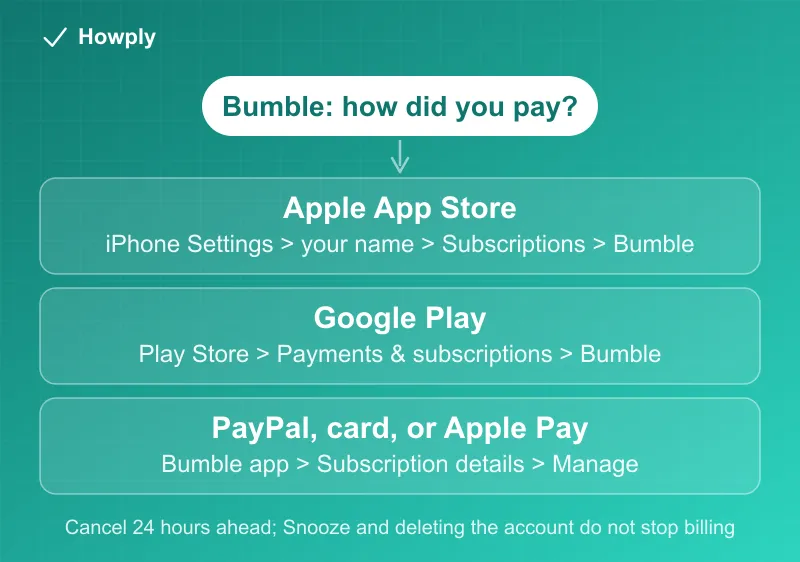
Step 1: find out how you paid
Bumble’s subscription management page says you see your plan’s dates “through the same platform where you purchased it,” which doubles as the test for where to cancel:
- Bumble appears in iPhone Settings > your name > Subscriptions: Apple bills you
- Bumble appears in the Play Store under Payments & subscriptions > Subscriptions: Google bills you
- Neither, but the Bumble app shows your plan under Profile > Subscription details: you paid Bumble directly “through Credit Card, PayPal, or Apple Pay”
Apple Pay is the one that fools iPhone users: a subscription paid with Apple Pay inside Bumble is a direct Bumble payment, so it does not show up in the App Store list and is canceled in the Bumble app.
Step 2: cancel
Apple App Store:
- Open Settings on your phone
- Tap your name at the top, then Subscriptions
- Find and select Bumble
- Tap Cancel Subscription
If Bumble is not in that list even though you are sure Apple bills you, it may be on another Apple Account; our guide to canceling a subscription on iPhone covers the other places it can be.
Google Play (Android):
- Open the Google Play Store app
- Tap your profile icon > Payments & subscriptions > Subscriptions
- Select Bumble
- Tap Cancel Subscription
More on Google’s rules, including access for the time already paid, is in our Google Play cancel guide.
PayPal, credit or debit card, or Apple Pay:
- Open the Bumble app
- Tap the profile icon
- Select Subscription details, then tap Manage your subscription
- Choose to cancel your subscription
“If you can’t access Bumble to cancel your subscription yourself,” Bumble says to contact its support team.
Timing, and what happens after
- 24 hours ahead. Renewal is automatic “unless canceled at least 24 hours before the renewal date”
- A Google hold is normal. On Google Play “you might notice a small preauthorization charge before your renewal date,” which Bumble describes as Google checking for funds before the payment
- You keep the perks. “Canceling a subscription stops the next renewal, but you can usually keep access until the end of the period you’ve already paid for”
- One subscription, every device. “You can use your active subscription across devices as long as you’re logged into the same Bumble account,” so there is no need to cancel twice on a phone and a tablet
Snooze and account deletion do not cancel
Snooze Mode is Bumble’s break button: it hides your profile for 24 hours, 72 hours, a week, or indefinitely while you keep chatting with existing matches. It does nothing to billing: “Switching on the Snooze feature does not pause your subscription.” It has a side effect worth knowing too: “Any matches you have without active chats will expire while you’re in Snooze Mode.”
Deleting your account is in Settings (profile icon > gear icon > Delete account), but the deletion page says to cancel first: “Subscriptions may not cancel automatically. If you’re subscribed to Bumble Boost, Premium, or Premium+, be sure to cancel this first.” For App Store subscribers it is definite: “deleting your account won’t automatically cancel your subscription.” Deleting the app from your phone does not delete the account either. If you delete by mistake, the account can be restored “for up to 28 days” through support.
Compare the other big dating apps: deleting a Tinder account never cancels a subscription (Tinder guide), while on Hinge it cancels immediately only for Hinge’s own payment method (Hinge guide). Match’s rules differ again, starting with a free trial that ends the moment you cancel (Match guide).
Refunds
Bumble’s refund page says eligibility depends on “the platform you used,” “your location,” and “what you purchased,” and routes requests by payment method:
- Apple App Store: “Apple manages payments and refund decisions.” Request it at reportaproblem.apple.com; our Apple refund guide walks through the form
- Google Play: in the Play Store, go to Payments & subscriptions > Subscriptions, select the Bumble purchase, and tap Request a refund
- Card, Apple Pay, PayPal, or Bumble Web: contact Bumble’s support team with your order number, the email or phone number on your account, your Bumble User ID, the payment method, and a short reason. Your User ID is in the app: Profile > question mark icon > Settings, then scroll down and “double-tapping the Bumble logo to copy the number”
Two cautions from the same page: cancel future renewals separately, because a refund request does not do it, and “If Apple or Google Play approve a refund, you may lose access immediately.”
Quick answers to what people search
Does deleting Bumble cancel my subscription? Not reliably. Bumble says subscriptions “may not cancel automatically,” and App Store subscriptions keep renewing after deletion. Cancel first.
Does Snooze Mode pause my Bumble payments? No. “Switching on the Snooze feature does not pause your subscription.”
I paid with Apple Pay but can’t find Bumble in my iPhone subscriptions. Why? Apple Pay inside Bumble is a direct Bumble payment. Cancel in the Bumble app under Subscription details > Manage your subscription.
Will I lose Premium right away if I cancel? No. You keep the perks “until the end of your subscription date.” A refund approved by Apple or Google can end access immediately, though.
How do I get a refund from Bumble? Apple or Google payments: ask Apple or Google. Card, Apple Pay, PayPal, or web payments: contact Bumble support with your order number and User ID.
Bottom line
Check where Bumble shows up (iPhone Subscriptions, the Play Store, or only inside the Bumble app) and cancel there at least 24 hours before the renewal date. You keep Premium or Boost until the paid period ends. Snooze Mode is a break for your profile, not your bill, and deleting your account is the last step, after the subscription is canceled. Refunds go to whoever took the payment: Apple, Google, or Bumble’s support team for card, Apple Pay, and PayPal.
Cancel, renewal, snooze, deletion, and refund details verified against Bumble’s Support Center articles linked above on September 28, 2026. If Bumble changes the process, this guide will be updated with the revision noted.