How to Cancel ESPN Unlimited or ESPN Select (Every Billing Path)
ESPN cancels in seven clicks if ESPN bills you, and in the store if Apple, Roku, or a Disney bundle does. Every path, the no-refund rule, and the September 17 price timing.
ESPN’s streaming plans renamed themselves twice in two years (ESPN+ became ESPN Select; the full-network tier is ESPN Unlimited, both laid out in our ESPN Select and Unlimited guide), and the cancel path depends less on the plan name than on who takes your money. If ESPN bills you, cancellation is seven clicks on the website and you keep access to the end of the cycle. If Apple, Google, Roku, or a Disney bundle bills you, the Cancel button is not on ESPN’s site at all. Here is every path, what ESPN says about refunds and pausing, and how the September 17, 2026 price increase changes the timing.
The quick answer
- Billed by ESPN directly: espn.com → profile picture → Account → Manage Subscription → the plan under Plans & Billing → Cancel → confirm. Effective “the end of your billing cycle”
- Billed through Apple, Google, Roku, or another partner: ESPN’s own page says “you must visit the third-party partner’s website to manage or review your subscription options.” Cancel in that store
- On the Disney+, Hulu, ESPN bundle: the bundle is one subscription, managed through Disney+ or Hulu, and canceling it ends all three services
- On the ESPN, FOX One bundle: ESPN.com → Manage My Account → Manage with MyDisney → the plan → Cancel. “Pausing is not available”
- No refunds: “We do not offer refunds or credits for partially used billing periods.” Access runs to the end of what you paid for
- No pause: “There is no option to pause ESPN Unlimited.” Turning off auto-renewal is the only stop
- Price increase timing: new prices are $13.99 (Select) and $31.99 (Unlimited) monthly. “Anyone who subscribed prior to August 20, 2026, will retain that price until their first billing date after September 17, 2026,” so cancel before your first renewal after 9/17, not before 9/17 itself
- Your ESPN account survives: canceling “will not delete your ESPN account”
Key facts at a glance
| Who bills you | Where to cancel | What ends |
|---|---|---|
| ESPN (espn.com) | espn.com Account → Manage Subscription → Cancel | Select or Unlimited only |
| Apple, Google, Roku, other partner | That store’s subscription settings | The ESPN plan billed there |
| Disney+, Hulu, ESPN bundle | Disney+ or Hulu account, whichever bills the bundle | Disney+, Hulu, and ESPN together |
| ESPN, FOX One bundle | espn.com → Manage with MyDisney → Cancel (or FOX if bought from FOX) | ESPN Unlimited and FOX One together |
| Pay-TV provider (activated Unlimited) | Your TV provider | Handled on the provider’s bill |
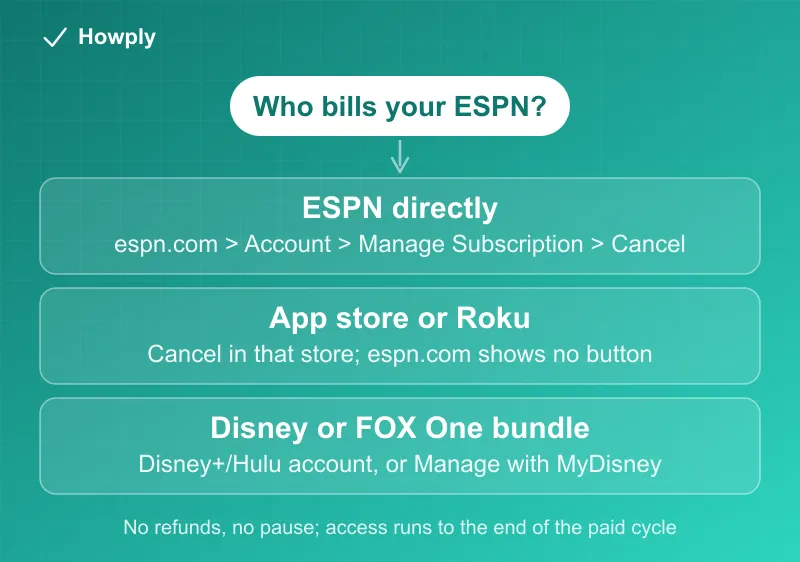
Step 1: figure out who bills you
Check the card or bank statement for the ESPN charge. A line from ESPN itself means the direct path below. APPLE.COM/BILL, GOOGLE*, or ROKU means the store path. A Disney or Hulu descriptor means the bundle path, and the amount will match a bundle price, not $13.99 or $31.99. If the statement is unclear, the subscription-finding guide covers how to read recurring charges, and the APPLE.COM/BILL guide decodes Apple’s descriptors.
Method 1: ESPN bills you directly
ESPN’s official cancellation page gives the steps, and they only work in a browser:
- “Log in to your ESPN account through a computer or mobile browser”
- “Hover over (web) or select (mobile browser) your Profile picture in the upper right corner of the page”
- “Select Account under the Manage My Account section”
- “Select Manage Subscription”
- “Click on the Subscription under Plans & Billing”
- “Select the plan you wish to cancel”
- “Select ‘Cancel’ and confirm your cancellation (effective the end of your billing cycle)”
Two rules from the same page. “You’ll continue to have access to it until the end of your current billing cycle, but you will not be charged moving forward.” And: “We do not offer refunds or credits for partially used billing periods.” Canceling on day 2 of a month gets you 28 more days and no money back, so there is no reason to rush a cancellation mid-cycle; there is every reason to do it before the renewal date.
Method 2: Apple, Google, Roku, or another partner bills you
The important note on ESPN’s page: “If your ESPN subscription is billed through a third party, such as Apple, Google, Roku, etc., you must visit the third-party partner’s website to manage or review your subscription options.” ESPN cannot cancel a subscription it does not bill, and the Manage Subscription screen on espn.com will not show a Cancel button for it.
- Apple: Settings → your name → Subscriptions → ESPN → Cancel Subscription. The refund rules that apply there are Apple’s, covered in our App Store refund guide
- Google Play: Play Store → profile → Payments & subscriptions → Subscriptions → ESPN → Cancel
- Roku: my.roku.com/subscriptions → Active subscriptions → ESPN → Manage subscription → Turn off auto-renew (Roku’s current label for cancelling). Step-by-step, with the remote path and the bundle exception: how to cancel ESPN on Roku
Method 3: you are on the Disney+, Hulu, ESPN bundle
Per ESPN’s bundle page, the bundle is purchased and managed through Disney+ or Hulu, and what happens on cancellation “depends on whether you had an existing subscription before you signed up and where you purchased that subscription.” In practice, the bundle is one line item: canceling it ends Disney+, Hulu, and ESPN together. Our Disney+ cancel guide and Hulu cancel guide walk the bundle flow from each side.
If you only want to drop ESPN and keep Disney+ and Hulu, ESPN’s page has a specific warning: to move to a Disney+, Hulu bundle without ESPN, “you should manage your ESPN Select or Unlimited subscription before signing up” and “you must wait until your ESPN subscription billing cycle ends to switch.” Cancel ESPN first, let the cycle end, then pick the two-service bundle.
The bundle prices moved too. Per Disney’s plans page, the Disney+, Hulu, ESPN Select Bundle Basic is $21.99 a month and the Select Premium tier $32.99 for new subscribers from August 20, 2026, with existing bundle subscribers seeing the new price on their first billing period on or after September 17.
Method 4: the ESPN, FOX One bundle
This one has its own official page: “go to your account on ESPN.com, select ‘Manage My Account’, select ‘Manage with MyDisney’, select the plan you wish to cancel, and then select Cancel.” Then: “You will retain access until the end of your billing cycle. Pausing is not available.” If you bought the bundle from FOX rather than ESPN, FOX handles the cancellation.
Can you pause instead?
No. ESPN’s pause page is blunt: “There is no option to pause ESPN Unlimited or MLB.TV during or after the MLB season; however, you can cancel auto-renewal to stop future charges, giving you access until the current paid period ends.” The one seasonal exception is MLB.TV added through ESPN, where “MLB.TV Monthly subscribers will not be charged after October of each season, with those monthly charges resuming on or about March 1st.” For a sports service you only want in-season, the practical move is cancel at season’s end and resubscribe at the next; the account and login survive. Services that do let you pause are compared in our pause instead of cancel guide.
The September 17 price increase, and when to act
ESPN’s plans page lists ESPN Select at $13.99 a month or $139.99 a year and ESPN Unlimited at $31.99 a month or $319.99 a year, up from $12.99 and $29.99 monthly according to press reports. The grandfathering rule: “Anyone who subscribed prior to August 20, 2026, will retain that price until their first billing date after September 17, 2026.”
That wording matters for timing. The higher charge does not land on September 17; it lands on your first renewal after September 17. An account that renews on the 10th pays the old price on September 10 and the new price on October 10. If the increase is your reason to leave, cancel before that October renewal and you will have paid the old rate through the entire final month. The general playbook for increases, including the downgrade-a-tier option (Unlimited to Select saves $18 a month), is in our price increase guide.
After you cancel
- Confirmation: the cancel screen confirms immediately; check your email for the record
- Access: continues to the end of the paid period on every path above
- Account: “canceling your subscription will not delete your ESPN account,” so fantasy leagues, favorites, and the free ESPN app keep working
- Still charged next month? A charge after a confirmed cancellation usually means a second billing path (a store subscription plus a direct one, or a bundle you forgot). Work through the canceled but still charged guide before disputing anything
Bottom line
Find the biller first, because that decides where the Cancel button lives: espn.com for direct subscribers, the store for app-store and Roku billing, Disney+ or Hulu for the bundle, MyDisney for the FOX One bundle. Every path keeps access to the end of the paid cycle and none refunds the remainder, so cancel before the renewal date rather than after. With the price increase, that date is your first renewal after September 17, not September 17 itself. For basketball, the season and monthly prices and blackout rules are in our NBA League Pass guide.
Steps and quotes from ESPN Fan Support and the Disney+ Help Center pages linked above, verified August 31, 2026. ESPN renames plans and adjusts bundles often; if the flow changes, this guide will be updated with the revision noted.
Official sources
- ESPN Fan Support: Cancelling Your ESPN Select or Unlimited Subscription
- ESPN Fan Support: ESPN Select or Unlimited Plans and Prices
- ESPN Fan Support: How do I cancel the ESPN, FOX One bundle?
- ESPN Fan Support: Can I pause the ESPN Unlimited plan or MLB.TV plan?
- ESPN Fan Support: ESPN Select & Unlimited in bundled subscriptions with Disney+ and Hulu
- Disney+ Help Center: Disney+ plans and prices