New Card, Same Subscription Charges? Why It Happens and How to Stop One
A replacement card does not end a subscription: Visa and Mastercard pass your new number to merchants. What the updater does, its limits, and how to stop a charge.
Canceling a card to end a subscription is one of the oldest tricks in personal finance, and it mostly stopped working years ago. Visa and Mastercard both run background services that hand your new card number and expiration date to merchants that store your card, precisely so that recurring charges keep flowing after a card is lost, expired, or reissued. Here is what those services do and do not do, per Visa’s own FAQ and an issuing bank’s cardholder notice, why “the merchant got my new number” is the design rather than a breach, and the ways to actually stop a charge.
The quick answer
- A replacement card usually does not stop a subscription. Visa Account Updater (VAU) and Mastercard Automatic Billing Updater (ABU) send participating merchants your new account number and expiration date; per Visa’s FAQ that is exactly, and only, what they update (not your name or address)
- You are enrolled by default. Issuing banks enroll cards automatically; the bank page quoted below says so plainly
- You cannot block one merchant. The bank’s own FAQ: “Can I stop a specific merchant from obtaining my updated card information? No.” The choice is all merchants or none
- You can opt out entirely by contacting your card issuer; the opt-out then follows the card through future reissues until you remove it. Banks name one specific reason to do it: fraudulent recurring charges you do not want to follow you to the new card
- The reliable ways to stop a charge are, in order: cancel with the merchant, then a stop-payment order with your bank for that merchant, then the dispute process for charges after a confirmed cancel
- The reverse trap: not every merchant participates, so a bill you want to keep can still fail after a card change and turn into a late fee. Check the ones that matter
Key facts at a glance
| Question | Answer |
|---|---|
| What the updater sends | New card number and expiration date; closed-account notices (Visa) |
| What it does not send | Name or address changes |
| Enrollment | Automatic when the issuer participates |
| Block one merchant only | Not possible; opt-out is all-or-nothing |
| Opt out | Contact your card issuer; status persists across future reissues |
| Merchants that do not participate | Charges fail after the change; you must update them by hand |
| Stop a specific recurring charge | Cancel with the merchant, then a stop-payment order at your bank |
| Charge after you canceled | Refund request, then dispute (see the guides linked below) |
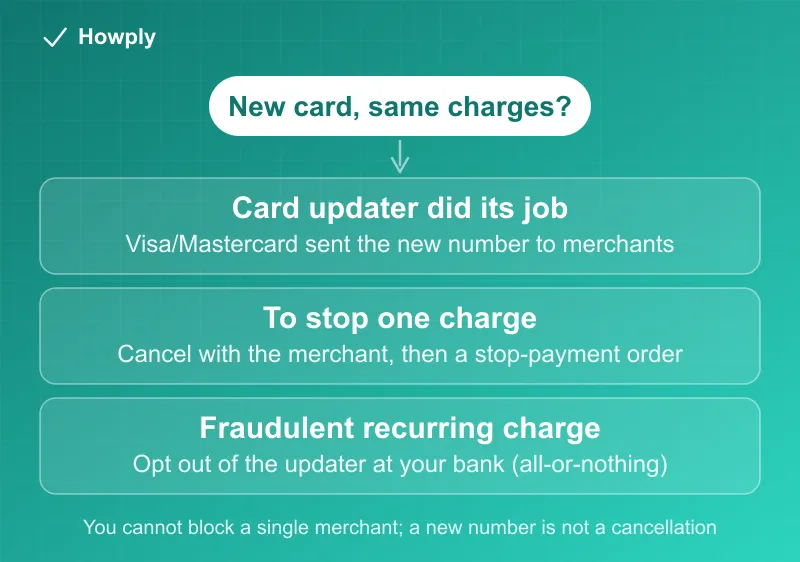
What actually happens when your card is replaced
When your bank reissues a card (expired, lost, stolen, or upgraded), it reports the change to the card network’s updater. Merchants that keep cards on file (subscriptions, ride apps, digital wallets, storefronts with saved cards) can query that service through their payment processors and receive the replacement details. Per Visa’s FAQ, VAU “supports only account number and expiration date changes, and closed account and contact cardholder advices”; Mastercard’s equivalent, described on an issuing bank’s cardholder page, exists “to ensure as little disruption as possible for your card-on-file transactions and recurring payments.”
Two consequences follow. First, a canceled card is not a canceled subscription; the merchant’s next attempt simply uses the new number. Second, this is the design, not a merchant overreach: the bank enrolled the card, and the merchant received an update through the network. Complaining to the merchant about “how they got the number” leads nowhere; the settings that matter live at your bank.
What the updater will not do for you
- It will not let you block one merchant. The bank FAQ answers the question directly: no. If you want the updater to stop feeding a particular company, the only lever is opting out of the service entirely
- It will not reach every merchant. Only participating merchants receive updates, and each decides how often to check. The bank’s warning cuts the other way from this article’s title: for bills you want to keep (insurance, utilities, the gym), a card change can still cause a decline and a late fee, so update those by hand rather than assuming the service caught them
- It will not carry a cancellation. Visa’s service can carry a closed account advice, but a merchant receiving that stops because there is no card, not because your subscription ended; the account with the merchant still exists and can be reactivated the moment a card is added
How to actually stop a recurring charge
- Cancel with the merchant first. Every other step is a backstop; the merchant’s own cancel flow is what ends the obligation. Our cancel guides cover the big ones, and the subscription sweep guide finds the ones you forgot
- If you cannot or the merchant will not: a stop-payment order. The bank FAQ names it as the tool for revoking authorization for a specific recurring payment, at the fee in the bank’s schedule. The CFPB’s guidance on stopping automatic payments describes the same two-step, done by phone and then in writing: tell the company you are revoking its permission, then tell your bank you have revoked it. The CFPB adds the payoff: once both are told, any further payment that company initiates is an error, and you can ask your bank for a refund; a stop-payment order is the bank-side instruction that enforces it, usually for a fee
- Opt out of the updater if the charge is fraudulent or the merchant is one you never want reaching a new card. This is the case the bank itself lists (“What if I had fraudulent recurring payments and I don’t want that merchant to obtain my new card information? You may elect to opt out”). Understand the trade: every legitimate subscription then needs a manual card update at the next reissue
- A charge after a confirmed cancel is a billing error, not a card problem: the canceled but still charged guide has the escalation ladder and the bank dispute guide the formal process and its 60-day clock
Where refunds land after a card change
The updater question has a mirror image: a refund issued to a card you no longer hold. That path is different (the network routes it to the replacement account, or the merchant credits a balance) and is covered in the refund to a closed or expired card guide.
Bottom line
A new card number is not a cancellation, by design: the card networks hand your replacement details to merchants that store your card, you are enrolled automatically, and you cannot exempt a single merchant. Stop a subscription where it lives (the merchant), use a stop-payment order as the backstop, and reserve the full updater opt-out for the fraudulent-charge case, knowing it means updating every legitimate subscription by hand from then on. If you cannot sign in to the account to cancel, our guide to cancelling without a login covers the routes that still work.
Verified against Visa’s official Account Updater FAQ, an issuing bank’s Mastercard Automatic Billing Updater cardholder FAQ, and the CFPB’s automatic-payments guidance, all linked above, as of August 18, 2026. Opt-out mechanics and stop-payment fees are set by your own card issuer; its terms are the source of truth for your card.