Canceled Peacock but Still Charged: Find Who Actually Bills You
Peacock can be billed by Peacock, Xfinity, or an app store, and canceling in the wrong place changes nothing. Read the charge, cancel with that biller, get the money back.
“I canceled Peacock and it charged me again” almost always has the same root cause: Peacock was canceled in one place while a different company was doing the billing. Peacock’s own help page says it plainly: if you do not see the Cancel All Subscriptions option on your Peacock account, a third party bills you. Xfinity’s page says the mirror image: if you signed up through an X1, Xumo, or Flex box, “you’ll be billed by Xfinity,” and if you signed up with Peacock directly, “you’ll need to visit peacocktv.com to manage your subscription.” Neither company can stop the other’s charge. The August 2026 price increase, which hits existing subscribers on their first bill on or after September 17, has sent a wave of people into cancel flows, and a share of them are canceling on the wrong side. Here is how to read the charge, cancel with the right biller, and what refund you can realistically expect.
The quick answer
- The charge tells you the biller. A line on your Xfinity bill means Xfinity bills you. PEACOCK on a card statement means Peacock bills you directly. APPLE.COM/BILL or GOOGLE*Peacock means an app store bills you
- Peacock direct: peacocktv.com > Account > Subscriptions tab > Cancel All Subscriptions. No such button means Peacock is not your biller
- Xfinity TV box (X1, Xumo Stream Box, Flex): Settings > Apps & Subscription > Peacock > Unsubscribe, confirmed on a second screen. Access runs “through the date displayed” and billing stops
- Xfinity online Premium Plus: xfinity.com StreamStore > Peacock tile > Premium Plus > Remove > Update Cart > Submit Order
- Included Peacock Premium from an Xfinity Internet or NOW offer is not a charge; canceling Premium Plus leaves it “Included”
- Refunds: Peacock’s policy is “generally non-refundable.” A charge that lands after a confirmed cancellation is a billing dispute, with a 60-day window on credit cards
Key facts at a glance
| What you see | Who bills you | Where to cancel |
|---|---|---|
| Peacock line on the Xfinity bill | Xfinity | TV box Settings > Apps & Subscription, or xfinity.com StreamStore for online Premium Plus |
| PEACOCK on a card or bank statement | Peacock directly | peacocktv.com > Subscriptions > Cancel All Subscriptions |
| APPLE.COM/BILL | Apple | iPhone Settings > your name > Subscriptions |
| GOOGLE*Peacock | Google Play | Play Store > Payments & subscriptions |
| Roku or Amazon charge | Roku or Amazon | That platform’s subscription settings |
| No Cancel button on peacocktv.com | Someone else | Follow the charge, not the app |
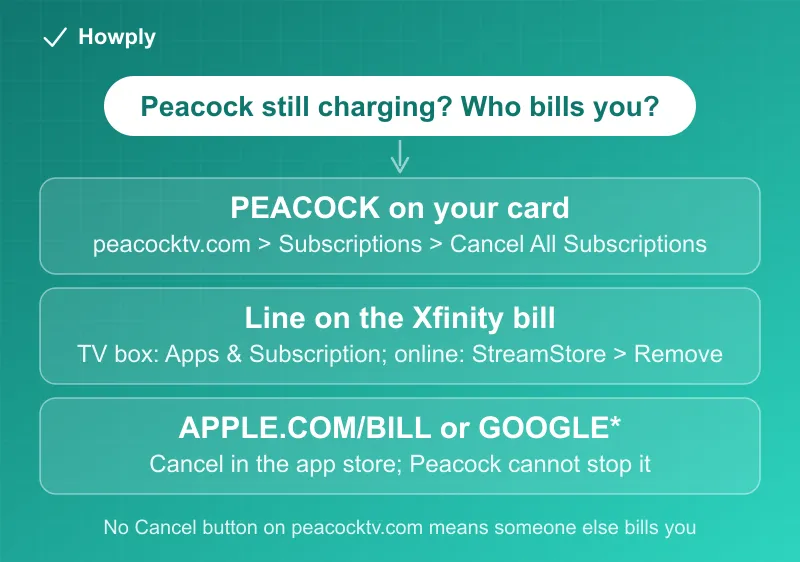
Step 1: read the charge, not the app
The Peacock app looks identical no matter who bills you, which is the whole trap. Your statement does not. Per Xfinity’s page, a Peacock plan started on an Xfinity TV box is billed by Xfinity, so it shows up as a line on your Xfinity bill, not as a separate card charge. A plan started at peacocktv.com is billed by Peacock and appears on your card as PEACOCK. App-store plans carry the store’s name. Find the most recent charge, note who it came from, and cancel with that company. Canceling anywhere else is a no-op.
One more confirmation from Peacock’s side: its cancellation page states that if you do not see Cancel All Subscriptions, a third party bills you. That missing button is a diagnosis, not a bug.
Step 2a: billed by Peacock
Sign in at peacocktv.com, open the Subscriptions tab, and select Cancel All Subscriptions, then click through the retention screens until you see the on-screen confirmation. “All” is literal: it ends the base plan and every add-on. Access continues to the end of the paid cycle, then the account drops to the free tier. The full path, add-on handling, and the cancel-by-chat fallback are in our Peacock cancel guide.
Step 2b: billed by Xfinity, on the TV box
Per Xfinity, on your X1, Xumo Stream Box, or Flex box:
- Go to Settings, then Apps & Subscription (or say “Manage Peacock” into the Voice Remote)
- You will see the recurring price, the renewal date, and manage or cancel options; if you do not, Xfinity is not your biller
- Select Unsubscribe, then Unsubscribe again on the second page
Xfinity states you keep access “through the date displayed” and “you’ll also no longer be charged.” You can resubscribe from the same page before the cycle ends. Two billing details from the same page: upgrades are charged “a prorated amount on your Xfinity account immediately,” and downgrades take effect “on your next billing cycle,” so a plan change made mid-cycle is not a refund event.
Step 2c: billed by Xfinity, online (Premium Plus)
If you upgraded to Premium Plus online, the TV-box steps do not apply. Per Xfinity’s Premium Plus page: sign in at xfinity.com, open the StreamStore page, click the Peacock tile, click the Premium Plus tile, then Remove, Update Cart, approve the terms, and Submit Order. Access continues through the current Peacock bill cycle and the plan stops renewing.
The line that resolves a lot of confusion: if you get Peacock Premium “at no additional cost through an offer from Xfinity” (Gig, NOW TV, StreamSaver, and similar packages), you “continue to have access to Peacock Premium through your qualifying offer after canceling” Premium Plus, and the StreamStore shows it as Included. That included tier is not a charge. If you are trying to remove it to lower your bill, there is nothing to remove; it is part of the package price.
Step 2d: billed by an app store
Apple, Google Play, Roku, and Amazon plans cancel in the store’s own subscription settings, never on peacocktv.com. The exact paths are in the Peacock cancel guide, and the Apple case has its own wrinkle: an APPLE.COM/BILL charge you cannot place is decoded in our Apple bill charge guide.
Step 3: the charge that lands anyway
Once you have canceled with the right biller and a charge still arrives:
- Check for a second subscription. The most common finding is two Peacock plans, one direct and one through a store or Xfinity, often created when someone signed up on a new device. Our subscription sweep guide walks every biller’s list
- Read the “paid plan was canceled” email correctly. Peacock’s help article says it means you “requested to cancel your Premium or Premium Plus plan and you’ve reached the end of your current billing cycle, or we’ve had an issue charging your card.” For Xfinity and Spectrum customers it can also mean you “may have lost eligibility” after a change in your cable or internet package. The page does not say a refund was issued
- Refund expectations. Peacock’s refund policy is two sentences: charges are “generally non-refundable” and refunds are “at its sole discretion.” A charge after a confirmed cancellation date is the strongest case you can bring; keep the confirmation
- Escalate by biller. Xfinity charges are disputed with Xfinity billing; card charges after a confirmed cancellation follow the canceled but still charged playbook, including the 60-day credit card billing-error window from our bank dispute guide
The September 17 detail for existing subscribers
If your reason for canceling is the price increase, note the timing from Peacock’s official notice: new prices took effect August 18, 2026 for new subscribers, and existing subscribers move to the new rate on their first billing date on or after September 17, 2026. A cancellation made before that date, with the right biller, prevents the higher charge; a cancellation made in the wrong place does not. The full price table and who is exempt are in the Peacock cancel guide.
Bottom line
One Peacock login can be billed by three different companies, and only the one that charges you can stop the charge. Read the statement line, cancel with that biller (Peacock’s Subscriptions tab, the Xfinity TV box or StreamStore, or the app store), and keep the confirmation. If a charge still lands, look for a second subscription first, then dispute with the biller, knowing Peacock’s default is no refunds and your credit card’s billing-error window is 60 days. The three Peacock tiers and their annual prices are in our Peacock plan price guide.
Cancellation paths, billing rules, and proration language verified against Peacock’s and Xfinity’s official help pages linked above as of August 27, 2026, and the canceled-plan email wording on September 30, 2026; the September 17 date is from Peacock’s official price-increase notice. If either company changes its process, this guide will be updated with the revision noted.