How to Cancel ChatGPT Plus (and the Refund Rule to Know First)
ChatGPT Plus cancels from Settings > Billing, but cancel 24 hours early or you pay for another month. Fees are non-refundable, with one exception worth knowing.
Canceling ChatGPT Plus takes four clicks on the web, and two details decide whether it costs you anything: the 24-hour rule, and OpenAI’s stance that subscription fees are non-refundable. Here is the exact path for web, iPhone, and Android, plus the one refund exception that actually works.
The quick answer
- On the web: chatgpt.com > profile icon > Settings > Billing > under Cancel plan, select Cancel
- Subscribed in the iOS or Android app? Cancel through Apple or Google, not OpenAI
- Timing: cancel at least 24 hours before your next billing date or you are charged for another period
- When it ends: the day after your next billing date, so you keep access until then
- Refunds: OpenAI states subscription fees are non-refundable, with an exception for accidental charges
Key facts at a glance
| Question | Answer |
|---|---|
| Where to cancel (web) | Profile icon > Settings > Billing > Cancel plan |
| Subscribed via App Store or Play Store | Cancel through Apple or Google’s subscription settings |
| Business plan | Profile icon > Workspace settings > Billing > Manage plan > Cancel subscription |
| Deadline | At least 24 hours before the next billing date |
| When access ends | The day after your next billing date |
| Refunds | Fees are non-refundable; accidental charges may qualify within 14 days |
| Refund processing | 5 to 7 business days once approved |
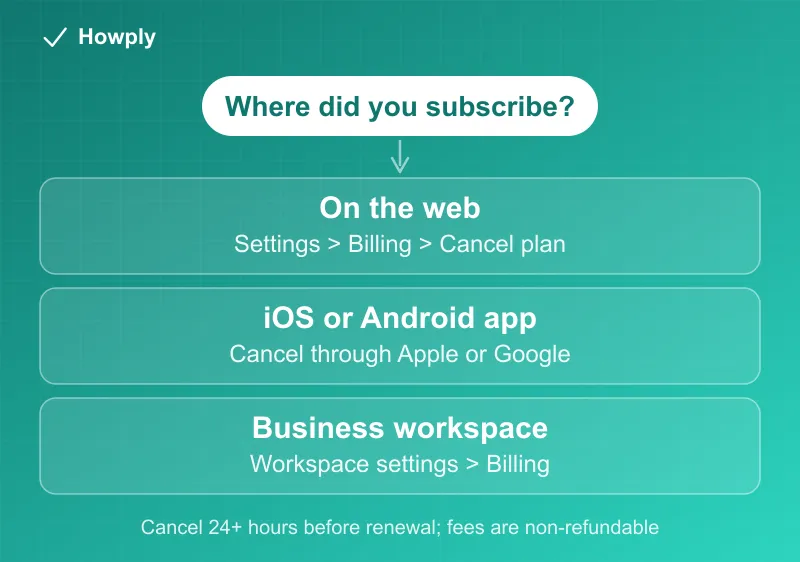
Method 1: Cancel on the web
- Log in to ChatGPT with the account that pays for the subscription
- Select your profile icon, then Settings
- Open Billing
- Under Cancel plan, select Cancel and confirm
Note the wording OpenAI uses: your cancellation becomes effective the day after your next billing date. You are not cut off immediately, and you are not refunded the current period either. You simply stop renewing.
Method 2: Subscribed through an app store
If you signed up inside the ChatGPT app on a phone, Apple or Google holds the billing and OpenAI cannot stop it:
- iOS: Settings > your name > Subscriptions > ChatGPT > Cancel Subscription
- Android: Play Store > profile > Payments & subscriptions > Subscriptions > ChatGPT > Cancel
For Apple subscriptions, refunds also have to be requested from Apple rather than OpenAI.
Method 3: Business subscriptions
Business plans cancel from the workspace rather than a personal account: log in, click your profile icon, select Workspace settings, open the Billing tab, choose Manage plan, then Cancel subscription. (Enterprise and Edu plans are handled separately through OpenAI, not self-service.)
The 24-hour rule is the one that costs money
OpenAI’s help page is explicit: to avoid being charged for the next billing period, cancel at least 24 hours before your next billing date. Cancel with twelve hours to go and the next charge can still land, and since fees are non-refundable, that money is gone. If you are unsure of your renewal date, it is on the same Billing page you cancel from. Check it before you close the tab.
Refunds: the rule and the exception
The default is stated plainly by OpenAI: subscription fees are non-refundable. But there is a real exception and a real process:
- Accidental purchases are generally eligible for a refund if you contact OpenAI within 14 days of the charge
- How to ask: log in to ChatGPT with the charged account, go to the Help Center, and open the chat widget at the bottom-right. The system shows a summary of your eligibility before connecting you to an agent
- Make sure you are logged in at help.openai.com with the same account that was billed. If the widget says login is required or cannot find your subscription, sign in to the correct account and reopen it
- Approved refunds process in 5 to 7 business days, with a receipt sent to your account email
If you subscribed through Apple, skip all of this and request the refund from Apple directly.
After you cancel
Plus features keep working until the period ends, then the account drops to the free tier. Your chat history and account stay intact. One useful footnote from OpenAI’s documentation: deleting your OpenAI account automatically cancels any active subscription, so an account deletion cannot leave a charge running behind you.
Bottom line
Before you cancel, it may help to see what the other plans cost: our comparison of ChatGPT, Claude, and Gemini individual plans lists every tier from the companies’ own pricing pages, and our free Subscription Tracker shows what your AI and streaming plans add up to. If you connected bank accounts through Finances, canceling Plus does not disconnect them; our ChatGPT Finances guide covers the disconnect and deletion steps. What each ChatGPT tier includes before you decide to downgrade instead is in our ChatGPT plans guide. If you are moving to another assistant, plan limits are in our guides to Claude Pro vs Max and Perplexity Pro vs Max.
Cancel at Settings > Billing on the web, or through Apple or Google if that is who bills you. Do it more than 24 hours before your renewal date, because fees are non-refundable once charged. And if a charge really was accidental, the Help Center chat is the documented path to ask, within 14 days.
Steps and refund rules verified against OpenAI’s official Help Center documentation as of July 25, 2026. If the process changes, this guide will be updated with the revision noted. This is general information, not legal advice.