Refund Sent to a Closed or Expired Card? Where the Money Actually Goes
A refund to a dead card is not lost. Amazon and PayPal quietly convert it to balance, while Apple and Google refunds land at your old bank. The map, by platform.
You returned the item or won the refund, and then remembered: the card you paid with is canceled, expired, or the account behind it is closed. The good news is that the money is not lost on any major platform. The catch is that each one handles it completely differently, and two of them quietly move your refund somewhere most people never think to look.
The quick answer
- Amazon: if your original payment method cannot accept the refund, Amazon adds it to your Amazon gift card balance automatically. Check amazon.com/gc/balance before anything else
- PayPal: a refund that cannot reach the original card is added to your PayPal balance instead
- Apple: refunds go back to the original payment method; if that card is dead, the money lands with the card issuer, and past 30 days Apple’s instruction is to contact your financial institution
- Google Play: same pattern; for a refund to a closed or inactive card, Google points you to the bank, which received the funds and runs the recovery
- The general rule: card networks route refunds to the issuing bank even for closed cards. The bank then applies it to your account, or holds it for you to claim
- Nothing arrives as a paper check by default. No major platform mails you the money; it becomes balance or sits at the bank until you act
Key facts at a glance
| Platform | Where the refund ends up | What you do |
|---|---|---|
| Amazon | Gift card balance on your account | Check the balance, spend it |
| PayPal | PayPal balance | Check Activity, then the balance |
| Apple (App Store etc.) | Issuing bank of the dead card | Contact the bank after 30 days |
| Google Play | Issuing bank of the dead card | Contact the bank, not Google |
| Expired (not closed) card | Usually still lands in the account behind it | Check the account statement first |
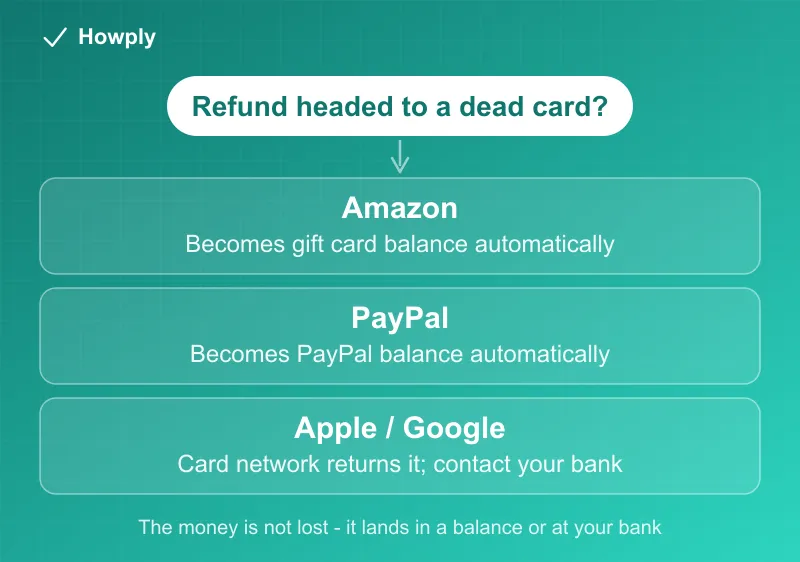
The two platforms that convert it to balance
Amazon documents this directly: when it cannot use your original payment method, for example an expired card, the refund is added to your Amazon gift card balance, per its official refunds page. No email fanfare accompanies this, which is why a “missing” Amazon refund is so often sitting in the gift card balance already.
PayPal behaves the same way: if the refund cannot be applied to the card you paid with, it becomes PayPal balance. Check Activity, filter to Refunds, and then look at your balance. Our PayPal refund guide covers the full status-by-status walkthrough.
The practical upshot for both: the refund already arrived. It is just in a different pocket than the one you were watching.
The two platforms where the bank takes over
Apple sends refunds to the original payment method, full stop. If a card refund has not appeared 30 days after approval, Apple’s documented next step is your financial institution, not Apple, because at that point the money has left Apple’s side. Google Play routes the same situation the same way: for refunds to closed or inactive cards, Google’s guidance is to contact the bank, which received the funds and holds the recovery process.
This is less scary than it sounds. An important mechanic most people do not know: card networks accept refunds to closed and expired card numbers, and route them to the issuing bank. What happens next depends on the bank:
- If the account behind the card still exists (you replaced an expired card, same account), the credit typically posts to it normally
- If the account is fully closed, the bank receives the money and holds it; call them with the refund date and amount, and ask how they return funds received for a closed account
Bring evidence to that call: the refund confirmation email and the transaction date make the trace fast.
Expired is not the same as closed
An expired card is usually the easy case: the card number changed or the plastic aged out, but the underlying account lives on, so refunds tend to post to the account despite the dead card number. A closed account is the case that needs the phone call. Before contacting anyone, check the statement of the account that used to sit behind the card, because there is a good chance the credit is already on it.
If nothing surfaces anywhere
Work the ladder in order: platform balance first (Amazon, PayPal), then the account statement behind the expired card, then the bank for closed accounts. If a platform insists it refunded and the bank insists it never arrived, go back to the platform’s support with the bank’s response and ask for the refund’s reference or trace ID, which lets the bank locate the transfer. And if the refund itself was never issued at all, that is a different problem with its own escalation path, covered in our still-being-charged guide.
Bottom line
A refund to a dead card is a routing problem, not a lost-money problem. Amazon and PayPal solve it for you by converting to balance, so look there first. Apple and Google hand it to your bank, so past their windows the bank is the right call, armed with the date, amount, and reference ID. And an expired card is rarely a problem at all, because the account underneath usually catches the credit anyway.
Platform behaviors verified against Amazon, Apple, Google Play, and PayPal official documentation. If a platform changes its process, this guide will be updated with the revision noted.