How to Cancel Super Duolingo (Your Streak Is Safe)
Super Duolingo cancels wherever you subscribed, and deleting the app does not stop billing. The exact path for each, and what happens to your streak and progress.
The question most people actually have about canceling Super Duolingo is not where the button is. It is whether the streak survives. It does. Duolingo states plainly that your streak and learning progress are unaffected. Here is the exact cancel path for each way you might have subscribed, plus the refund reality.
The quick answer
- Cancel where you subscribed. The path differs for app, phone settings, and web
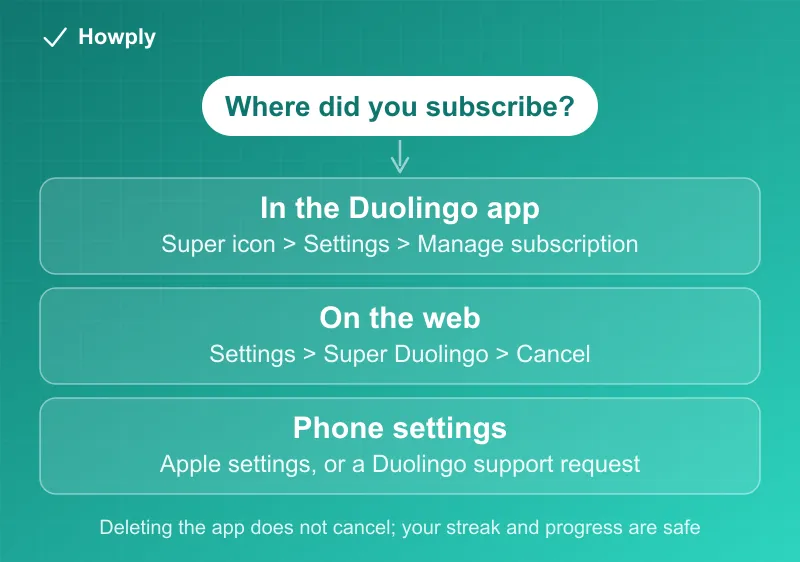
- In the Duolingo app: Super icon > Settings > Manage subscription > Cancel subscription
- On the web: profile picture > Settings > Super Duolingo > Cancel subscription
- Your streak and progress are safe. Canceling does not touch them
- Access: Super features work for the rest of the paid period
- The trap: deleting the app or your account does not cancel the subscription
- Refunds: generally nonrefundable, with no credit for partial periods
Key facts at a glance
| Question | Answer |
|---|---|
| Subscribed in the app (iOS/Android) | Super icon > Settings > Manage subscription > Cancel |
| Subscribed on the web | Profile picture > Settings > Super Duolingo > Cancel |
| Subscribed via phone settings (iOS) | Cancel through Apple’s subscription settings |
| Subscribed via phone settings (Android) | Submit a Duolingo support request |
| Does deleting the app cancel it? | No. Neither does deleting your account |
| Streak and progress | Unaffected |
| Access after canceling | Rest of the subscription period |
| Refunds | Generally nonrefundable; no proration |
Method 1: You subscribed in the Duolingo app
- Open the Duolingo app
- Tap the Super icon at the top of the home screen
- Tap Settings (the gear icon)
- Tap Manage subscription
- Select Cancel subscription and proceed
- Confirm through the App Store, Google Play, or Alipay, depending on how you pay
That final confirmation step is easy to miss. The cancellation is not complete until the store confirms it.
Method 2: You subscribed on the web
- Sign in to your Duolingo account in a browser
- Click your profile picture at the top of the home screen and choose Settings
- Select Super Duolingo
- Select Cancel subscription and confirm
Method 3: You subscribed through your phone’s settings
If the subscription started in your device’s subscription settings rather than inside Duolingo:
- iOS: cancel through Apple’s subscription settings (Settings > your name > Subscriptions)
- Android: Duolingo directs you to submit a support request for this case
The trap: deleting does not cancel
Duolingo says it directly: deleting the app and/or your account does not cancel your subscription. This is the single most expensive misunderstanding with app subscriptions, because the charges keep landing on a card while the app is gone from your phone. Cancel first through the correct path above, confirm it, and only then remove the app if you want.
What happens after you cancel
Straight from Duolingo’s documentation:
- Your streak and learning progress are not affected
- You keep Super features for the remainder of the subscription period
- Automatic billing stops once the cancellation goes through
- You can reactivate anytime, picking up where you left off
So there is no reason to time your cancellation around protecting a streak. The streak lives with your account, not your subscription.
Refunds: generally no
Duolingo’s stated policy is that all charges for in-app purchases are nonrefundable, and there are no refunds or credits for partially used periods. Canceling does not retroactively refund payments, and fees are not prorated by cancellation date.
There are documented request paths, though approval is not guaranteed:
- iOS subscribers: refunds are handled by Apple, not Duolingo, through Apple’s own request process
- Web subscribers: sign in, click the Super icon, scroll to the bottom, and contact Duolingo support with the refund request in your message
- Android subscribers: contact Duolingo support and select Purchase Issue as the topic
Requests made soon after the charge have the best chance. Weeks later, expect a no.
Bottom line
Cancel where you subscribed: in the app under Manage subscription, on the web under Settings > Super Duolingo, or through Apple if your phone bills you. Deleting the app cancels nothing. And the thing people worry about most is the thing that is safe: your streak and progress stay exactly as they are.
Steps, streak behavior, and refund policy verified against Duolingo’s official help center as of July 29, 2026. If the process changes, this guide will be updated with the revision noted.