GOOGLE * on Your Statement: What the Charge Is and How to Find It
GOOGLE * charges name the Google product or app developer. A lookup table, how to match one to your order history, temporary holds, and the 120-day reporting window.
A charge that starts with GOOGLE * is a charge made through Google’s billing, but the part after the star is what tells you what it was for. Google’s help center says “you’ll find a charge on your account that starts with “GOOGLE*” and ends with the Google product or another descriptor.” It could be a Google Play app, a YouTube or Google One subscription, a Google Store order, or a harmless temporary hold. This guide gives Google’s own lookup table, shows how to match a charge to your order history, explains the holds that look like charges, and covers the windows for reporting a charge you do not recognize.
The quick answer
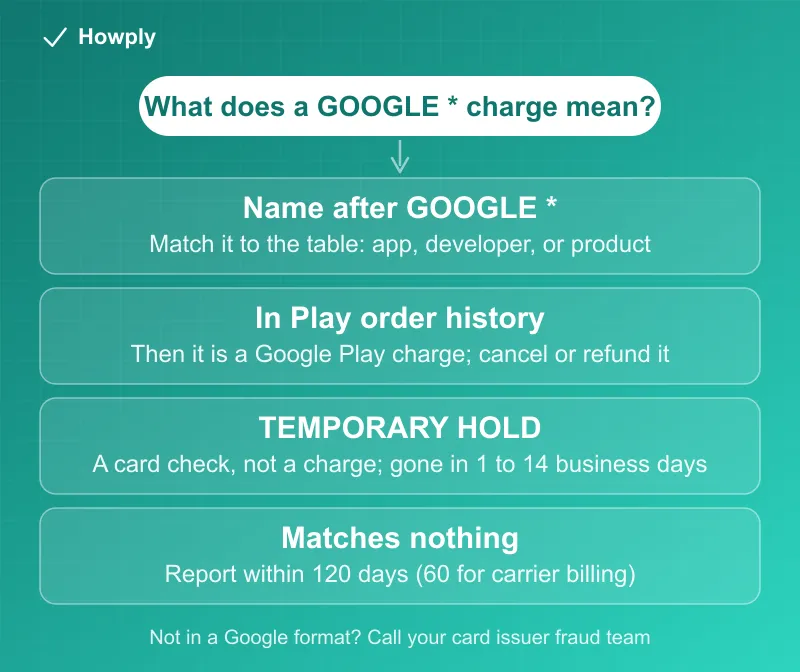
- The format: a Google charge starts with “GOOGLE*” and ends with the product or another descriptor, and “Some of these descriptors may appear shortened”
- Google Play purchases appear as “GOOGLEApp developer name,” “GOOGLEApp name,” or “GOOGLEContent type,” such as “GOOGLEBooks”
- Check your Google Play order history first: if the charge is listed there, “it’s from Google Play”
- A hold is not a charge: “GOOGLE *TEMPORARY HOLD” is “a pending charge performed to verify that your card account is valid,” and it goes away
- Report a card or PayPal charge within 120 days: “Google can only take action on credit, debit, or PayPal transactions within 120 days from the transaction date”
- Other retailers show their own name: “When you buy from a retailer other than Google, the charge will appear with the retailer’s brand”
Key facts at a glance
| Question | Answer |
|---|---|
| What a Google charge looks like | GOOGLE * followed by a product, app, developer, or content type |
| Where to match it | Your Google Play order history, and your Google purchase history |
| Does a hold cost money? | No. Authorizations are not charges |
| How long can a hold stay? | 1 to 14 business days, depending on your bank |
| Report a card or PayPal charge | Within 120 days of the transaction |
| Report a carrier billing charge | Within 60 days, with a correlation ID or request ID from your carrier |
| Google’s reply time | Typically within 7 business days |
| Purchases at non-Google retailers | Appear under the retailer’s brand, not as GOOGLE * |
Google’s lookup table
Google lists how common purchases appear on a bank statement. These are the rows that apply in the United States, copied from the Google Pay Help page; rows for single countries are left out.
| On your statement | What it is |
|---|---|
| GOOGLE *{Company} or GOOGLE *{Developer} | Google Play Store for Apps |
| GOOGLE *Google Play | Google Play Movies & TV |
| GOOGLE *Play Credit | Google Play gift cards and other transfers to a Google Play balance |
| GOOGLE *GOOGLE | YouTube Premium |
| GOOGLE *YouTube Videos | YouTube Movies |
| GOOGLE *SERVICES | Google Fiber or YouTube TV |
| GOOGLE *Google Storage | Google Drive |
| GOOGLE* Google Storage | Google One |
| GOOGLE *Devices, GOOGLE *Google Store, or GOOGLE STORE {store_location} | Google Store |
| GOOGLE WORKSPACE {first_7_letters_of_domain_name} | Google Workspace |
| GOOGLE *Voice | Google Voice |
| GOOGLE *WALLET or GOOGLE *Balance | Google Wallet |
| GOOGLE *GPAY TEMP | GPay (Pay Online with GPay) |
| GOOGLE *CHROME TEMP | Google Chrome (Autofill) |
| GOOGLE *ANDROID TEMP | Android (Autofill) |
| GOOGLE *PAYMENTS TEMP | Google Payments |
| GOOGLE *PROJECT FI | Google Project Fi |
| GOOGLE *CLOUD_{BAID} | Google Cloud |
| GOOGLE *Commerce Ltd, GOOGLE *Google Music, or GOOGLE *Music | Google Play Music (now YouTube Music) |
Two entries differ by one space and mean different things: “GOOGLE Google Storage” is Google Drive, while “GOOGLE Google Storage” with the space before the second word is Google One. The curly-brace parts are placeholders. A separate Google payments page explains that “Company is usually the company that makes the charge through Google, such as the developer of an Android app or the publisher of digital magazine.”
Step 1: match it to your order history
The fastest check is in your account, not on the statement. Google says a charge listed in your Google Play order history is from Google Play. For subscriptions, our guides show where to cancel each one: Google Play subscriptions, Google One, YouTube Premium, and YouTube TV. If someone else uses your card, ask them to check their own Google account too, because a purchase made from another account will not be in yours.
Step 2: is it a hold?
When you use a payment method through a Google service, “during a purchase or with autofill on Chrome, you may find a charge on your account with the descriptor GOOGLE *TEMPORARY HOLD.” Google says this “is a pending charge performed to verify that your card account is valid. When the transaction goes through, the hold will go away.” The Google Play page adds that these “are authorization requests, and not charges. You don’t pay for authorizations,” that they “may stay in your account for 1-14 business days depending on your bank,” and that if one remains “after 14 business days, contact your bank for more information.” The same page notes there are “no fees for making purchases on Google services like Google Play or Google Drive,” only the purchase, taxes, and delivery fees, and that your own bank “might charge fees for international transactions.”
Step 3: report a charge you really do not recognize
If the charge matches a Google format and not your order history, Google Play Help says “you should report it to Google.” The path depends on how you paid:
- Card, debit, or PayPal: “If the transaction occurred within the past 120 days, fill out this form.” Submit a separate claim for each payment method, and “you can expect an email update typically within 7 business days.” After 120 days, “contact the fraud department for your credit or debit card company or PayPal immediately”
- Mobile carrier billing: Google can act only within 60 days and needs a “correlation ID” or “request ID” from your carrier. A correlation ID starts with a lowercase g, while a request ID starts with an uppercase G
- eWallets: “Contact the fraud department of your eWallet company immediately”
- A family member made it: Google says you “may be eligible for a refund,” so start with a refund request, and see our guide if a Google Play refund has not arrived
You can check or cancel a claim later with the email address you used and the Claim ID Google sent you, which helps if you find the charge was yours after all. To prevent repeats, Google suggests you “set up purchase verification for Google Play.”
If it does not start with Google
Google is direct about charges outside its formats: “If the charge in question isn’t in one of the formats above, it didn’t come from Google Play. Contact your payment method’s fraud department immediately.” Our guides to APPLE.COM/BILL charges and Microsoft and Xbox charges cover the other two big stores, and the steps for disputing a charge with your bank apply when a charge cannot be explained. If the same amount appears twice, see double-charged for a subscription.
Quick answers to what people search
What is a GOOGLE * charge on my credit card? A charge made through Google’s billing. The name after the star identifies the product, such as a Google Play app, YouTube Premium, Google One, or the Google Store.
*What is GOOGLE TEMPORARY HOLD? A pending check that Google runs to confirm your card is valid. It is not a charge and it goes away.
Why does my statement say GOOGLE Google Storage? That is Google Drive. With a space, GOOGLE Google Storage is Google One.
How long do I have to report a Google Play charge? 120 days for card, debit, or PayPal charges, and 60 days for mobile carrier billing.
*Does a charge for a non-Google app show as GOOGLE ? Android app purchases through Google Play do, using the developer or app name. A purchase from another retailer shows that retailer’s brand.
Bottom line
Read the name after GOOGLE *, match it against Google’s table and your Google Play order history, and treat GOOGLE *TEMPORARY HOLD as a card check that disappears. If a Google-format charge matches nothing, report it within 120 days for card or PayPal and within 60 days for carrier billing. If the charge is not in a Google format, it did not come from Google Play, and your card issuer’s fraud team is the right call.
Statement formats, hold behavior, and reporting windows quoted from the Google Pay Help, Google Play Help, and Google payments center pages linked above, read on October 1, 2026. Google updates these pages without notice, and the descriptor table can add or retire entries.