Chargeback vs Refund on Steam, Xbox, Apple, and Google Play: What You Risk
A bank chargeback is not a refund with extra steps: Steam restricts the account, Microsoft calls repeated ones fraud, Apple blocks buying. The rules and the safe order.
A chargeback feels like the nuclear option that always works: call the bank, the money comes back, done. On the big digital stores it is also the option with a blast radius. Steam’s own support page says that when a payment is disputed, “any accounts and purchases associated with the chargebacks are restricted.” Microsoft’s page warns that “repeated misuse abuse of chargebacks can be considered fraud.” Apple’s billing pages describe what an unpaid balance does to an account: no new purchases, no free app downloads, no subscriptions. And Google Play has just made developers pay for chargebacks, which gives them a fresh reason to contest yours. Here is what a chargeback does on each platform, when it is still the right tool, and the order of operations that keeps your account intact.
The quick answer
- A chargeback is not a refund. Steam’s definition: a chargeback “is initiated by the bank on their customer’s behalf and is commonly used to return funds in cases of fraud or unauthorized use.” A refund is a request you make to the store, and it leaves your account alone
- Steam restricts the account and the purchases tied to a disputed payment. The restriction lifts automatically only when the dispute is reversed and the funds return to Steam, which “may take up to 60 days”
- Microsoft: use support for refund problems; repeated chargebacks “can be considered fraud”
- Apple: a reversed payment can leave an unpaid balance, and per Apple’s page an unpaid balance can block new purchases, free downloads, and subscriptions until it is paid
- Google Play: report unrecognized charges to Google first; Google “can only take action on credit, debit, or PayPal transactions within 120 days.” Since August 3, 2026, developers bear chargeback costs and have a new tool to contest disputes
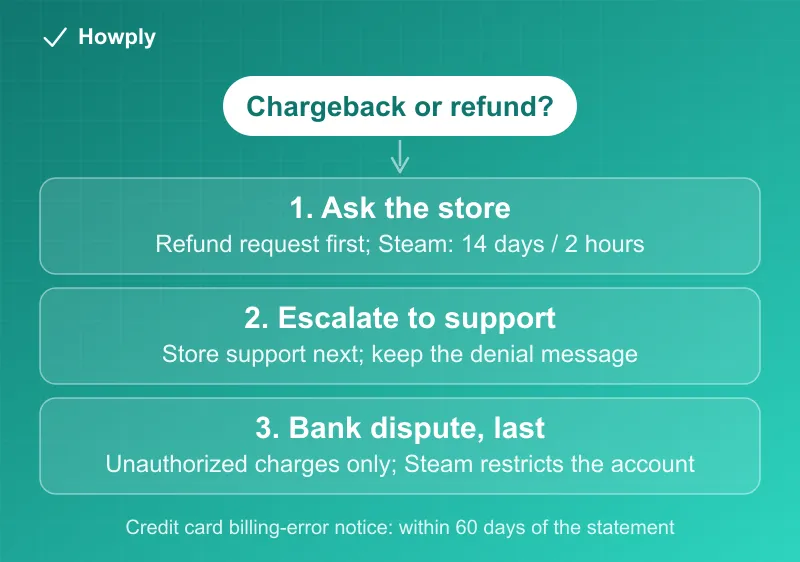
- Right order: store refund request first, store support second, bank dispute last, and only for charges you did not authorize or a store that will not respond
Key facts at a glance
| Platform | What a chargeback does | Official way out |
|---|---|---|
| Steam | Restricts accounts and purchases tied to the dispute | Reverse the dispute with your bank; restriction lifts automatically when funds return (up to 60 days) |
| Microsoft / Xbox | Repeated misuse “can be considered fraud” | Contact Microsoft Support for refund issues instead |
| Apple | An unpaid balance blocks purchases, free downloads, and subscriptions | Pay the balance: retry the card, add a new method, or redeem a gift card |
| Google Play | Google acts on card and PayPal transactions within 120 days; developers now pay chargeback costs | Report the charge to Google first; use the bank as the last step |
| Any credit card | Billing-error rights still apply | Written notice within 60 days of the statement |
Steam: the restriction is automatic, and so is the fix
Steam’s chargeback page is the most explicit of the four. To “protect our users from additional unknown charges,” Steam restricts the accounts and purchases associated with a disputed payment. Two details decide how bad that is:
- The way out is the bank, not Steam. “The quickest way to remove the restriction on your Steam account is for the owner of the payment method to contact their bank and to reverse the dispute.” When the funds return, “the restriction is automatically removed, and the disputed content is restored”
- It is slow. Steam says a reversal “may take up to 60 days.” Past that, you contact Steam Support with an official letter from your bank listing the reversal date, the amounts, and the ARN (acquirer reference number) for the returned funds
And Steam’s own framing of the alternative is the point: you can request a refund “for nearly any purchase on Steam” and “for any reason,” with automatic approval inside 14 days and under 2 hours played. Our Steam refund guide covers that flow, and the denied or missing refund guide covers what to do when it fails. A chargeback skips both and buys you a restriction instead. Hardware purchases are the same: a disputed hardware order restricts the account until the dispute is reversed or the hardware is returned.
Microsoft and Xbox: the warning is short
Microsoft’s chargeback page does not publish a restriction schedule. It says two things. First, if you have an issue with a game or app from the Microsoft Store or a reason to want a refund, “you should contact Microsoft Support.” Second, “repeated misuse abuse of chargebacks can be considered fraud.” Read together: a single dispute over a genuinely unauthorized charge is what chargebacks are for; using them as a refund shortcut is what gets treated as abuse. The store’s own refund rules, including the 14-day and 90-day windows, are in our Xbox refund rules guide.
Apple: the unpaid balance is the mechanism
Apple’s support pages do not describe chargebacks as such. What they describe is the state a reversed payment can leave behind. Per Apple’s billing-problem page, when “Apple couldn’t charge your payment method for a previous purchase,” you have an unpaid balance, and until it is settled you “might be unable to” make new purchases, download free apps, or use subscriptions. The fix is paying it: retry the current payment method, add a new one, or redeem an Apple Gift Card to cover the balance.
The practical consequence: a chargeback on an App Store purchase can freeze every subscription on the account, not just the disputed one. Apple’s actual refund door, reportaproblem.apple.com, answers within 24 to 48 hours; the steps are in our Apple refund guide.
Google Play: 120 days, and a developer with a new incentive
Google Play’s unrecognized-charge page sets the order: if you have access to your Google Account, contact Google support; if you do not, go to your payment method’s fraud department. And it sets the clock: Google “can only take action on credit, debit, or PayPal transactions within 120 days from the transaction date.”
The newer fact is on the developer side. Google’s Play Console policy makes developers responsible, for orders placed after August 3, 2026, for “the purchase price (less Play’s service fee) and the associated chargeback fees from the financial institution.” Alongside it, Google introduced a Review Refund API so developers can share delivery and consumption data that lets Google “better identify and contest illegitimate chargebacks.” Translation for you: a chargeback on a Play purchase now costs the developer real money, and they have a formal channel to fight it with evidence that you used what you bought. Filing one for a purchase you actually consumed is a dispute you are likely to lose. Google’s refund path, and its own timelines, are in our Google Play refund guide.
To confirm that a statement line is a Google charge in the first place, see our GOOGLE * charge guide.
When a chargeback is still the right move
None of this means never. Your card rights exist for a reason, and the CFPB and FTC rules give you 60 days from the statement to file a billing-error notice. The chargeback is the correct tool when:
- The charge is unauthorized: a stolen card, a purchase nobody in your household made. Every platform above explicitly points this case to the bank or its fraud department
- The store has refused or gone silent after you requested a refund through its official channel and escalated to support
- Your 60-day window is about to close and the store still has not acted
In those cases, file it knowing what follows: on Steam, a restriction until the bank reverses or the matter is resolved; on Apple, a possible unpaid balance to clear; on Play, a developer who may contest it. Keep the store’s refund-denial message, because it is your evidence that you tried the right way first.
Bottom line
On the four big stores, the bank is the last door, not the first. Request the refund from the store, escalate to its support, and only then dispute with your bank, reserving that for charges you did not authorize or a store that will not respond. Steam restricts the account until the dispute is reversed, Microsoft treats repeated chargebacks as fraud, Apple can freeze purchases and subscriptions behind an unpaid balance, and Google Play developers now pay for and contest disputes. A refund request costs you a form; a chargeback can cost you the account. Xbox’s own windows, 14 days typical for games and 30 days for subscriptions, are in our Xbox refund rules guide. Nintendo, which treats digital purchases as final, is covered in our Nintendo eShop refund guide.
Platform rules quoted from Steam’s, Microsoft’s, Apple’s, and Google’s official support and policy pages linked above, verified August 26, 2026, with the quotes rechecked against the live pages on September 30, 2026. Card-dispute rights are summarized from the CFPB and FTC guidance linked in our bank dispute guide. Platforms revise these policies; the linked pages are the source of truth for any current case. This is general information, not legal advice.