Refund Not Showing Up? How Long to Wait, by Platform and Payment Method
A refund marked "issued" is not in your account yet. The official posting windows for Amazon, Apple, Google Play, PayPal, and Xbox, and the day to escalate.
“Your refund has been issued” is the moment most people start watching their bank app, and the moment the clock they are watching is the wrong one. Issued means the platform released the money. It then travels back through the payment method you used, and every method has its own published window: a credit card refund from Amazon has an official 3 to 5 business days, a checking-account refund up to 30, an Apple refund up to 30 days on a card statement, a PayPal refund to a debit card up to 5 business days and sometimes 30. This guide puts every official window on one page, explains what the gap is made of, and gives you the day on which waiting stops being the right move.
The quick answer
- “Issued” is the start of the clock, not the end: the platform has released the money; your bank or card network still has to post it
- Credit and debit cards are the slow lane: 3 to 5 business days is the common official figure, but Apple says up to 30 days on a statement, and Amazon allows up to 10 business days for debit
- Balances and wallets are fast: a PayPal balance refund is same-day, and store credit is usually immediate
- Carrier billing is the slowest: Apple allows up to 60 days, Google Play 1 to 30 business days, because a third company sits in the chain
- The escalation order is fixed: the merchant or platform first, then your card issuer. Per the CFPB, a billing-error notice to your credit card company must be sent within 60 days of the statement that shows the charge
Key facts at a glance
| Platform and method | Official window after the refund is issued |
|---|---|
| Amazon, credit card | 3 to 5 business days |
| Amazon, debit card | Up to 10 business days |
| Amazon, checking account, EBT, prepaid | Up to 30 days |
| Apple, card or Apple Pay | Up to 30 days to appear on the statement |
| Apple, carrier billing | Up to 60 days |
| Google Play, card or PayPal | 3 to 5 business days, up to 10 by issuer |
| Google Play, carrier billing or prepaid | 1 to 30 business days |
| PayPal, balance | Same day |
| PayPal, debit card or bank | Up to 5 business days, up to 30 by card company |
| Xbox and Microsoft Store (digital games) | “Several business days or longer”; Microsoft publishes no fixed count |
| Credit card dispute deadline (any purchase) | Written notice within 60 days of the statement with the charge |
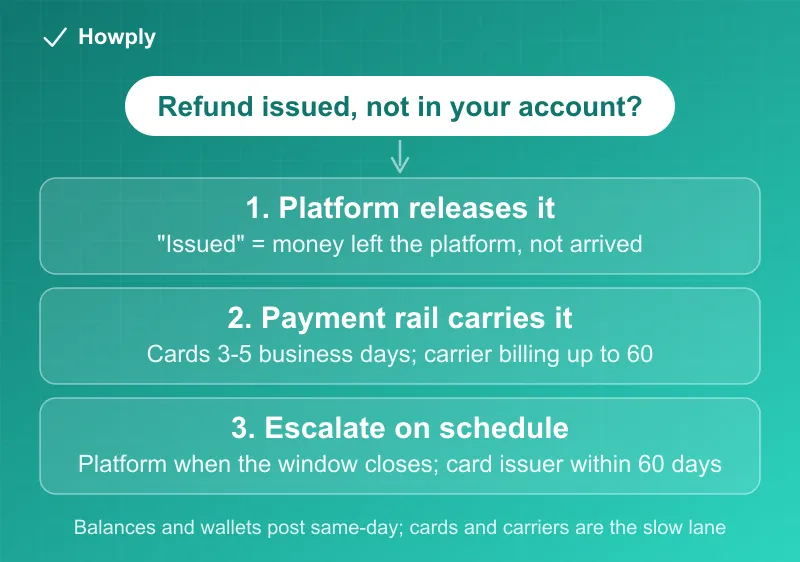
What the delay is actually made of
A refund is not a single transfer. It moves through three hands, and each has its own pace:
- The platform releases it. This is the “issued” or “approved” status. For Xbox, an approved request first shows as being processed on your Microsoft account; for Apple, a request can sit in review before it is approved at all
- The payment rail carries it back. Card refunds ride the card network as a separate transaction from the original charge, which is why they do not simply “undo” the line on your statement. A refund can post days after a purchase in the same amount, and a pending charge that drops off is not a refund, it is an authorization expiring
- Your bank posts it. This is the step platforms cannot see, and it is why the official windows hedge on the card side: Amazon lists pre-paid cards “depending on the issuer of the card,” and PayPal says “depending on your card company, some refunds may take up to 30 days.” Weekends and holidays do not count as business days at any stage
The practical translation: “3 to 5 business days” means a refund issued on a Thursday can legitimately appear the following Thursday.
The escalation day, per platform
Waiting past the official window is where money gets lost, because most disputes have deadlines. Use these:
- Amazon: the status page shows the refund date and method. Past the method’s window, contact Amazon customer service with the order number; the step-by-step is in our Amazon refund guide
- Apple: check status at reportaproblem.apple.com. An approved refund that has not appeared after 30 days on a card is a conversation with your bank first, then Apple; the path is in our Apple refund guide
- Google Play: refund status lives in your order history. Past 10 business days on a card, contact the card issuer; carrier-billed refunds past 30 business days go to the carrier. Details in our Google Play refund guide
- PayPal: a refund still “Pending” after 5 business days means the seller’s side has not cleared it, so the seller is the right call, not PayPal. A “Completed” refund that is missing from your bank is a bank conversation. Our PayPal refund guide has the status decoder
- Xbox and Microsoft Store: Microsoft gives no fixed day count for digital games (“several business days or longer”), so ask your bank when the payment method will be credited, then contact Xbox support with the order number; details are in our Xbox refund rules guide
When the card has changed
Refunds always go back to the original payment method, and a card that was closed or replaced since the purchase does not stop the refund; it reroutes it. Most banks forward a refund from a closed card number to the replacement account or issue it another way, but the timeline resets and you often have to call to find it. That situation has its own playbook in our refund to a closed card guide.
The last resort: a billing error with your card company
If the platform confirms the refund and it never arrives, or the platform refuses a refund you are owed, the CFPB’s guidance is direct: first ask the seller to refund or undo the charge; if that fails, contact your credit card company, which “in some cases” can reverse the charge (a chargeback), or file a billing-error notice. The notice must be sent within 60 days of the charge appearing on your statement, and the CFPB notes that being charged for something you did not receive counts as a billing error. Once filed, the issuer has to acknowledge in writing within 30 days and resolve within 90; the mechanics and the letter itself are in our subscription dispute guide.
That 60-day window is the reason not to wait indefinitely on a slow refund. A refund issued on day 1 that has not arrived by day 30 leaves you a month to file; one you first chase on day 55 leaves you days.
Quick answers to what people search
My refund is not showing up on my card. How long should I wait? Count business days from the date the platform marked it issued, not from the day you asked. The common official figure for cards is 3 to 5 business days, Amazon allows up to 10 for debit cards, and Apple says a card refund “might take up to 30 days for the statement to show the refund.” Only after the platform’s own window has passed is it your bank’s turn to answer.
The refund shows as pending at my bank. When does it clear? A pending refund is your bank’s step, the third of the three hands above, and platforms cannot see or speed it up. Apple’s own advice for a request already filed is that “contacting Apple by phone or chat won’t help speed up your request, or the processing of your funds.” Wait out the window for your payment method, then ask the bank.
How long does an Apple Cash refund take? Apple groups it with cards: for “Credit and debit cards, Apple Pay, Apple Cash, and all other payment methods” a refund from Apple “might take up to 30 days for the statement to show the refund,” and “If you don’t see the refund after 30 days, contact your financial institution.” A wrong pending charge from a store paid with Apple Cash is different: Apple says to “wait 4 business days for it to clear,” because the final amount can differ from the initial hold, as with gas or restaurant tips.
I paid a store with Apple Pay. Where does the refund go? Back to the card behind Apple Pay. Per Apple, “When the merchant processes your refund, it goes back to your payment card automatically, but it might take several days to appear on your card statement.” The merchant may ask for the last four digits of your Apple Pay card number, which differs from the number on the physical card; it is in the Wallet app under the card’s details.
A refund posted after midnight, or on a weekend. Does that change anything? Only the count. Business-day windows skip weekends and holidays, and a refund released late on a Friday starts its clock on Monday. That is why a refund with a 3 to 5 business day window can honestly take a calendar week.
Store credit or a wallet balance is faster, right? Yes. Apple says store credit “might take up to 48 hours to see the refund in your Apple Account balance,” and a PayPal balance refund is same-day. If a platform offers credit instead of a card refund and you will spend the money there anyway, credit is the shortest wait.
Bottom line
Read the refund status as a starting gun. Cards take 3 to 5 business days as the norm and up to 30 on a statement in Apple’s case; balances and wallets are near-instant; carrier billing can take one to two months. Escalate with the platform the day the official window closes, go to your bank when the platform shows “completed” and your account does not, and keep the 60-day credit card dispute deadline in view the whole time, because that is the deadline that actually decides whether a lost refund stays lost. The return deadlines themselves, store by store, are in our return windows comparison. Walmart’s own refund timing table, immediate for cash and up to 7 days for cards, is in our Walmart return policy guide. Amazon’s timeline table, 2 to 3 hours for a gift card balance and up to 30 days for a prepaid card, is in our Amazon return policy guide. Best Buy’s own timing, 7 to 10 business days to process a mail return and checks for large cash payments, is in our Best Buy return policy guide.
Official refund windows verified against the Amazon, Apple, Google Play, PayPal, and Xbox help pages linked in the platform guides above, and the CFPB’s credit card refund guidance, as of August 25, 2026. Platforms change these windows without notice; the linked official pages are the source of truth for any specific case. The Xbox timing was corrected on September 30, 2026 to match Xbox Support’s current wording, and the bank-posting sentence was narrowed the same day to match the Amazon and PayPal pages.
Official sources
- CFPB: How can I get a refund on a product or service I purchased with my credit card?
- Amazon: Refund timelines by payment method
- Google Play Help: Refund timelines
- Apple Support: Check the status of a refund
- Apple Support: If you have an issue with an Apple Cash transaction
- Xbox Support: Request a refund for digital games
- Apple Support: Get a refund for purchases made with credit or debit cards using Apple Pay
- PayPal Help: Where is my refund?