Steam Refund Policy: 14 Days, 2 Hours, and What Happens Past Them
Steam refunds any game within 14 days of purchase and under 2 hours played, paid within a week of approval. Over the limit, bans, gifts, DLC, and the 48-hour rules.
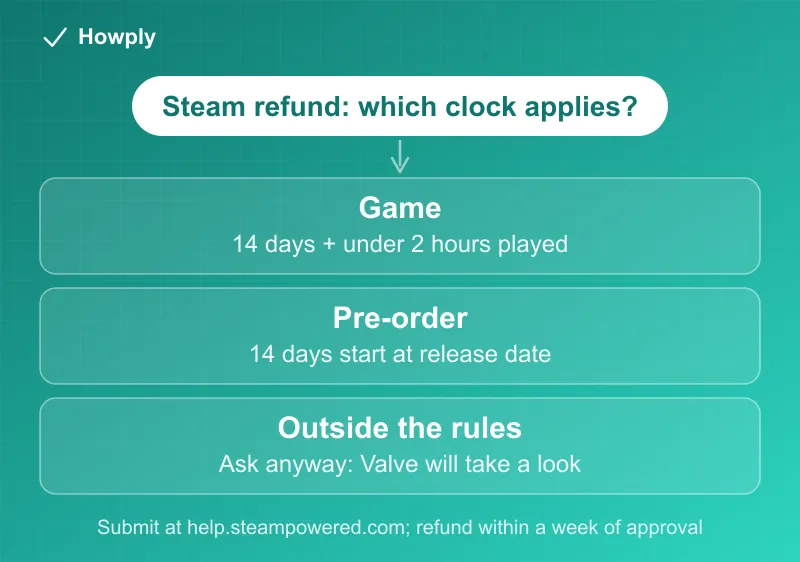
How long do you have to refund a game on Steam? Valve’s refund policy gives you 14 days from purchase and under 2 hours of playtime, for any reason, and pays the money back “within a week of approval.” Past either limit you can still ask, and the policy says Valve will take a look. The details are where people trip: DLC, pre-orders, gifts, and bundles each have their own clock. Here is the whole map, checked against Valve’s official policy page on October 7, 2026.
The quick answer
- The rule: refund for any reason within 14 days of purchase if the game has under 2 hours of playtime
- Where: submit the request at help.steampowered.com
- Money back: full refund within a week of approval, to your Steam Wallet or the original payment method
- Missed the window? Ask anyway. Valve’s own policy says it will take a look at out-of-rule requests
- Abuse note: refund a lot and Valve “may stop offering them to you”
Key facts at a glance
| Purchase type | Refund rule |
|---|---|
| Game or software | 14 days from purchase, under 2 hours played |
| DLC | 14 days, base game under 2 hours played since the DLC purchase, DLC not consumed/modified/transferred |
| In-game purchase (Valve game) | Within 48 hours, item not consumed, modified, or transferred |
| In-game purchase (third-party game) | Only if that developer enabled refunds |
| Pre-order or Early Access | 2-hour rule applies; the 14-day clock starts at the release date |
| Gift, unredeemed | Standard 14-day / 2-hour rule |
| Gift, redeemed | Same rules, but the recipient must initiate the refund |
| Steam Wallet funds | 14 days, only if none of the funds were used |
| Bundle | Nothing transferred, and combined playtime across all items under 2 hours |
| Renewable subscription | Within 48 hours of purchase or of any renewal, if unused that cycle |
| Videos | Not refundable, unless bundled with non-video refundable content |
How to submit the request
- Go to help.steampowered.com and sign in with your Steam account
- Select Purchases, then the game or item you want refunded
- Choose the problem that fits, then the option to request a refund
- Pick where the money should go: Steam Wallet (fastest) or the original payment method, add a note if you want, and submit
Once approved, Valve issues the full refund within a week. That is the policy’s only timing promise; for a card, your bank’s processing adds its own delay. If the original payment method cannot take the refund, “your Steam Wallet will be credited the full amount.”
The two clocks people confuse
The 14 days run from purchase; the 2 hours are total playtime, however long it takes you to reach them. If you are on the fence about a new game, check your playtime on the game’s library page before a session pushes it past two hours.
Pre-orders flip the clock. Buying a game months before release does not burn your window: the 14-day count only starts on the release date. The 2-hour rule still applies from the moment you can play, and for Early Access or Advance Access, the policy says “any playtime will count against the two-hour refund limit.”
Subscriptions run on a 48-hour clock, not 14 days
Steam’s renewable subscriptions (periodic content and service plans) follow their own rule that is easy to miss: a refund is available within 48 hours of the initial purchase, or within 48 hours of any automatic renewal, and only if the subscription is unused during that billing cycle. “Used” is broad by the official definition: playing any game in the subscription, or consuming any benefit or discount it includes, closes the window. Canceling works like everywhere else: turn it off anytime in your account details, keep access until the cycle ends, and no further charges. If a renewal you meant to stop just landed, the 48-hour clock makes this the most time-critical refund on Steam.
Two smaller print items from the same policy page: videos (movies, series, tutorials) are not refundable at all unless bundled with refundable non-video content, and for bundles containing non-refundable items, the checkout screen itself tells you whether the whole bundle can be refunded, which is worth a glance before paying.
Missed the window? Ask anyway
This is the most useful line in the entire policy, quoted directly: “even if you fall outside of the refund rules we’ve described, you can ask for a refund anyway and we’ll take a look.” A game that broke after a patch, a purchase during a family emergency, a title that will not launch on your hardware: submit the request with an honest explanation. Approval is discretionary, but the door is officially open, and consumers in some jurisdictions have additional legal rights when a game is faulty.
The counterweight is the abuse clause: if it looks like you are using refunds to play games for free in two-hour slices, Valve “may stop offering them to you.” Occasional honest refunds are explicitly fine; a pattern is not.
Quick answers to the questions people search
How long do you have to refund a Steam game? 14 days from the purchase date, as long as the game shows under 2 hours of playtime. For a pre-purchase, the 14 days start on the release date, not the day you paid.
How many hours can you play and still refund on Steam? Fewer than 2. The policy counts total playtime on the title, so two separate 70-minute sessions put you past it.
Can I get a refund if I played more than 2 hours, say 7? Not under the standard rule, which requires “less than two hours” of playtime. You can still ask: “even if you fall outside of the refund rules we’ve described, you can ask for a refund anyway and we’ll take a look.” Explain the reason honestly, such as a game that will not run properly on your hardware.
I bought it months ago and never played it. Is it too late? The standard window is 14 days from purchase, so yes under the rule, and the same ask-anyway line applies. The exception is a pre-purchase that was not playable before release: the 14-day, two-hour period starts “on the game’s release date.”
Will I get banned for requesting a refund past 2 hours? The policy mentions no ban for asking. Its penalty is narrower: “If it appears to us that you are abusing refunds, we may stop offering them to you.” It also says “We do not consider it abuse to request a refund on a title that was purchased just before a sale and then immediately rebuying that title for the sale price.” The one ban that matters is different: “If you have been banned by VAC (the Valve Anti-Cheat system) on a game, you lose the right to refund that game.”
How long does the refund take? “You will be issued a full refund of your purchase within a week of approval,” in Steam Wallet funds or to the original payment method.
Can I refund a game I gifted? “Unredeemed gifts may be refunded within the standard 14-day/two-hour refund period. Redeemed gifts may be refunded under the same conditions if the gift recipient initiates the refund. Funds used to purchase the gift will be returned to the original purchaser.”
What about a key or gift card bought elsewhere? “Valve cannot provide refunds for purchases made outside of Steam (for example, CD keys or Steam wallet cards purchased from third parties).”
What refunding does
The game is removed from your library and the full price comes back; the policy promises “a full refund of your purchase.” If you refund a gift you sent, the money returns to you as the purchaser once the rules above are met.
Bottom line
Under 14 days and under 2 hours: request it at help.steampowered.com and the refund is close to automatic. Outside the rules: ask anyway with an honest reason, because the policy explicitly invites it. Just watch the playtime clock before you decide to sleep on it, since the 2 hours keep counting whether you are enjoying the game or not. Xbox’s rules, 14 days typical and never after 90, are compared in our Xbox refund rules guide. Nintendo’s eShop is far stricter; the few exits it allows are in our Nintendo eShop refund guide.
Rules, including the 48-hour subscription window, verified against Valve’s official Steam Refunds policy as of August 11, 2026, and re-checked on September 25 and October 7, 2026 (the policy page shows a last update of April 23, 2024). If Valve changes the policy, this guide will be updated with the revision noted.