How to Cancel Spotify Premium (and Keep Your Playlists)
Spotify Premium can only be canceled from the web account page, not the app. The exact path, what happens to your playlists, and the trial and partner billing rules.
Canceling Spotify Premium is quick once you know the one rule that trips everyone up: you cannot do it inside the mobile app. Cancellation lives on the web account page. Here is the exact path, what happens to your music, and how the rules change for trials, family plans, and partner billing.
The quick answer
- Cancel at: spotify.com/account in a browser, then Manage your plan > Cancel subscription
- Not in the app: the iOS and Android apps have no cancel button for standard Premium
- Access: Premium continues until your next billing date, then the account switches to the free tier
- Your music survives: playlists and saved music carry over to the free account
- Billed through a partner (phone or internet provider, app store): cancel through that partner instead
Key facts at a glance
| Question | Answer |
|---|---|
| Where to cancel | spotify.com/account > Manage your plan > Cancel subscription (web only) |
| In the mobile app? | No; iOS and Android apps have no cancel button for standard Premium |
| When it takes effect | Next billing date, then the account switches to the free tier |
| Refund for the current period | No proration or refund; you keep Premium for the month already paid |
| Playlists and saved music | Kept on the free account |
| Canceling during a free trial | Premium ends immediately, and zero-priced trials cannot be reactivated |
| Billed through a partner | Cancel through the carrier, provider, or app store that bills you |
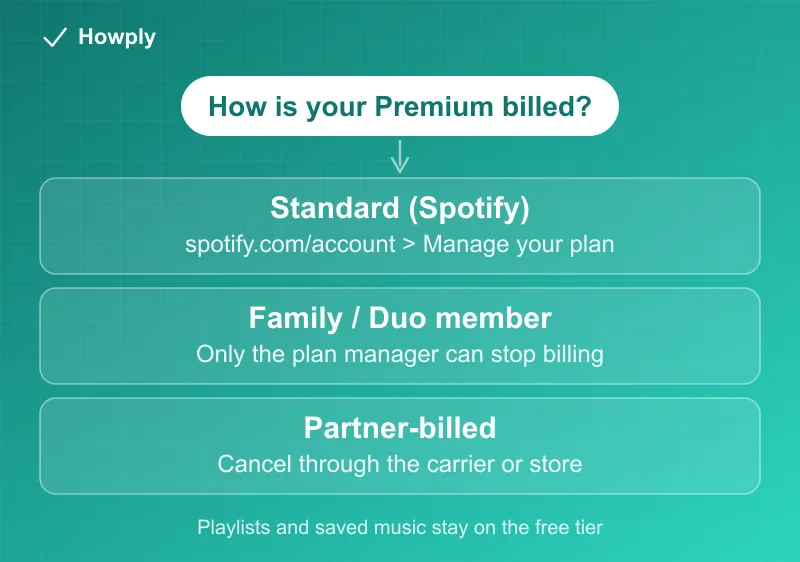
Method 1: Cancel a standard Premium plan
- Sign in at spotify.com/account in any browser (phone browsers work fine)
- Open Manage your plan
- Click Cancel subscription and follow the confirmation steps
- Look for the confirmation email and note your final Premium date
Spotify does not prorate or refund the current period. Cancellation simply takes effect at the next billing date, so canceling right after a renewal costs you nothing extra: you keep Premium for the month you already paid for.
What happens to your library
Nothing is deleted. Your playlists, saved albums, and followed artists all remain on the free account. What you lose is the Premium feature set: ad-free listening, full offline downloads, and unrestricted skips. If you re-subscribe later with the same login, everything is exactly where you left it.
Canceling during a free trial
One important difference: cancel during a zero-priced trial and your account switches to free immediately, not at the end of the trial window. Spotify also notes that zero-priced trials cannot be reactivated, so if you want the full trial period, wait to cancel until shortly before it converts to paid.
Family and Duo plans
- Plan manager: cancels for the whole group using the same web steps above
- Plan member: the account page steps only remove your account from the plan; the plan itself keeps billing the manager. Ask the manager to cancel if the goal is to stop the charge
Billed through a partner?
If Premium arrived bundled with your mobile carrier, internet provider, or was purchased through an app store, Spotify does not control the billing. On your account page under Payment settings you will find a contact link for your billing partner; cancellation happens on their side. Charges on your card statement will name the billing partner, which is the fastest way to tell who to contact.
”My account says free, but I’m still being charged”
This one is common enough that Spotify documents it: if the account you are looking at shows the free plan with no payment info attached, “there’s no Premium plan to cancel” there, and the charge is coming from a different Spotify account. Spotify’s own advice is to log out and back in with other details you might have used: signups via email, phone number, Apple, and Google each create separate accounts, the exact trap covered in our double charge guide. Find the account whose page shows a Premium plan and payment method; that is the one to cancel.
Bottom line
Browser, spotify.com/account, Manage your plan, Cancel subscription. You keep Premium until the paid period ends, your playlists are safe on the free tier, and only partner-billed plans need a different route. If the account looks free but the charges keep coming, you are signed in to the wrong account, not uncancelable. If a cheaper plan would do instead of cancelling, the four Premium plans, the $9.99 Audiobooks Access plan and the audiobook hour rules are in our Spotify plans guide. Switching from Amazon Music? Its cancel steps and pause option are in our Amazon Music cancel guide.
Steps, trial behavior, and the wrong-account diagnostic verified against Spotify’s official support documentation as of August 11, 2026. If the process changes, this guide will be updated with the revision noted.