How to Cancel Planet Fitness Without Going In: Online or by Mail
Planet Fitness lets you cancel online in the member portal or by mail, no visit needed. The current 7-day notice rule for dues and the annual fee, and the $58 buyout.
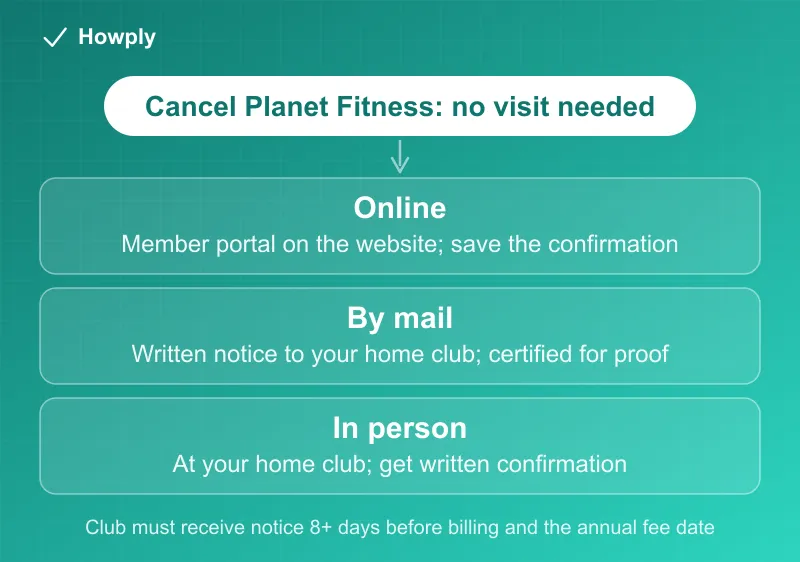
Yes, you can cancel Planet Fitness without going to the gym. Planet Fitness’s own FAQ lists three ways to end a membership, and only one of them involves walking into your home club: “You can send written notification via mail to your home club requesting to end your membership, visit your home club in person, or log into your account online through the member portal on the website.” What decides how much you pay on the way out is not the method but the calendar: you must cancel at least 7 days before your next billing date, and the same 7-day rule applies to the annual fee. Planet Fitness has rewritten that rule three times since July, so older guides, including an earlier version of this one, quote cutoffs that no longer apply. Here is the current wording and how to use it.
The quick answer
- Without going in: yes. Cancel online “through the member portal on the website,” or by “written notification via mail to your home club”
- The caveat: “Some policies and procedures may vary by location based on state and local guidelines.” If the portal shows no cancel option for your account, the mail route is the other no-visit method the FAQ lists
- Monthly dues: 7 days ahead. The FAQ says to “cancel your membership at least 7 days before your next billing date”
- Annual fee: also 7 days ahead. You “must cancel your membership at least 7 days prior to the annual fee date”
- Minimum-term memberships: ending early costs “a $58 buyout fee”
- Your dates: the FAQ says “You can find your billing dates by logging into your member portal at planetfitness.com or on your membership agreement.”
- Keep proof: the portal confirmation, or a certified-mail receipt showing when the club got your letter
Key facts at a glance
| Question | Answer |
|---|---|
| Cancel online? | Yes, through the member portal on the Planet Fitness website |
| Cancel by mail? | Yes, written notification to your home club |
| In person? | Yes, at your home club |
| Phone or email? | Not among the methods the FAQ lists |
| Monthly billing date | Your own date, shown in the member portal or your agreement |
| Notice deadline | Cancel at least 7 days before your next billing date |
| Processing time | Up to 7 days for billing changes to take effect |
| Annual fee deadline | Cancel at least 7 days before the annual fee date |
| Early exit from a minimum term | $58 buyout |
| Where to check your dates | Member portal at planetfitness.com, or your membership agreement |
| Downgrade instead of cancel | In person at the club only |
Method 1: Cancel online in the member portal
The FAQ’s wording is “log into your account online through the member portal on the website.” Sign in at planetfitness.com with the account tied to your membership, open the account menu, and look for the membership options. Planet Fitness does not publish the button names, so do not rely on a screenshot from someone else’s account; what you see can differ by club.
Two things to do once you have submitted it:
- Save the confirmation. Take a screenshot of the final screen and keep any confirmation email. If a charge appears later, that record is what the club and your bank will ask for
- Check the date. Online or not, the 7-day rule below still applies. A request that reaches the club 5 days before your billing date is too late to stop that draft
If the portal offers no way to end your membership, that is the “may vary by location” caveat at work. The FAQ’s other no-visit option is mail.
Method 2: Cancel by mail, without visiting
The FAQ: “You can send written notification via mail to your home club requesting to end your membership.” Your home club is the location where you joined; its address is on that club’s page at planetfitness.com.
A letter that leaves no room for doubt includes:
- Your full name and the address on the account
- Your PF Club Pass or member number, if you have it
- One plain sentence: “I am requesting to end my Planet Fitness membership.”
- The date and your signature
Send it by certified mail with a return receipt. That is our advice, not a Planet Fitness requirement, and the reason is in the rule itself: the FAQ’s earlier wording turned on when the club received your notice, and its current wording, cancel at least 7 days before, still does nothing for a letter that has not arrived. The return receipt is the only proof of that date. Allow for delivery time on top of the 7 days: a letter has to arrive, not just leave, more than 7 days before your billing date.
Method 3: Cancel in person
The FAQ’s third option is to “visit your home club in person.” Ask the front desk for written confirmation of the date your cancellation was recorded, and keep it. This is also the only route for a downgrade: “If you’re looking to downgrade your membership, just stop by your club and a team member can assist you.”
The dates that decide your last charge
Planet Fitness states the rule in one paragraph of its FAQ: “Please note, to stop the billing of your monthly membership on your next billing date, cancel your membership at least 7 days before your next billing date.” The annual fee follows the same clock: “To stop the billing of the annual fee, you must cancel your membership at least 7 days prior to the annual fee date.” And if your membership has a minimum term and you end it early, “a $58 buyout fee is required.”
Applied to real dates (our math, counting back 7 days):
| Your next billing date | Latest day to cancel |
|---|---|
| The 17th | The 10th |
| The 1st of a month after a 31-day month | The 24th of the month before |
| The 1st of a month after a 30-day month | The 23rd of the month before |
| Annual fee on November 15 | November 8 |
The billing and annual fee dates are specific to your membership. The FAQ: “You can find your billing dates by logging into your member portal at planetfitness.com or on your membership agreement.” The online version is in your account billing page.
If you are within a minimum term, the $58 buyout is due when you end early. Check whether your agreement has a minimum term before you pick the date; if the term ends within a month or two, waiting may cost less than the buyout.
Where the documents disagree: the rule changed twice
Planet Fitness’s FAQ has given four different notice rules in under four months, which is why guides around the web disagree:
| When we read the FAQ | Monthly dues | Annual fee |
|---|---|---|
| July 17, 2026 | 7 days before your billing date | Not stated |
| September 23, 2026 | Received by the 10th to stop a draft on the 17th | Received by the 25th of the month before the fee date |
| October 14, 2026 | Received at least 8 days before your next billing date | Received at least 8 days before the fee date |
| October 27, 2026 | Cancel at least 7 days before your next billing date | Cancel at least 7 days before the fee date |
The current version also drops the fixed 17th-of-the-month draft date and points you to your own billing date instead. If your membership agreement states a different deadline, the FAQ’s own caveat applies: “Some policies and procedures may vary by location based on state and local guidelines.” When in doubt, give notice earlier than either rule requires.
Moving away? A transfer may beat cancelling
A lot of people searching for a way to cancel without going in have moved. Planet Fitness lets you move your membership to another club online if all of these are true, per the FAQ:
- You are not a minor
- You have been a member for at least 90 days
- You have not transferred in the past 90 days
- You do not owe dues or fees at your current club, and do not have a financial cosigner or a third-party subsidized membership
- Your membership “is billed monthly, not a Paid in Full membership”
If you are not eligible, the FAQ says to “contact your home club for assistance.” Transfers must stay in the same country, and the transfer policy notes that “a transfer fee may apply.”
If the charges keep coming
- Start with the club. “If your home club is open, your best source of billing or membership information is to contact them directly. If your home club is closed, please contact our member services department.” The FAQ gives member services hours of Monday through Friday, 9 a.m. to 6 p.m. Eastern
- Know how you pay. The FAQ notes that “many Planet Fitness clubs accept payment through checking accounts only” by electronic funds transfer. A disputed charge on a checking account goes through your bank, not a card issuer, and our guide to disputing a subscription charge with your bank covers that route
- Bring the proof. The portal confirmation, the club’s written confirmation, or the certified-mail receipt with the delivery date is what settles it. Our canceled but still being charged guide has the paper trail to keep
For other chains and the general rules, see our guide to canceling any gym membership. LA Fitness counts the postmark on a mailed notice rather than the day it is received, as our LA Fitness guide explains, and our Equinox guide covers its five cancellation channels.
Bottom line
You do not have to go in. Cancel through the member portal on planetfitness.com, or mail a written notice to your home club by certified mail so you can prove when it arrived. Make sure it is done at least 7 days before your next billing date, and at least 7 days before your annual fee date if you want to skip that fee too. If you are still inside a minimum term, the exit costs $58. New York City members also have the city’s click-to-cancel rule behind them since October 1, 2026; our NYC Click-to-Cancel guide explains what it requires and how to complain. This rule change and others like it are tracked in our verified change log.
Verified against the Planet Fitness Customer Service and FAQ page as of October 27, 2026, which carries every quotation above. First published July 17, 2026. The September 23 update replaced a 7-days-before-billing rule with 10th-of-the-month and 25th-of-the-prior-month cutoffs; the October 14 update replaced those with an 8-day rule; the October 27 update follows the FAQ’s current 7-day rule for both monthly dues and the annual fee. Policies can vary by club; the FAQ itself says so.