How to Cancel Adobe Creative Cloud Without the Termination Fee Sting
Adobe charges 50% of your remaining months if you cancel an annual plan after 14 days. Here is how the fee works, who owes nothing, and how to cancel the smart way.
Adobe Creative Cloud is one of the few big subscriptions with a real early termination fee, and it surprises people every day. Whether you owe anything depends entirely on which of Adobe’s three plan types you are on and how long ago you subscribed. Here is the fee math, the exact cancellation steps, and the timing that saves you money.
The quick answer
- Cancel at: account.adobe.com > Plans > Manage plan > Cancel your plan (or via Adobe’s support chat)
- First 14 days: cancel any plan within 14 days of the initial order for a full refund
- Annual plan, paid monthly: after 14 days, canceling costs an early termination fee of 50% of your remaining monthly payments (Adobe’s terms use a different formula for customers in California, below)
- Month-to-month plan: cancel anytime, no fee
- Annual plan, prepaid: no refund after 14 days, but access continues to the end of the paid year
- Before you cancel: download your cloud files. If you are over the free 5GB limit when you cancel, Adobe gives you 30 days to reduce your cloud usage
Which plan are you actually on?
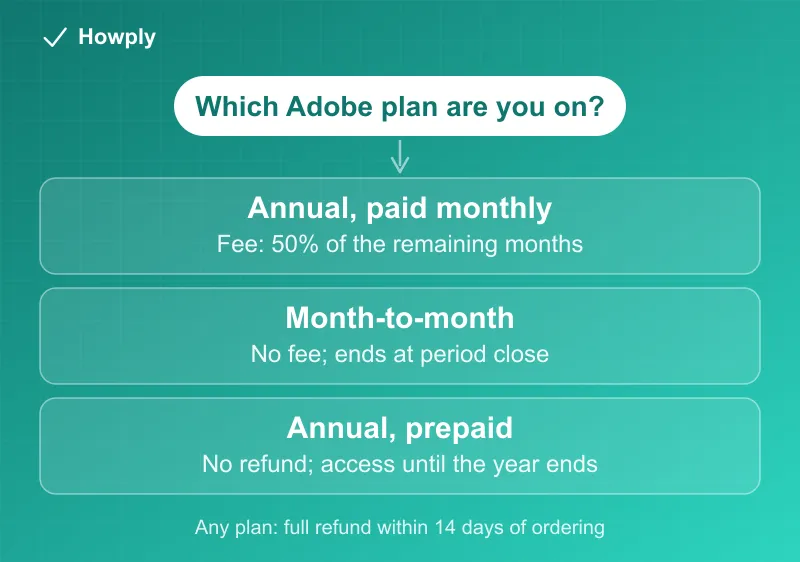
A common choice at signup is “Annual, paid monthly” because it shows the lowest monthly price, which hides that it is a 12-month contract. Check at account.adobe.com under Plans. The three types behave completely differently at cancellation:
| Plan type | Cancel after 14 days |
|---|---|
| Annual, paid monthly | Fee: 50% of the months left on the contract |
| Month-to-month | No fee, ends at period close |
| Annual, prepaid | No refund, access until the year ends |
The fee math with Adobe’s own current North America prices: on the Creative Cloud Pro plan at $69.99/month, canceling with 3 months left (Adobe’s own ninth-month example) costs about $105, half of the $210 remaining. On a single-app plan at $22.99/month, the same timing costs about $34. Adobe states your plan card (upper right at account.adobe.com) shows which plan you actually have, and that these US terms differ for some countries.
California is different. Adobe’s terms say: “For customers in California, should you cancel after 14 days, you’ll be charged a lump sum amount of 30% of your annual commitment and your service will continue until the end of that month’s billing period.” That is based on the annual commitment rather than the months left, so compare it with the exact fee Adobe shows in the cancel flow before you confirm.
How to cancel
- Sign in at account.adobe.com and open Plans
- Select Manage plan, then Cancel your plan
- Adobe shows the exact fee (if any) and retention offers before the final confirmation. Common offers include free months or a discounted rate
- Confirm, then save the confirmation email showing the end date and any fee charged
If the site will not process the cancellation, Adobe’s support chat at helpx.adobe.com can cancel the plan for you; ask for written confirmation.
Ways to avoid or shrink the fee
- Inside 14 days of signup or renewal: cancel now for a full refund, no fee. The 14-day clock also matters right after your plan auto-renews into a new term
- Near the end of your contract year: the fee is half of what remains, so with one or two months left it may cost less to let the plan run out with auto-renew turned off
- Consider the retention offer: if your issue is price, the free months Adobe offers during the cancel flow are real and do not extend your contract
Before you lose access: the 30-day file deadline
This is the sharpest edge in Adobe’s cancellation rules, and it has a real clock. After cancellation your account converts to a Creative Cloud free membership with a 5GB cloud storage limit, and per Adobe’s post-cancellation page, “After cancellation, your allowed cloud storage is reduced to 5 GB. If you are over your storage limit, you have 30 days to reduce your online usage. After 30 days, you could lose access to some or all of your files saved on the Creative Cloud servers.” Anyone with years of Lightroom originals or Creative Cloud libraries is over that limit, so download before you cancel, not after the countdown starts.
What survives on the free membership: sign-in with the same Adobe ID, files on your own drive (always untouched), cloud files within 5GB, and starter versions of some apps. Most Creative Cloud applications stop working when the subscription ends.
Bottom line
Check your plan type first. Month-to-month cancels free, prepaid annual just runs out, and annual-paid-monthly owes half the remaining months unless you are inside the 14-day window. Cancel at account.adobe.com, read the fee screen carefully, and grab your cloud files before you confirm. If you also pay for Canva, our Canva Pro cancel guide covers where that plan cancels and the 3-month pause Canva offers instead.
Fee rules, current plan prices, and the 5GB/30-day file deadline verified against Adobe’s official subscription terms (updated January 2026) and cancellation documentation as of August 11, 2026; the 30-day storage rule and the California fee were rechecked against Adobe’s live pages on September 30, 2026. If the terms change, this guide will be updated with the revision noted.