How to Get a PlayStation Store Refund: The Download Rule Decides
Downloading a game usually kills the refund, PS Plus refunds shrink with use, and the money itself can take 30 to 60 days. The PlayStation rules, decoded.
PlayStation’s refund policy runs on one switch that most people flip without realizing it: the download. Where Steam gives you two hours of actual playtime to decide, PlayStation’s official policy generally ends refund eligibility the moment a game is downloaded or streamed, played or not. Here are the real rules, the faulty-content exception that overrides them, and the one number nobody expects: the money itself can take 30 to 60 days to come back.
The quick answer
- Games and DLC: refundable within 14 days of purchase, but only if the content has not been downloaded or streamed
- The exception that overrides everything: faulty content is refundable regardless of downloads or deadlines
- PS Plus: refundable within 14 days of signing up, and per Sony this covers your first payment, not a recurring fee; if you already used the subscription, “we may reduce your refund based on your use of the subscription”
- Pre-orders: cancelable before release as long as the main content has not been downloaded or preloaded; pre-order bonuses stop working when you cancel
- Where the money goes: back to the original payment method, or credited to your PSN wallet if that is impossible
- How long: PlayStation’s stated window is 30 to 60 days, by far the slowest of the major game stores
Key facts at a glance
| Question | Answer |
|---|---|
| Game / DLC window | 14 days, and never downloaded or streamed |
| Downloaded it already? | Only refundable if the content is faulty |
| In-game purchases | 14 days, bought on PS Store, and the game not launched since the purchase |
| PS Plus | 14 days from signup, first payment only; usage can reduce the amount |
| Renewal charge you forgot? | Recurring fees are not covered by the 14-day refund rule |
| Pre-orders | Cancelable before release if not downloaded or preloaded |
| Refund arrives | 30 to 60 days, to the original method or PSN wallet |
| How to file | Transaction History, select the purchase, Request Refund |
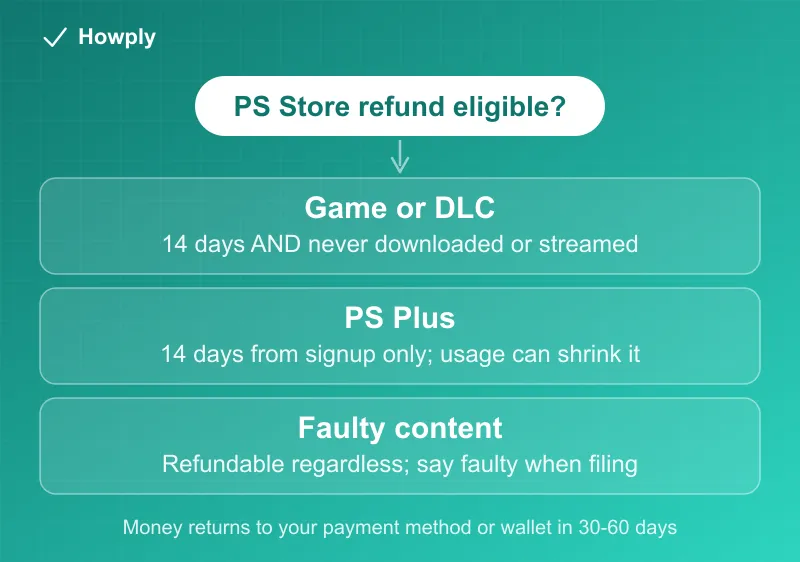
The download rule, and its one override
For games and DLC the two conditions are joined by an AND: within 14 days, and the content has not been downloaded or streamed. A midnight download you never launched still counts as a download. This makes the practical advice simple: if you are not sure about a purchase, do not download it yet, because the undownloaded state is your refund eligibility.
The override is just as absolute in the other direction: faulty content qualifies for a refund regardless of the 14 days or the download. If the game crashes, will not launch, or is materially broken, file on those grounds and say so explicitly; you are in a different rule lane than buyer’s remorse.
PS Plus: the two traps in the fine print
The subscription rule looks generous until you read both clauses. First, the 14 days run from signing up, and they cover the first payment only: the renewal that quietly charged you in month four is, per the policy, not what the refund window is for. Second, even inside the window, Sony may reduce the refund based on your use: stream a few games and the refund shrinks accordingly. If you intend to cancel, the official cancellation flow runs from Account Management or console settings, benefits continue to the end of the paid period, and anything you bought at member discounts stays yours.
For the renewal-charge scenario, the general escalation ladder (refund request, then the card dispute process with its 60-day window) is covered in our still-being-charged guide.
Pre-orders: cancel early, lose the bonus
A pre-order is cancelable up to release, with one condition and one cost. The condition: the main content has not been downloaded or preloaded, so skip the preload if you are wavering. The cost: pre-order bonus content stops working when you cancel, which matters if you already used a bonus that unlocked early.
The 30-to-60-day wait
Approval is not arrival. PlayStation’s stated delivery window for the money is 30 to 60 days, to the payment method you used, or to your PSN wallet when the original method cannot take it. Two practical notes follow: check the wallet before assuming a refund is missing, and do not judge the refund lost until the 60-day mark has actually passed. For contrast, Steam pays approved refunds within a week, so do not calibrate your expectations across stores.
How to actually file
Open your Transaction History (web or console), select the purchase, and choose Request Refund if it is offered, then follow the prompts. If the option does not appear for an eligible purchase, or your case is the faulty-content lane, go through PlayStation Support directly and state the grounds.
Bottom line
Treat the download button as the point of no return for ordinary refunds, keep pre-orders unpreloaded until you are sure, and read PS Plus refunds as a first-payment courtesy rather than an escape hatch from renewals. When a refund is approved, the money is honest but slow: wallet or card, give it up to 60 days before escalating. To stop the subscription itself on the web, PS5, or PS4, see our PlayStation Plus cancel guide.
Rules verified against PlayStation’s official refund and subscription support pages. If Sony changes the policy, this guide will be updated with the revision noted. This is general information, not legal advice.