How AppleCare One Family Works: Price, What It Cancels, and How to Leave
AppleCare One Family is $49.99 a month for up to six people. It auto-cancels existing AppleCare plans with pro-rata refunds, and leaving Family Sharing ends coverage on the spot.
AppleCare One Family went on sale Monday, September 14, as scheduled; by that evening Apple’s page had dropped its launch-date banner and introduces the plan in one line: “A new way to cover all of your family’s eligible devices in one plan.” It costs $49.99 a month for up to six people in a Family Sharing group. What the marketing does not lead with is what happens to the AppleCare plans your family already pays for, which the terms answer plainly: they are canceled and refunded pro rata the moment the devices enroll. The same terms also contain the rules for getting out, for what a family member’s sign-out does to their coverage, and for what a chargeback does to the whole plan. Here is the plan as Apple’s page and its September 9, 2026 terms describe it, read on September 12.
The quick answer
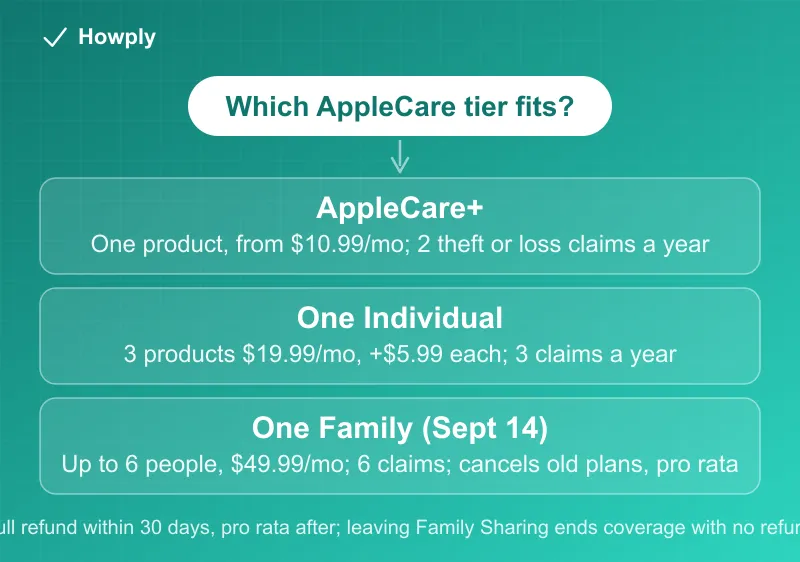
- Three tiers now. AppleCare+ covers “a single product,” from $10.99 a month for an iPhone. AppleCare One Individual covers “up to three products starting at $19.99/mo.” plus “$5.99/mo. each” beyond three. AppleCare One Family covers “all your family’s eligible products for $49.99/mo.” for “up to six people in your Family Sharing group, including yourself”
- Family is on sale as of September 14. Apple’s page carried a 9.14 availability banner until launch day and now lists the plan alongside the others
- Existing plans are canceled, not stacked. When a device joins a Family plan, “that AppleCare plan will be cancelled upon device enrollment” with a pro-rata refund, except plans that are financed or billed by a reseller
- Theft and loss claims scale with the tier: AppleCare+ “up to two claims per year,” One Individual “up to three total claims per year,” One Family “up to six total claims per year”
- Same service fees on every tier: “$29 service fee” for screens and back glass, “$99 service fee” for other accidental damage, and a deductible on theft and loss
- Refund rule: cancel “within thirty (30) days of initial purchase” for “a full refund of the Monthly payment”; after that, “pro rata refund based on the percentage of unexpired time”
- The two Family traps: leaving the Family Sharing group “will be deemed an expression of intent to cancel coverage for your devices,” and if the group is disbanded, members’ devices lose coverage “immediately” and “no refund will be issued”
Key facts at a glance
| Question | What Apple’s page or the terms say |
|---|---|
| Who can cancel a Family plan? | ”Only the AppleCare One Family Plan subscriber may cancel”; the group Organizer only “if they are also the Plan subscriber” |
| Which devices qualify? | Recently purchased or currently on AppleCare+, or owned devices “four years old or newer or any headphones one year old or newer,” in good condition after “a diagnostic check and/or inspection” |
| What happens to my current AppleCare+ when I join? | Canceled on enrollment; monthly and annual plans refunded pro rata to the payment source, fixed-term plans refunded “via an Apple Gift Card” |
| Does it auto-renew? | Yes: “YOUR MONTHLY PLAN WILL AUTOMATICALLY RENEW EVERY MONTH UNLESS AND UNTIL CANCELLED” |
| How do I cancel immediately? | support.apple.com/en-us/118218, “800-APL-CARE (800-275-2273),” email ac_plus_cancellation@apple.com, or written notice to Apple’s Elk Grove address |
| Switching Individual to Family, or back? | Change in Settings; “a pro-rata refund will be issued for the unused portion,” and on a downgrade “devices not selected for enrollment… will lose coverage immediately” |
| A family member signs out of their Apple Account on a covered device? | ”Twenty-four (24) hours to sign back in” or that device loses coverage |
| Missed payment? | ”Sixty (60) days in which to pay all past due amounts or the Plan will be cancelled,” with coverage active during the grace period |
| Chargeback? | ”Deemed an expression of intent to cancel your Plan”; same-period chargebacks get “no refund” |
| Vision Pro? | One per Individual plan, “six (6)… at a time” per Family plan |
What the three tiers cost and cover
Apple’s AppleCare page sets the prices side by side. AppleCare+ for iPhone is “One product from $10.99/mo. or $109.99/yr until cancelled.” and includes “Theft and loss coverage up to twice in 12 months.” AppleCare One Individual is “up to three products starting at $19.99/mo. until cancelled,” where you can “add more products anytime for $5.99/mo. each,” and the products can include “ones you already own.” AppleCare One Family is “all your family’s eligible products for $49.99/mo. until cancelled,” and the page’s two operational promises are that “all current eligible products are automatically covered without extra fees” and “newly purchased products are automatically added.”
The benefits are the same set at every tier: accidental damage repairs at “$29” for a screen or back glass and “$99” for anything else, battery replacement “if the capacity drops below 80 percent,” extended hardware coverage, and theft-and-loss replacement for iPhone, iPad, and Apple Watch. What changes is the claim ceiling, two, three, or six per year, and the per-device math. Three devices on Individual is $19.99; the same three on AppleCare+ could cost $10.99 each for iPhones alone. Six people with two or three devices each on Family is $49.99 regardless of count, which is where the plan is designed to win.
Two eligibility rules limit what covering all of a family’s devices means. The terms require devices to be “less than 4 years old and headphones must be less than 1 year old,” and adding an owned device may require “a diagnostic check and/or inspection.” The support article describes that check: a remote diagnostic, photographs taken with a second iPhone or iPad, or an Apple Store visit, and a device that fails the check “might be eligible for coverage after an Apple-certified repair.”
What Family does to the plans you already have
This is the part to read before Monday. The terms are explicit that enrollment replaces, rather than adds to, existing coverage: a device already covered by an AppleCare plan has that plan cancelled the moment it enrolls in the Family plan, and a refund may follow. The exception in the same sentence is “financed AppleCare plans or plans billed by resellers,” which stay as they are.
The refund mechanics depend on how the old plan was bought. monthly and annual AppleCare plans are refunded pro rata for the unused portion, back to the original payment source. For older fixed-term plans, the refund is “via an Apple Gift Card to the Apple Account signed into the device at the time the AppleCare plan is cancelled.” A family that paid two years up front on a fixed-term AppleCare+ gets the balance back as store credit, not cash.
The FAQ on Apple’s page states the automation bluntly: with the Family plan, every eligible device in the family is added automatically and existing plans are upgraded for you. So the decision to buy the Family plan is also a decision to cancel every eligible AppleCare+ plan in the group. Anyone in the group who would rather keep a separate plan has one option under the terms: leave the Family Sharing group, because members cannot buy a different AppleCare plan while they are in it.
Cancelling, and what you get back
Section 12 of the terms opens with the promise most subscription contracts bury: you can cancel the plan, or any extra device on an Individual plan, at any time and for any reason, and a refund may be due under the schedule that follows.
The refund schedule is the standard Apple one. Cancel a monthly plan within 30 days of first buying it and the monthly payment comes back in full. After thirty days, “you will receive pro rata refund based on the percentage of unexpired time remaining on your Monthly term.” Extra devices on an Individual plan follow the same 30-day rule for their own $5.99 charge.
The four cancellation channels are listed in the terms: the web page at support.apple.com/en-us/118218, the phone line at “800-APL-CARE (800-275-2273),” email to ac_plus_cancellation@apple.com, or written notice to “Agreement Administration, MS: 217-AC, 2511 Laguna Blvd, Elk Grove, CA 95758.” Email and mail requests need the device serial number, Apple Account, plan agreement number, proof of purchase, and contact details.
Returning the new device does not cancel the plan by itself. If you return newly purchased equipment without contacting Apple to cancel right away, the plan may run to the last day of the month your last payment covered before it ends. The plan keeps billing until you act, and a device added in the meantime keeps it alive.
Switching tiers refunds the unused portion. Moving from Individual to Family, or Family to Individual, is done in Settings under General, then AppleCare & Warranty, and “a pro-rata refund will be issued for the unused portion” of the plan you leave. On the way down, though, “devices not selected for enrollment in the AppleCare One Individual Plan will lose coverage immediately.”
Apple’s page adds a practical note about the bill: monthly AppleCare charges appear on the Apple Account payment method, and an unfamiliar recurring Apple line item is a common source of the confusion covered in our unrecognized Apple charge guide.
The Family rules that end coverage without a refund
Three clauses in the Family terms operate automatically, and none of them sends a refund.
Leaving the group. For a member of a Family plan, leaving the Family Sharing group or cancelling the Apple Account counts as an “expression of intent to cancel coverage” for that member’s devices, and coverage ends for them at the moment of leaving or cancelling.
The group disbanding. If the Family Sharing group is dissolved, the subscriber keeps the plan and coverage for their own devices; every other former member’s devices are removed, their coverage ends immediately, and “no refund will be issued.” The subscriber keeps paying $49.99 for their own devices; everyone else is uncovered.
Signing out. If a family member signs out of the plan’s Apple Account on a covered device and signs into an account outside the group, they have 24 hours to sign back in or that device loses coverage. The Individual plan has the same 24-hour rule, shortened to “the end of your billing cycle, whichever occurs first.”
Two more mechanics matter for the person paying. Only the subscriber can cancel, so a parent who is the Family Sharing Organizer but not the plan subscriber cannot end it. And a failed payment does not end coverage immediately: “you have sixty (60) days in which to pay all past due amounts or the Plan will be cancelled,” and “during the Grace Period, the Plan will stay in effect.”
Chargebacks are cancellations
The terms treat a card dispute as a decision, not a query. A chargeback on the current month’s payment is read as an “expression of intent to cancel your Plan”: the plan may be cancelled as of the chargeback date, with no refund. A chargeback on an earlier period also cancels the plan, with a pro-rata refund. Reversing the chargeback does not restore it: “the Plan may still be cancelled as of the date you requested the chargeback.”
For a disputed AppleCare charge, the order of operations therefore matters: cancel through Apple first and take the pro-rata refund, rather than disputing the charge and losing the plan for the whole family. The general difference between the two routes is in our chargeback versus refund guide.
What changed in the October 13, 2026 terms
Apple replaced the terms on October 13, 2026; the legal page now lists the new version for a “Purchase Date on or after October 13, 2026,” and earlier purchases stay on the September 9 terms. We compared the two documents line by line. Three things changed, and the rules above did not:
- Apple HomeView is now a covered device. The iOS device list reads “Beats device, HomePod, Apple HomeView, iPad, and iPhone.” A new exclusion comes with it: Apple will not pay “to repair damage to any mount purchased for use with the Apple HomeView.”
- iPhone service fees are split for folding screens. The old “Screen-Only Damage” row ($29) is now “Outer Display-Only Damage” at $29, and two rows were added: “Cover Layer-Only Accidental Damage” at $19 and “Inner Display Accidental Damage” at $99. Back Glass-Only stays $29 and Other Accidental Damage stays $99, before tax.
- Damage to more than one of those parts now stacks. Where a phone has outer display, back glass, or cover layer damage together, the terms charge each applicable fee, “up to a maximum fee of the applicable iPhone Other Accidental Damage.”
Section 12 (Cancellation), the Family Sharing rules, the refund schedule, and the chargeback clause are word for word the same in both versions, so everything above applies whichever version you are on.
Buying it with a new iPhone
The FAQ sets the window: “For 60 days after a new Apple purchase, you can get a new plan through the Settings app,” and coverage “begins when your device ships or is picked up (or when your first device is added to the AppleCare One plan).” For a pre-ordered iPhone 18 Pro, that means billing starts at shipment, not at delivery. The plan can also be added at checkout on apple.com, where it sits next to the trade-in box; how that trade-in credit actually works, and why the estimate is not the credit, is in our Apple Trade In guide, and the launch timeline is in our sister site’s pre-order guide.
Bottom line
AppleCare One Family is $49.99 a month from September 14 for every eligible device belonging to up to six people, with six theft-and-loss claims a year and the same $29 and $99 service fees as every other AppleCare tier. Buying it cancels the family’s existing AppleCare plans with pro-rata refunds, cash for monthly and annual plans and gift-card credit for fixed-term ones. It can be cancelled at any time, with a full refund inside 30 days and a pro-rata refund after, through four channels the terms list. The clauses to plan around are the ones that end coverage without paying anything back: leaving the Family Sharing group, the group being disbanded, a 24-hour sign-out lapse, and any chargeback. Apple’s phone lease program works differently; it is covered in our Apple Upgrade guide.
Prices and FAQ answers quoted from Apple’s AppleCare page, and contract terms from the AppleCare One Terms and Conditions for purchases on or after September 9, 2026, both read on September 12, 2026, and rechecked as of October 18, 2026 against the terms for purchases on or after October 13, 2026, which changed only the covered device list, the iPhone service fee rows, and a HomeView mount exclusion. Terms vary by state; the version shown for your state at purchase is the one that applies. This is general information, not legal advice.
Official sources
- Apple: AppleCare plans, pricing, and FAQ
- Apple: AppleCare One Terms and Conditions, United States, purchase date on or after October 13, 2026 (PDF)
- Apple: AppleCare One Terms and Conditions, purchase date September 9 to October 12, 2026 (PDF, earlier version)
- Apple Legal: AppleCare One Terms and Conditions (state selector)
- Apple Support: Add or remove a device from your AppleCare One plan
- Apple Newsroom: AirPods 5 release, first mention of AppleCare One Family (September 9, 2026)