How to Cancel Spectrum Internet or TV: Sign In, Return Gear, Final Bill
Spectrum has no public cancel button: you sign in or visit a store, return every box and power supply, then watch for one last statement. Plus what lasts 60 days.
Canceling Spectrum is a three-part job: end the service, return the equipment, and settle the last statement. Spectrum’s support site explains each part, but it spreads the deadlines across three separate articles. This guide puts them in order, with what shuts off the day you disconnect and what you keep for 60 days.
The quick answer
- How to cancel: Spectrum’s change-or-cancel page shows no cancel button to the public. It says “Sign in to view your cancellation options.” A Spectrum Store can also process the disconnect and take your equipment in the same visit.
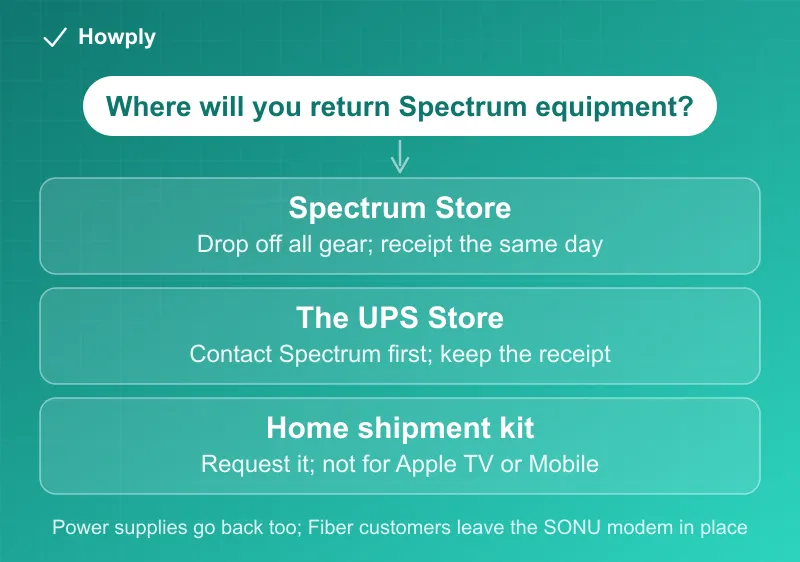
- Return the gear: modems, routers, receivers, and the power supplies that came with them. A Spectrum Store or The UPS Store handles it at no charge, and a home shipment kit exists if neither is nearby.
- Fiber customers: leave the SONU modem plugged in. It stays with the home.
- Final bill: one more statement arrives at the next billing cycle, and another if equipment is still out.
- What you keep: email and account sign-in for 60 days. Voicemail and the Spectrum TV App stop on the disconnect date.
Key facts at a glance
| Question | Answer |
|---|---|
| Cancel online? | Options appear only after you sign in |
| Where to return | Any Spectrum Store, or The UPS Store if no store is near you |
| Home shipment kit | By request; not for Spectrum Apple TV or Spectrum Mobile devices |
| What must go back | Modems, routers, receivers, auxiliary gear, and power supplies |
| Fiber exception | The SONU modem and its power cord stay at the premises |
| Unreturned gear | An unreturned equipment fee is added to your balance |
| Final statement | Next billing cycle; a second one if gear is still unreturned |
| Email access | 60 days from the Internet disconnect date |
| Voicemail and Spectrum TV App | End on the disconnect date |
Step 1: Disconnect the service
Spectrum’s Change or Cancel Your Spectrum Service article covers upgrades, moves, and holds in detail. For ending service it offers one line: “Sign in to view your cancellation options.” The disconnect itself is not completed on the public page; the options load behind your login. Spectrum Stores handle disconnects as well, and the after-disconnect article notes that payments can be made at a store when you drop off equipment.
Two alternatives are worth checking before you cancel:
- Seasonal hold. Spectrum’s Seasonal status puts TV, Internet, or Home Phone on hold for a monthly fee so part-time residents avoid canceling and reinstalling. Spectrum asks you to contact them to confirm eligibility.
- Moving. If Spectrum serves the new address, you can transfer service instead of ending it.
Step 2: Return every piece of equipment
Spectrum’s equipment return article lists three ways to hand gear back:
- Spectrum Store drop-off. Bring everything to any Spectrum Store; you can book an appointment online first. You leave with a receipt listing the equipment returned and the date. Spectrum calls this the way to avoid unreturned equipment charges.
- The UPS Store. If no Spectrum Store is near you, take the equipment to The UPS Store, tell the associate you are returning Spectrum equipment, and they package and ship it. Keep the receipt to track the return. The after-disconnect article adds one condition: “Contact us before returning any equipment through UPS.”
- Home shipment return kit. If you cannot reach either store, contact Spectrum to request a kit with a box, a return label, and bubble wrap. Spectrum Apple TV and Spectrum Mobile devices cannot go back this way, and Multi-AP Spectrum WiFi Extenders need a specialized return kit.
Three details trip people up:
- Power supplies count. Spectrum states that “power supplies that came with your equipment must also be returned.”
- Fiber customers keep the SONU. The Spectrum Optical Network Unit modem and its Universal Power Supply cord are not returned. Of the SONU, Spectrum says: “This device must remain plugged in and operational at the premises.”
- Old or dead equipment still goes back. Spectrum asks you not to discard it; bring it to a Spectrum Store or The UPS Store.
If you returned everything and reminders keep arriving, Spectrum’s article says to contact them.
Step 3: Watch for the final statement
The after-disconnect article explains the billing tail. Once the disconnect request is processed, a final statement arrives at the next billing cycle covering outstanding charges such as International Calling or Pay-Per-View. If equipment is still unreturned, you may receive an additional statement, and Spectrum warns that “an unreturned equipment fee may be charged to your account.” That fee rolls into your total balance. Payments go through Spectrum.net, the My Spectrum App, or a Spectrum Store.
If you keep seeing charges after you believe you have canceled, our guide to a canceled subscription that still bills you covers the paper trail to keep. Leaving DIRECTV instead? Our DIRECTV cancel guide covers its 14-day refund window, the early termination fee and which equipment goes back.
What ends on day one and what lasts 60 days
Spectrum’s own timeline, in order:
- Disconnect date: sign-in to the Spectrum TV App ends, your Spectrum username stops working for TV channel apps, and voicemail access ends. Save or forward voicemail messages before that date.
- 60 days after disconnect: Spectrum email access ends. Back up contacts and messages and remove the account from your phone before then.
- 60 days after disconnect: sign-in to Spectrum.net and the My Spectrum App ends, unless you keep a streaming service billed through Spectrum.
- Streaming add-ons: you can keep them with your Spectrum credentials, but anything that came through an inclusion offer switches to full retail price.
If you also have Spectrum Mobile
Spectrum’s change-or-cancel article spells out three side effects:
- Disconnecting all other Spectrum services ends the bundle discount on Spectrum Mobile.
- Disconnecting a line while keeping the Mobile account leaves that line’s Device Payment Plan on its normal schedule. Closing the Mobile account makes the remaining Device Payment Plan balance due on the next statement.
- Disconnecting your primary line promotes the secondary line to primary within 72 hours, and it takes over the original rate plan.
Hawaii note
Spectrum says customers in Hawaii follow a different equipment return process and links a separate article for it.
Bottom line
Spectrum does not cancel you from a public web page; the options sit behind your sign-in or at a store. The expensive mistake is the equipment: every modem, router, receiver, and power supply has to come back, or a fee lands on the final statement. Fiber customers leave the SONU alone. After that, expect one more bill, 60 days of email and account access, and an immediate end to voicemail and the TV app. Cancelling Starlink too? The Starlink cancellation guide covers its UTC billing cutoff and kit returns. Comparing your next provider? The home internet price comparison lines up the current entry prices.
Steps verified against Spectrum’s official support articles 115216, 115361, and 140331 as of October 28, 2026. If the process changes, this guide will be updated with the revision noted.