How to Cancel Starlink: UTC Billing Cutoff, 30-Day Kit Return, Rental Rule
Starlink cancels from the account page, but only before midnight UTC on your billing day. The 30-day kit return, rental-kit charge, and reactivation rules.
Starlink is one of the few internet providers you can cancel without talking to anyone: three clicks in your account and the plan ends. The catches are in the details Starlink’s help center spreads across several articles. Billing runs on UTC, not your local time. Returning the dish requires canceling first, and only a 30-day window gets your money back. And if your kit was a no-cost rental, keeping it costs the full price. Here is how all of it fits together.
The quick answer
- Where to cancel: log in at starlink.com, open Your Subscription from the Home page, select Manage next to your service plan, then Cancel Service. No call required.
- When it counts: Starlink bills on UTC. A change made after 12:00 AM UTC on your billing day waits for the next billing day. In Pacific time that cutoff is 5 PM the previous afternoon during daylight time, 4 PM in winter.
- What happens to service: it stays active until the date you already paid for, then drops off future bills.
- Getting money back for the kit: only if you cancel within the 30-day return period. Tick the hardware-return box during cancellation, print the emailed label, and ship it. Starlink allows up to two weeks after it receives and inspects the kit to start the hardware refund, then up to 10 to 15 business days for the money to reach your bank.
- Rental kits: a Standard 4 or Standard 4 X kit provided as a no-cost rental must go back in good condition within 30 days of canceling, or you are charged the full kit price.
- Coming back later: reactivation depends on local capacity. Starlink currently reports no sold-out regions in the United States.
Key facts at a glance
| Question | Answer |
|---|---|
| Cancel path | Account Home > Your Subscription > Manage > Cancel Service |
| Billing cutoff | Before 12:00 AM UTC on your billing day, or the change slips a cycle |
| Service after canceling | Runs to the paid-through date, then stops billing |
| Changed your mind | A Resume link appears in the end-date alert until the change takes effect |
| Hardware refund | Full refund if canceled inside the 30-day return period; none after |
| Refund timing | Up to 2 weeks after receipt and inspection to start, then up to 10 to 15 business days to reach your bank |
| Rental kit | Return in good condition within 30 days of canceling or pay the full kit price |
| Return label | Emailed with the subject “Your Starlink Return”; re-download on desktop only |
| 12-month Residential plan | Canceling triggers a Change Fee; plan is discontinued for new activations |
| Reactivation | Capacity-dependent; no sold-out US regions at the time of writing |
Step 1: Cancel from your account
Starlink’s cancel service article recommends the website over the app. Log in, select Your Subscription on the Home page, click Manage next to your service plan, then Cancel Service. The same article describes the effect in one sentence: “Your service will remain active up until the date paid for, and will be removed from future billing cycles.”
If you only wanted to stop a pending plan switch rather than the whole service, that is a different button: Manage, then Change Plan, then Cancel upcoming change.
Starlink also lists a separate Pause Service option in its account help, and the cancel article notes that a canceled or paused plan can be resumed from the alert at the top of the page as long as the change has not taken effect yet.
Step 2: Mind the UTC clock
This is the detail that catches US customers. From the cancel article: “Starlink subscriptions billing is tied to UTC time; changes must be made before 12:00 AM UTC on your billing day. Changes made after midnight will be delayed until the next billing day.”
Midnight UTC is not midnight where you live. On the US West Coast it is 5:00 PM Pacific Daylight Time, or 4:00 PM Pacific Standard Time, on the day before the UTC date changes. On the East Coast it is 8:00 PM or 7:00 PM. If your billing day is the 15th and you cancel at 9 PM Pacific on the 14th, UTC has already rolled into the 15th, and Starlink’s rule says the change waits for the next cycle. Cancel a day early to be safe.
Step 3: Decide what to do with the hardware
The kit return article ties the two actions together: “In order to return your kit you will have to cancel your subscription.” During cancellation, check the box offering to return your hardware. If the box does not appear, Starlink says the kit is not eligible for return.
What you get back depends on timing and on how you got the kit:
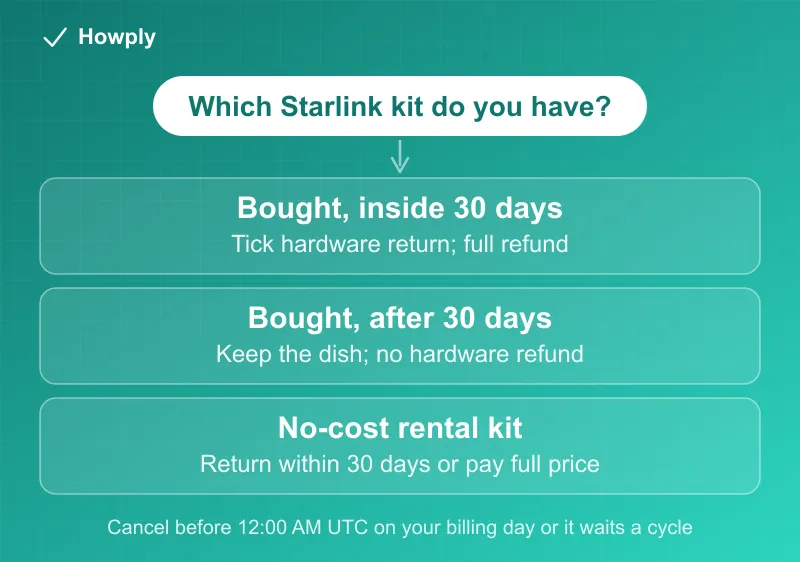
- Bought the kit, canceling inside 30 days: Starlink states that “If you cancelled within the 30-day return period, you will be eligible for a full refund on the hardware.” Starlink’s refunds article says to allow up to two weeks after the kit arrives and is inspected for the refund to start, then up to 10 to 15 business days for it to appear at your bank. The return article we read on October 12, 2026 also promised the first month of service back; the version we read on October 28, 2026 mentions only the hardware.
- Bought the kit, past 30 days: the article is blunt: “Starlink kits returned outside of the 30-day window will result in no refund.” The dish is yours; there is nothing to send back.
- No-cost rental kit: since October 2025, a Standard 4 or Standard 4 X kit supplied as a no-cost rental must be returned in good condition within 30 days of canceling. Starlink’s wording for the alternative: “If you do not return the kit in good condition, you will be charged the full price of the kit.”
- Ticked the return box by mistake: if you own the kit outright, Starlink now says you do not have to send it back, even inside the return window. Ignore the label email; you can reactivate later or transfer the kit.
- Bought from a retailer: return it through that retailer, not Starlink.
The prepaid label arrives by email under the subject “Your Starlink Return”; check spam. It can be downloaded again from the Order Summary page on a desktop browser only, not in the app. Stow the dish, use the original box or any larger box that fits, include nothing but Starlink equipment, and drop it with the carrier on the label.
If you are on the 12-month Residential plan
The 12-month plan article says this option, formerly called the 12-month commitment, is discontinued for new activations. Existing customers are still bound by it: canceling service is on the list of actions that trigger a Change Fee, and so is canceling during the 30-day trial without returning the kit. The fee may be pro-rated or flat depending on the market, and Starlink points you to the confirmation email from your order for the exact amount. Finishing the full 12 months means you own the kit with nothing further to pay. Changes on this plan go through customer support rather than the self-service menu, per Starlink’s plan change article.
Coming back later
Starlink’s reactivation article walks it back in three clicks: Subscriptions, Manage, Activate Plan. You can pick your old plan or a new one, at whatever the price is at that time. The one condition is capacity. Reactivating Residential service after canceling depends on room in your area, though Starlink adds that “there are currently no sold-out regions in the United States, meaning US-based customers can resume Residential service without delay.” If Residential is ever full where you live, Roam or Priority plans are offered instead.
Still waiting on a deposit?
If you never activated and only paid a deposit, the deposit article says to open the Deposits section of the account Home page and click Cancel. The refund is processed immediately and can take up to 10 to 15 business days to appear at your bank. Starlink warns the step cannot be undone and you lose your place in line.
Bottom line
Canceling Starlink is three clicks, but the calendar does the real work. Act before midnight UTC on your billing day, which is late afternoon on the US West Coast, or pay for another cycle. Decide about the dish at the same time: inside 30 days of a purchase you can send it back for a full refund, after 30 days it is yours, and a no-cost rental has to go back within 30 days or you buy it. Twelve-month plan customers face a Change Fee either way. If you later want Starlink again, US capacity is currently open, but the price will be whatever is current then. Weighing the alternatives first? The home internet price comparison puts Starlink next to the wired providers.
Steps verified against Starlink’s official help center articles as of November 17, 2026. Starlink’s terms vary by country; this guide describes the US help center text. Between October 12 and October 28, 2026, Starlink moved refund timing to a separate refunds article, dropped the first-month refund from the kit return article, and lengthened the deposit refund window from 10 days to 10 to 15 business days. If the process changes, this guide will be updated with the revision noted. This is general information, not legal advice.
Official sources
- starlink.com/9d43bef2-36fe-bcd1-9f6a-e0304e
- starlink.com/a522bcf2-1e26-981f-1530-c05052
- starlink.com/b48d1f99-6343-7a14-795a-142a7a
- starlink.com/3a6a481b-f039-c82d-fa60-9a41fc
- starlink.com/903869c7-4eff-bf52-76c8-2af222
- starlink.com/5df6f223-a1ad-ed44-5552-d66c50
- starlink.com/b530b7dd-1222-6c4f-b146-284fd1