How Apple Trade In Credit Works: Revised Values, the 14-Day Clock, Returns
The estimate is not the credit. Apple inspects the phone, can revise the value, charges the difference on installment orders, and cancels the trade-in if you return the new iPhone.
The trade-in box at Apple checkout shows a number, and most buyers treat that number as money already in hand. It is not. Apple’s own FAQ calls it an estimate, and the credit only becomes real “after we receive your trade-in device and confirm that the condition matches what you have described.” Between the estimate and the credit sit an inspection, a possible revised offer, a 14-day return window, and one rule that surprises people every launch cycle: if you return the new iPhone, the trade-in is canceled and you may not get the old one back. With iPhone 18 Pro pre-orders open since this morning and trade-in values running up to $885, here is what Apple’s page actually promises, quoted from it on September 12, 2026.
The quick answer
- The credit is conditional. Apple pays “after we receive your trade-in device and confirm that the condition matches what you have described.” The footnote is blunter: “Actual value awarded is based on receipt of a qualifying device matching the description provided when estimate was made”
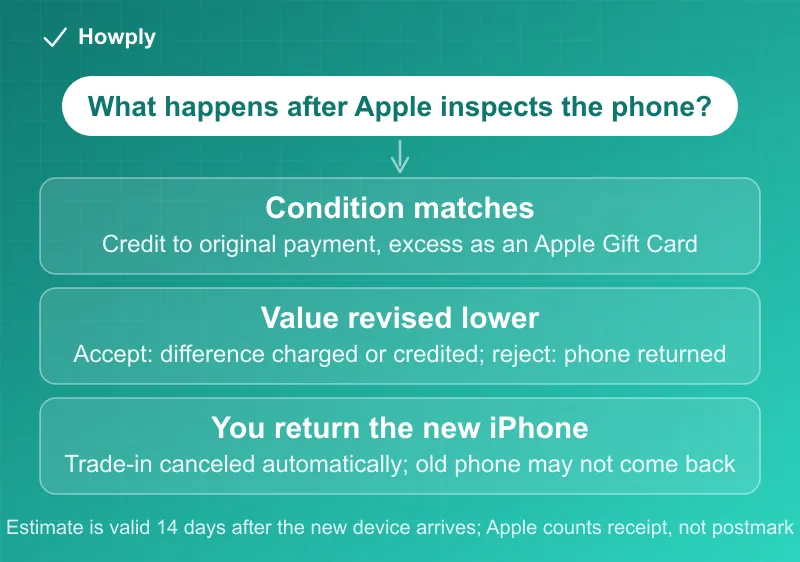
- Condition mismatch triggers a revised offer, not a refusal. “If the revised value is lower than the initial estimate, you can either accept or reject it.” Reject, and Apple will “return your old device, and charge the original trade-in value to your card”
- The clock is 14 days from delivery of the new device, not from ordering: “Your trade-in estimate is valid for 14 days after you receive your new device”
- Installment buyers are charged the gap. On a monthly plan the estimate is deducted up front, and “if it doesn’t match, your original payment method will be charged the difference in value”
- Returning the new device kills the trade-in. “Your trade-in will be cancelled automatically and in some cases it may not be possible to return your device”
- Sales tax is on the full price, not the price after credit: “Sales tax may be assessed on full value of a new device purchase”
- Current iPhone ceilings: iPhone 17 Pro Max “up to $885,” 17 Pro “up to $785,” iPhone Air and iPhone 17 “up to $585,” with the program floor at $35
Key facts at a glance
| Question | What Apple’s page says |
|---|---|
| When is the credit applied on a pay-in-full order? | ”To your original payment method, up to the total purchase price,” after inspection |
| What if the trade-in is worth more than the new device? | ”You’ll receive an Apple Gift Card by email with the remaining amount” |
| Paid with a gift card or Account balance? | Credit goes “to that gift card or balance… before any credit is applied to your credit/debit card” |
| On a monthly plan? | Estimate applied to the price up front; mismatch means “your original payment method will be charged the difference” |
| How long do I have to send it? | 14 days after you receive the new device |
| Can I cancel? | Before shipping, “by simply keeping your device.” After shipping, “the trade-in can’t be cancelled” except by rejecting a lower revised value |
| Revised value higher? | ”We’ll automatically increase your trade-in credit” |
| Do accessories matter? | ”You don’t have to” return them |
| Engraved phone? | Apple engraving “won’t be impacted”; “third-party engraving may affect your device’s value” |
| Too small a balance to finance? | Under $99 net on an iPhone, “you will not be offered the option to pay monthly” |
| Is ID required? | In store, “a valid photo ID” |
| Can Apple refuse? | Yes: Apple and its trade-in partners can refuse, cancel, or limit any trade-in transaction |
Three payment paths, three different credit mechanics
Apple’s FAQ answers “when will the credit be applied” with “It depends on what you buy and how you pay for it,” and the three cases behave differently enough to change which one you should pick.
Pay in full. You pay the full price at checkout. After Apple receives and inspects the old phone, the credit goes back “to your original payment method, up to the total purchase price.” Overshoot, and the excess arrives as “an Apple Gift Card by email.” The order of operations matters if you mixed payment methods: credit is applied first to any gift card or Account balance you used, “before any credit is applied to your credit/debit card.” So a buyer who covered part of the price with a gift card gets that part back as store credit, not cash.
Monthly installments. Here the estimate is deducted from the price before financing starts. That is convenient, and it is also where the risk sits, because Apple has already given you the money. Once Apple receives the old device and confirms it matches your description, nothing more happens; if it does not match, your original payment method is charged the difference in value. Apple adds that it will “work with you to confirm that you still want to move forward,” but the default is a charge, not a conversation. One threshold to know: if the net price after trade-in drops below $99 for an iPhone, the monthly option disappears and you pay in full instead.
Apple Upgrade, the Klarna lease. The trade-in does not reduce the price; it is “applied by Klarna across your payments for the length of your initial lease term.” If the phone “isn’t returned or isn’t in good working condition, your monthly lease payment will be updated by Klarna to reflect the adjusted value.” And it is a one-time benefit: “You cannot trade in a device when you upgrade.” The lease pricing itself, starting at $34.99 a month for the 18 Pro, is in Apple’s launch release and in our sister site’s pre-order guide.
What happens when the inspection disagrees with you
This is the step most people never think about until an email arrives. Apple’s rule: “If the condition of your device is different from what you described, we’ll provide a revised value.” From there you have two moves, and both are spelled out.
Accept, and “we’ll continue with the trade-in and either charge or credit the difference in value to the card you provided.” Reject, and “we’ll cancel the trade-in, return your old device, and charge the original trade-in value to your card.” Read that last clause carefully: rejecting a lower offer on an installment order means the full estimate you were already credited gets charged back, and you get the old phone returned. On a pay-in-full order nothing was credited yet, so rejection simply means no credit and the phone comes home.
The upside case is automatic: “If the revised value increases, we’ll automatically increase your trade-in credit.”
Practical consequence: the description you give at checkout is the contract. Apple’s estimate questions cover screen, body, and function, and an honest answer about a cracked screen produces a lower but stable estimate, while an optimistic answer produces a higher number that the inspection will revise. The revision is not a penalty, but on a financed order it is a surprise charge.
The 14-day clock and the return trap
Two timing rules interact, and the second one is the trap.
The estimate lasts 14 days after delivery. The estimate holds for 14 days after the new device arrives, and Apple has to receive the old one inside that window for the estimated value to stand. Note the verb: Apple must receive it in 14 days, so a prepaid kit dropped at a carrier on day 13 may miss. The kit, or drop-off instructions, comes by email after the new device ships.
Returning the new device cancels the trade-in. Apple’s standard return window and the trade-in window overlap, and the FAQ resolves the overlap against you: return a new device bought online with a trade-in and the trade-in is cancelled automatically, and in some cases the old device cannot be returned to you. That second clause means the old phone may already be in Apple’s processing stream. Anyone unsure about keeping the new model should hold the old phone until the decision is made, which the 14-day window allows.
Before shipping, cancellation is trivial: “you can cancel your trade-in by simply keeping your device.” After shipping, “the trade-in can’t be cancelled,” with the single exception of rejecting a lower revised value.
The smaller rules that cost real money
- Sales tax is charged on the full device price. The footnote: “Sales tax may be assessed on full value of a new device purchase.” In a state with 9 percent sales tax, an $885 credit does not save the $80 of tax on that portion
- Values are ceilings, not quotes. Every figure on the page is “up to,” and the footnote adds that values “vary based on the condition, year, and configuration.” Storage tier and unlocked status move the number
- Android phones need a signed-out account. “Failing to sign out of your Android account will impact the trade in eligibility of your device”
- Find My must be off. The FAQ gives the path: Settings, iCloud, turn off Find My, or do it from iCloud.com if the phone is gone
- In-store trade-ins need photo ID, and “offer may not be available in all stores, and may vary between in-store and online trade-in”
- Carrier deals are a different program. Apple’s launch release describes carrier credits “up to $1,200” for iPhone 14 or later “in any condition,” but those are bill credits over a contract term through the carrier, not Apple Trade In, and their terms live at apple.com/shop/buy-iphone/carrier-offers rather than on the trade-in page
What to do, in order
- Answer the condition questions as the inspector would. A revised offer is the only thing that can change the number after checkout, and honest answers remove it
- Pick the payment path with your risk in mind. Pay in full if you want zero chance of a surprise charge; installments if you want the credit up front and are confident in the description
- Do not ship the old phone until you are keeping the new one. The 14-day window starts at delivery, which leaves time to decide
- Ship early inside the window. Apple counts receipt, not postmark
- Watch for the inspection email. A revised offer has an accept-or-reject decision attached, and the reject path charges the original estimate on financed orders
- If a promised credit or gift card never arrives, Apple’s own answer is to contact a Specialist by chat or “by calling 1-800-MY-APPLE.” Timing for Apple refunds generally is in our Apple refund guide, and the fallback when a merchant credit stalls is in our refund timing guide
Bottom line
Apple Trade In pays what the inspection finds, not what the checkout box said. The estimate holds for 14 days after your new device arrives, a mismatch produces a revised offer you can accept or reject, installment orders get charged the difference, and returning the new phone cancels the whole thing. None of that is hidden; all of it is in Apple’s FAQ. Describe the phone accurately, keep it until you are sure about the new one, and ship it with days to spare. If you are weighing Apple’s lease instead, the costs and early-exit rules are in our Apple Upgrade guide.
All rules quoted from Apple’s Trade In page, its FAQ, and its terms footnote, read on September 12, 2026, with credit ranges from Apple’s September 9 press release, and rechecked as of October 18, 2026, when the ceilings and rules were unchanged. Trade-in values change without notice; the estimate in your own order is the one that applies.