Xbox Refund Rules: 14 Days for Games, 30 Days for Subscriptions, How to Ask
Xbox refunds digital games mostly within 14 days of purchase with little play time, never after 90, and subscriptions within 30 days of a charge, once per product.
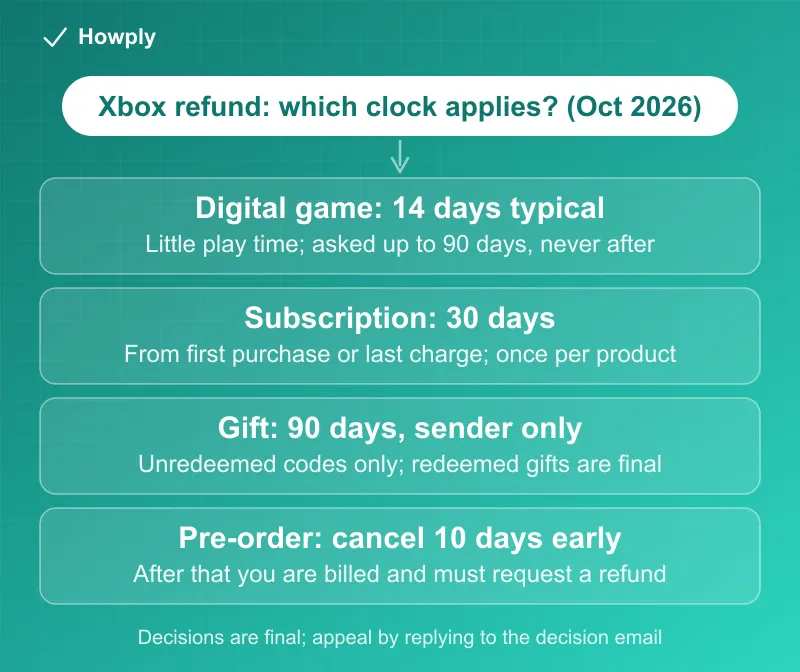
Microsoft sells Xbox refunds as a courtesy, not a right, and its own pages put three different clocks on them. A digital game is “typically” refunded if you ask “within 14 days of the game’s purchase date” and have not played it much; requests are accepted up to 90 days and never after; and a subscription such as Game Pass can be refunded “within 30 days” of the first purchase or of the most recent charge, “one time per Microsoft account, per XBOX subscription product.” This guide sets out every rule on Microsoft’s refund pages as read on October 8, 2026, the exact request steps, and what happens after a denial. If the refund was promised and the money has not arrived, our Microsoft and Xbox charge guide covers the Investigate tool, and the chargeback versus refund guide covers the bank route.
The quick answer
- Games: refunds are “typically” issued for requests made within 14 days of purchase when play time is not significant; requests can be filed for up to 90 days, but not all are accepted
- Hard stop: “Purchases aren’t eligible for a refund after 90 days.”
- Subscriptions: a refund within 30 days of the first purchase or before the first renewal, whichever comes first, plus a refund of the latest renewal charge if you cancel within 30 days of it, once per account per subscription product
- Consumables and currency: most are not refundable once bought or used
- Gifts: the sender, not the recipient, can request a refund, and only for an unredeemed gift within 90 days
- Decisions: “All refund request decisions are final,” with an appeal by replying to the decision email; a denied request cannot be resubmitted
Key facts at a glance
| Purchase | Window | Condition | Where it is written |
|---|---|---|---|
| Digital game or app | Typically 14 days; requests accepted up to 90 days | Little play time; limits per purchaser per year | Request a refund page |
| Any game purchase | Never after 90 days | Not listed on the refund page after that | I can’t find a purchase page |
| License agreement or warranty complaint | 30 days | ”only if you do not make or retain any copies” | Refund Terms |
| In-game consumables, virtual currency | Only if unused | ”wasn’t modified or used” | Refund Terms |
| Subscription (first purchase) | 30 days from purchase or before the first renewal, whichever is sooner | Cancel through the cancellation flow | Subscription page |
| Subscription (renewal charge) | 30 days after payment | Once per account per subscription product | Subscription page |
| Pre-order | Cancel up to 10 days before launch | After that, you are billed and must request a refund | Request a refund page |
| Gift | 90 days, unredeemed only | Sender requests; recipient cannot | I can’t find a purchase page |
| Gamertag change | None | ”We do not offer refunds for gamertag changes.” | I can’t find a purchase page |
| Prepaid retail codes | Not covered | Retailer’s return policy applies | Subscription page |
All windows and conditions quoted from Xbox Support and Microsoft Support pages, US versions, read October 8, 2026.
The default rule: sales are final
Microsoft’s Digital Game Purchase Refund Terms start from the opposite of a return window: “All sales of Digital Game Products are considered final, but we understand there may be extenuating circumstances.” When you ask, Microsoft says it weighs “a variety of factors like time since date of purchase, time since release, and use of the product.” The Microsoft Support page for store refunds says the same thing more bluntly: “Digital goods like apps, games, add-on content, subscriptions, movies, TV shows, and books aren’t refundable unless the offer or applicable law states that you’re eligible for a refund.”
Two exceptions are written into the terms. The first is a license objection: “Digital Game Products may be eligible for a refund within 30 days if you’re unsatisfied with the license agreement or warranty, but only if you do not make or retain any copies.” The second is narrow: “For single-use items (like consumables or in-game currency), your request may be eligible only if the item wasn’t modified or used.”
Games: 14 days in practice, 90 days on paper
The request page is where the working numbers live. “Refunds for digital games are typically issued for requests made within 14 days of the game’s purchase date, if you haven’t accumulated a significant amount of play time. You can make refund requests for game purchases within a 90-day period, however not all requests will be accepted.” Microsoft does not define “significant”; it is the one variable you cannot look up.
The companion page on missing purchases sets the outer edge: “Submitting a refund request doesn’t guarantee a refund if the request was made more than 14 days from the original date of purchase. Purchases aren’t eligible for a refund after 90 days.” It also explains why a recent purchase may not be listed yet: new purchases can take a few hours to show up.
There are caps as well: Microsoft says it often limits the number and type of game refunds, and the money refunded, per purchaser per year, and that it reserves the right to stop offering refunds to anyone it believes is abusing them, except where the law requires.
What is and is not covered
Covered: digital game offers from the Microsoft Store, Xbox apps other than movie and TV apps, digital game bundles, durable game content and some consumable content, on console, PC or mobile. Not covered or rarely covered: most in-game consumables and virtual currency once bought or used, gamertag changes (“We do not offer refunds for gamertag changes.”), and single items from inside a bundle.
Pre-orders have their own path. “If you pre-ordered a game and want to cancel, you can do so up to 10 days before the game launches” from Order history. After that point, Microsoft says, you may be billed and will need to request a refund instead.
Gifts flip the usual direction: the sender can request the refund and “The recipient can’t return or exchange the gift code.” The clock is 90 days from purchase and the code must be unredeemed; once a gift has been redeemed, Microsoft says it cannot refund it even inside the 90 days.
Subscriptions: 30 days, once per product
Game Pass and other Xbox subscriptions run on a separate page, XBOX subscription cancellations and refunds. The baseline is a cancellation that ends future charges: turning off recurring billing stops the next charge and leaves the benefits in place until the paid period ends.
The refund rules come in two sentences. “You can receive a refund within 30 days of your initial purchase or before your first recurring billing date (whichever is sooner) by canceling your subscription” through the cancellation steps. And: “you’re entitled to a refund of your most recent recurring billing charge if you cancel your subscription within 30 days after payment. This refund right is limited to one time per Microsoft account, per XBOX subscription product.” Requests made outside those cancellation paths are not eligible, and prepaid retail subscription codes are excluded altogether; those follow the retailer’s return rules.
One line matters for US readers. The page lists countries where a prorated refund on immediate cancellation is a legal right, Finland, Germany, the Netherlands, Poland, Portugal, Canada, Denmark, France, Israel, Korea and Türkiye. The United States is not on the list, so in the US the 30-day rules above are the whole policy.
How to request a game refund
From the Microsoft Support page, the steps are:
- Open the Xbox support page for digital game refunds and sign in, using the Microsoft account that made the purchase; another account will not see the order
- Select the item and choose Request a refund
- Give the reason for the request and select Next
- Review and select Submit
Then the timing: “When you request a refund, it may take 72 hours to process the request.” If approved, access to the game ends while the refund is processing, and Microsoft says refunds “are generally processed within 3–5 business days” to the original payment option; the Xbox page adds that the money can take several business days or longer to appear. If the card you paid with has since been closed or expired, see our guide to refunds to a closed or expired card.
For a subscription, cancel on the console under Profile & system, then Settings, Account and Subscriptions, choose the subscription, select Cancel subscription, and, per the page, “If eligible, you may be prompted to initiate a refund for your subscription.” The same flow exists on the web under your Microsoft account’s Subscriptions page. If a third party bills you, “contact them for info about cancellations and refunds.”
After a denial
“All refund request decisions are final. If the refund request is denied, you can appeal the decision by replying to the email message that you receive about the decision. You cannot resubmit the same refund request on this page.” So the appeal lives in your inbox, not on the site. For an unrecognized purchase by someone else, Microsoft says it can sometimes refund unapproved purchases but cannot guarantee it, and its Investigate tool only covers Microsoft Store charges from the last 60 days. If you cannot access the account that bought the item at all, both Xbox pages send you to your bank.
Where the documents disagree or leave gaps
Three numbers for one purchase. The refund page says 14 days “typically,” the missing-purchase page says 90 days is the end, and the Refund Terms say sales are final with a 30-day exception for license objections. All three are current Microsoft pages.
“Significant” play time has no definition. The condition that decides most game refunds is not quantified anywhere on the pages.
Subscriptions have a real right; games do not. The 30-day subscription refund is written as an entitlement, “you’re entitled to,” while game refunds are “typically issued.” Plan the paperwork accordingly: cancel a subscription inside 30 days, and for a game ask early and once.
Gift refunds depend on the recipient’s behavior. The sender can only be refunded while the code is unredeemed; nothing on the pages gives the recipient any option.
US buyers get no prorated refund. The prorated-refund list is limited to the named countries.
Before you request
This is a sequence of checks, not a recommendation:
- Count the days from purchase, not from download. 14 days is the working window, 90 days is the wall
- Check the play time before you ask. Microsoft weighs “use of the product,” and a heavily played game is unlikely to be refunded
- Sign in with the account that paid. Purchases on another account in the family group will not appear in your list
- For a subscription, cancel through the flow, not by letter. The 30-day refund only exists inside the cancellation process, and only once per product
- For a pre-order, cancel 10 days before launch. After that it becomes a refund request
- Keep the decision email. It is the only place an appeal can be filed
Quick answers to what people search
How long do you have to refund an Xbox game? “typically” 14 days from purchase with little play time; requests are possible up to 90 days, and nothing is eligible after 90 days.
Can you get a refund on Xbox after playing? Only if the play time is not “significant,” a term Microsoft does not define. Consumables and currency are not refundable once used.
How do I request an Xbox refund? Sign in on the Xbox support refund page, select the item, choose Request a refund, give a reason, select Next, then Submit. Processing “may take 72 hours.”
Can I get a Game Pass refund? Within 30 days of the first purchase or before the first renewal, whichever is sooner, and once per product within 30 days of a renewal charge, by canceling through the subscription flow.
How long does an Xbox refund take? Up to 72 hours to process the request, then “3–5 business days” to the original payment method.
Can I refund a gifted Xbox game? The sender can, within 90 days, if the gift is unredeemed; the recipient cannot return or exchange the code.
What if my Xbox refund is denied? “All refund request decisions are final.” Reply to the decision email to appeal; the same request cannot be resubmitted.
Bottom line
As of October 8, 2026, an Xbox game refund is a request Microsoft “typically” grants inside 14 days when the game is barely played, never grants after 90 days, and decides once; an Xbox subscription refund is a right inside 30 days of a charge, one time per product, through the cancellation flow. Ask early, from the account that paid, and keep the email, because the appeal happens there.
Windows, conditions and quotations from the Xbox Support and Microsoft Support pages linked above, US versions, read on October 8, 2026. Microsoft says refund decisions depend on factors it weighs case by case, and local law may add rights outside the US. This is general information, not legal advice.
Official sources
- Xbox Support: Request a refund for digital games (14-day and 90-day rules, consumables, decisions final, pre-orders), read October 8, 2026
- Xbox Support: I can’t find a purchase in the refund request list (90-day cutoff, wrong account, gifts, gamertags), read October 8, 2026
- Xbox Support: Digital Game Purchase Refund Terms (sales final, factors considered, 30-day license exception), read October 8, 2026
- Xbox Support: XBOX subscription cancellations and refunds (30-day subscription refund, once per product, prorated-refund countries), read October 8, 2026
- Microsoft Support: Get a refund for apps and games purchased from Microsoft Store (request steps, 72 hours, 3 to 5 business days), read October 8, 2026