How to Cancel TIDAL (and What the August 2026 Price Increase Changes)
TIDAL raised prices on billing dates from August 3, 2026. How to cancel on the web, Android, Apple, or Google Play, what you keep, and the 25% Cash App route TIDAL names.
TIDAL’s higher prices land on each subscriber’s first billing date on or after August 3, 2026, which means the surprise arrives on a different day for everyone through the month. If yours just hit, here is exactly how to cancel on each billing path, what TIDAL says you keep after canceling, the one discount TIDAL itself points to, and the wrong-account trap that makes people think the cancel button is missing.
The quick answer
- Web: sign in at account.tidal.com > Subscription > Cancel Subscription > confirm
- Android app: heart icon > gear icon (top right) > Edit > Manage Subscription > Subscription > Cancel Subscription
- Billed through Apple or Google Play: TIDAL cannot cancel it; cancel in Apple’s Subscriptions screen or Google Play’s Subscriptions page, same as any app-store subscription
- What you keep: per TIDAL, canceling before the next billing date stops future charges and you keep access through the end of the current billing period
- The price change: applied on your first billing date on or after August 3, 2026; if you have not been billed since, it applies on the next one. Current prices are on tidal.com/pricing
- A discount TIDAL names: eligible US customers on the Individual or DJ Individual plan get 25% off the updated monthly price for 12 months through a Cash App offer (new customers on that route get no free trial)
Key facts at a glance
| Question | Answer |
|---|---|
| Cancel on the web | account.tidal.com > Subscription > Cancel Subscription |
| Cancel on Android | Heart > gear > Edit > Manage Subscription > Cancel |
| Billed by Apple or Google | Cancel there; TIDAL’s own cancel button will not exist |
| Access after canceling | Through the end of the paid billing period |
| Price increase effective | First billing date on or after August 3, 2026 |
| Apple/Google subscribers and the increase | Handled by that platform, with its own notice |
| Discount TIDAL cites | 25% off for 12 months via Cash App (US, Individual/DJ Individual) |
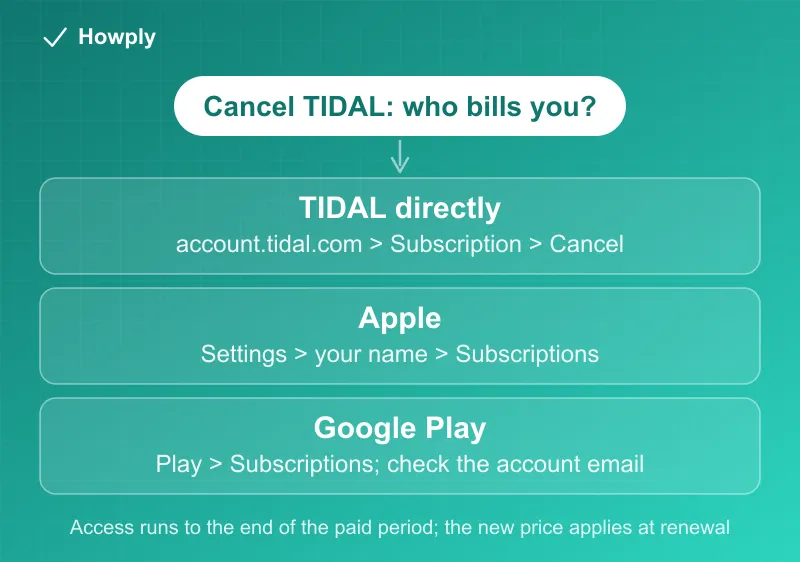
Step 1: figure out who bills you
TIDAL’s cancellation page is blunt about the split: if you pay through a third party such as Apple or Google Play, you cancel through them, not through TIDAL. It also gives the tell for a wrong-account situation: if Apple’s subscription list shows no active TIDAL subscription, you are billed some other way; if Google Play shows none, the subscription was registered under a different email. The general version of that diagnostic is in our subscription sweep guide, and it is the first thing to settle, because the cancel button you are looking for only exists on the platform that actually bills you.
Method 1: cancel directly (web or Android)
- Go to account.tidal.com and sign in with your login name and password
- Open Subscription
- Click Cancel Subscription and confirm
On Android, TIDAL’s in-app path is: heart icon > gear icon (top right) > Edit > Manage Subscription, then scroll to Subscription > Cancel Subscription. Either way, TIDAL states you keep access through the end of the current billing period, so there is no reason to wait until the last day.
Method 2: cancel through Apple
If TIDAL bills through your Apple Account, cancel it in Apple’s shared Subscriptions screen (Settings > your name > Subscriptions), the same screen every Apple-billed subscription uses; the Apple TV cancellation guide walks through it. Two Apple-specific notes from TIDAL’s page: the price change itself is managed by Apple and you would have received Apple’s notice about it, and if you signed up on an Apple device you also have the option to delete your account inside the TIDAL app.
Method 3: cancel through Google Play
On your Android device, open Google Play > Subscriptions, select TIDAL, tap Cancel subscription, and follow the prompts. If Play shows no active subscription, TIDAL says the account was registered with a different email, and TIDAL cannot see Play billing details, so the fix is signing into the right Google account, not contacting TIDAL.
About the price increase
TIDAL’s official notice makes three practical points:
- Timing: the new price took effect on your first billing date on or after August 3, 2026. If you have not been billed since then, it applies on your next billing date, which is why the “surprise” is spread across all of August
- No mid-cycle change and no forced consent screen: this is a direct-biller-style increase (email notice, then it applies), the pattern explained in our price increase guide. Apple and Google subscribers are handled by those platforms’ own rules instead
- The discount TIDAL itself points to: eligible US customers on the Individual or DJ Individual plan can get 25% off the updated monthly price for 12 months by signing up through a Cash App offer. New customers who take it get no free trial and are charged immediately, and the discount cannot be combined with a trial
Exact current prices are on tidal.com/pricing; TIDAL’s notice does not list them and neither does this guide, so check the page rather than a screenshot from before August 3.
After you cancel
- Access runs to the end of the paid period; nothing changes the day you cancel
- If a charge lands after your confirmed end date, the canceled but still charged guide has the escalation ladder
- Deleting your TIDAL account is a separate step from canceling; TIDAL links it from the same help page if you want the account gone too
Bottom line
Find who bills you first, because that decides which cancel button exists. Direct subscribers cancel at account.tidal.com in three clicks and keep the rest of the period; Apple and Google subscribers cancel on those platforms. The August 2026 increase applies at your next billing date, not mid-cycle, and if the new price is the only problem, TIDAL’s own Cash App route takes 25% off for a year.
Verified against TIDAL’s official cancellation and price-update pages linked above as of August 16, 2026. TIDAL directs readers to tidal.com/pricing for current prices, which this guide does not restate.