How AXS Tickets Work: Mobile ID Entry, Transfers, Resale, and Refunds
AXS tickets live in the app with a QR code that changes every few seconds. What that means at the gate, how transfers and resale payouts work, and when a refund exists.
If your ticket habits were formed on Ticketmaster, AXS will surprise you at three moments: at the gate, where a screenshot will not scan; after a transfer, which cannot be pulled back once the friend has it; and after a resale, when the money sits in your account until the show is over. AXS ticketed events run on the AXS app and its own rulebook, and this guide walks through that rulebook in AXS’s own words: how Mobile ID entry works, how to send a ticket to someone, how selling and getting paid work, and the narrow cases where a refund exists.
The quick answer
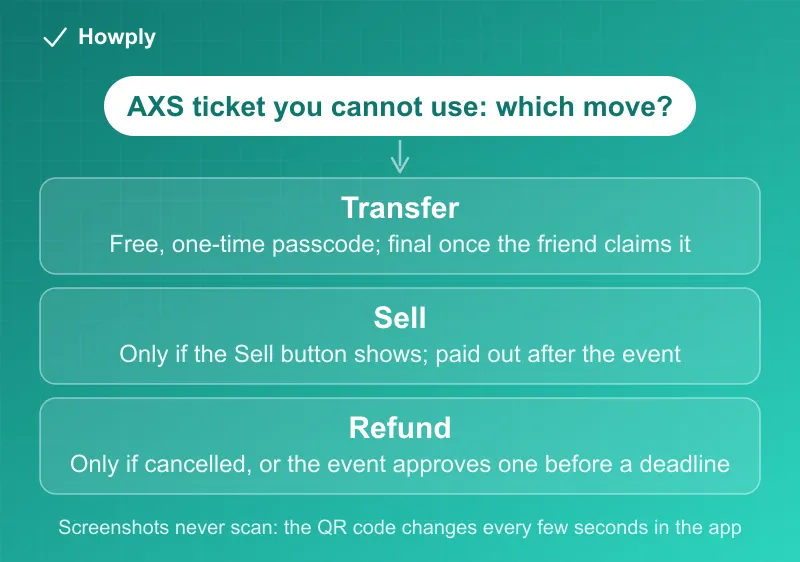
- Your ticket is the app. AXS Mobile ID tickets show “as a digital QR code that refreshes after a certain time-frame,” and “screenshots and printing mobile tickets are not available and tickets can only be accessed through the AXS App”
- Group going in? “Make sure everyone enters together, or transfer tickets to friends before the event”
- Transfers are free and unlimited, with one lock. “There is no limit on how many times a ticket can be transferred,” but once a transfer is complete, “the original ticket is no longer valid”
- Resale exists only where the Sell button shows. Listing is free; a resale fee comes off the sale, and “after the event takes place, you’ll be eligible to receive your payout”
- Sales are final by default. AXS says “all sales are final” and “refunds are only allowed in limited circumstances.” A cancelled, unrescheduled event is refunded automatically; otherwise a refund needs the event or venue to approve it, usually with a deadline
- Rescheduled means your ticket still works. “Your tickets will still be good for the new date,” and you can sell, transfer, or request a refund if the order qualifies
Key facts at a glance
| Question | AXS’s answer |
|---|---|
| Can I use a screenshot or printout? | No. The QR code “changes within the AXS App every few seconds” |
| Do I need Wi-Fi at the gate? | No. Tickets display in the app on event day “if you are connected to wi-fi or not” |
| Where are my tickets? | AXS.com: “Your Events.” App: “My Events” under the ticket icon. “They will always display before your event” |
| How do I transfer? | Your Tickets > the event > Transfer; a one-time passcode is required |
| Can I undo a transfer? | Only while it shows “Transfer Pending” or a “Recall Tickets” button; once claimed, no |
| Can I sell? | If the ticket was bought from AXS and Official Resale is on for the event: look for the Sell button |
| When do I get paid? | After the event, then 7 to 10 business days to your bank |
| Refund if the event is cancelled? | Automatic, to the original card, “usually within 30 business days” |
| Refund if I just can’t go? | Not unless the event or venue opens a refund window; transfer or sell instead |
Getting in: the QR code that keeps changing
AXS Mobile ID is the free digital delivery you pick at checkout. Per AXS’s Mobile ID page, you “get the AXS app,” “sign in to see your tickets,” and “show the tickets in the app at the gate and get them scanned to enter.”
The part that catches people is the code itself. AXS describes it as “a digital QR code that refreshes after a certain time-frame,” and on the screenshot question it is blunt: “No – AXS Mobile ID tickets include an anti-tout mechanism that ensures the tickets cannot be copied, as part of this, the QR code changes within the AXS App every few seconds.” So a code that keeps moving or redrawing on your screen is working as designed, and a photo of it is stale by the time you reach the scanner. Printing is out too: “AXS Mobile ID tickets are digital and cannot be printed for venue entry.”
Two reassurances from the entry page: you do not need a connection at the door (“Your tickets will display in your AXS app on event day if you are connected to wi-fi or not”), and if your tickets are not showing yet after a purchase, “They will always display before your event.”
For a group, AXS gives two options: enter together on one phone, or transfer each person their own ticket beforehand. Transferring is the safer one, because nobody has to wait outside for the phone holder.
Transfers: free, unlimited, and final once claimed
Per the transfer page, on AXS.com or in the app you open Your Tickets (the ticket icon in the app), pick the event, tap Transfer, choose the tickets, and enter the recipient’s first name, last name, and email address or phone number. “All transfers from your AXS Account will require a one-time passcode verification.” The recipient “will receive an email or text with a link to get their tickets and, if they haven’t already, to download and install the AXS App.”
How fast it lands depends on the recipient: “If the recipient has an AXS account, they will receive the tickets in their account once you hit Transfer. Otherwise, they will need to create an AXS account to claim the tickets.” That also decides whether you can take it back:
| State | Can you get the ticket back? |
|---|---|
| ”Transfer Pending” (not claimed yet) | Yes: revoke it and use the original ticket |
| Sent to the wrong email, unclaimed | Yes: the “Recall Tickets” button “will display when tickets have not been claimed” |
| Sent to an email with an existing AXS account | No: “the tickets will automatically be claimed” |
| Transfer complete | No: “the original ticket is no longer valid.” Your friend can transfer it back |
A few more rules from the Transfer / Share page: a grayed-out or missing Transfer button “means that your event is not eligible for transfers or shares,” though it “may become available at a later time,” and add-ons such as “merchandise, VIP package elements, or ticket insurance” are “typically not transferable.” Share, as opposed to Transfer, is for old-style e-tickets and sends a PDF the recipient prints.
Selling: the Sell button, the fee, and the wait for your money
You “can generally sell tickets if they were purchased from AXS and AXS Official Resale is available for the event,” and the test is concrete: sign in, open Your Tickets, select the event, “and check for the ‘Sell’ button.” If it is not there, AXS’s reasons page lists why: “the promoter requesting the show is unavailable for resale, the ticket is classed as VIP, or your ticket is priced as a special offer.”
Listing, per the selling steps, asks for a payout account and a card. The card is a backstop, not a fee: “this card will only be charged if the event is canceled, and the buyer needs to be refunded. You will not be charged to list your tickets.” The cost comes at the sale: “It’s free to list your tickets, and when your tickets sell, a resale fee (sometimes called a seller connection or seller fee) will be deducted,” and AXS shows the potential payout when you list.
Then the money waits. From the payout page: when the ticket sells, AXS emails you and the funds appear in your account, but “after the event takes place, you’ll be eligible to receive your payout (the selling price of the ticket less the resale fee).” You then move it yourself under Your Account > Payments > Transfer Money, and “the money will be in your bank account in 7-10 business days.” Do not jump the gun: “Please do not attempt to transfer money before the event takes place or your transfer request will be cancelled.” Sell a ticket to a show months away and that is how long AXS holds the money.
For buyers, resale tickets appear on the event’s seat map “in orange” next to standard tickets “in blue,” and AXS “guarantees every AXS Official Resale ticket is 100% valid.” Note that AXS Marketplace is different: it “displays resale ticket inventory sold by a third party service provider,” with its own policies.
Refunds: automatic for cancellations, otherwise by permission
AXS’s refund page starts from “all sales are final” with “refunds are only allowed in limited circumstances.” The cases that exist:
- Cancelled and not rescheduled. “No action is required to receive a refund.” The cancellation page says AXS will “automatically refund the credit card used for purchase” and “usually within 30 business days of the cancellation announcement.” Box office purchases go back to the box office. AXS “cannot submit the refund to an alternate card,” but a changed card number “should not impact your ability to receive the refund”
- Event or venue approves refunds. You get an email with instructions, and a “submit a refund request” link appears on qualifying events in your AXS account. “There are typically deadlines for submitting refund requests,” and the refund is processed “once funds are received from the applicable event / venue.” If you opted out of AXS emails or bought at a box office, “please check your online AXS Account for details,” because the email may never come
- Rescheduled. “Your tickets will still be good for the new date.” If you cannot make it, check the order for a Sell or Transfer button, and “you’ll also have the option to request a refund if your order qualifies,” again with a deadline
- Postponed. “Hang tight as your tickets will automatically roll into the new date once confirmed”
- Relocated. “In most cases your original tickets will be accepted at the new venue”
Simply not being able to attend is not on the list. For that, the tools are transfer and resale. If a refund is approved and the money is slow, our guide to how long refunds take covers the usual timelines, and our Allianz ticket protection guide covers what event ticket insurance does and does not pay.
If the ticket was a resale ticket and the show changes, our guide to resale ticket refunds on Ticketmaster and AXS covers both the buyer’s and the seller’s side. For the price you see before you pay, see how all-in ticket pricing works.
Quick answers to what people search
Do AXS tickets use a QR code? Yes, inside the AXS app, and it “changes within the AXS App every few seconds.” That is why screenshots and printouts do not scan.
Is an AXS transfer instant? If the recipient already has an AXS account under that email, “they will receive the tickets in their account once you hit Transfer.” If not, the tickets wait until they create an account and claim them, and you can recall them until then.
Can I get my ticket back after transferring it? Only while it is pending or unclaimed. Once claimed, “the original ticket is no longer valid”; ask the recipient to transfer it back.
Can I resell or refund an AXS ticket for a sports event I can’t attend? Selling depends on whether the Sell button appears for that event; refunds exist only if the event is cancelled or the event side approves a refund window. There is no general refund for not attending.
Can I transfer tickets to a group if we bought physical tickets? Transfer is for AXS Mobile ID tickets in the app; old-style e-tickets use Share, which sends a PDF. Physical tickets are handled by the box office that issued them.
How do I register or sign up for AXS? Tickets bought as AXS Mobile ID are tied to your AXS account; download the app, sign in, and your tickets appear under My Events. A friend receiving a transfer creates an account through the link in the transfer email or text.
Why hasn’t my resale money arrived? Payouts unlock only after the event, and a bank transfer then takes 7 to 10 business days. A transfer requested before the event is cancelled by AXS.
Bottom line
On AXS, the ticket is the app: keep it charged, do not bother with screenshots, and transfer tickets to your group before the show. Transfers are free and unlimited but final once claimed, so send them to the right email and use Recall while a transfer is still unclaimed. Selling works only where the Sell button appears, costs a fee at the sale, and pays out after the event plus 7 to 10 business days. Refunds are automatic for a cancelled show and otherwise depend on the event opening a window with a deadline. This guide covers AXS in the US; UK events follow the English (GB) version of AXS’s help center. For California events, state law adds its own floor from January 1, 2027, covered in our guide to California’s AB 1349 ticket law.
Entry, transfer, resale, payout, and refund rules verified against the AXS Help Center articles linked above on September 28, 2026. Fees and policies vary by event and venue; the event page and the AXS Purchase Agreement are the authority for a given order.
Official sources
- AXS Help Center: What is AXS Mobile ID?
- AXS Help Center: Do I need the AXS App to use my AXS Mobile ID?
- AXS Help Center: Can I share screen shots of digital tickets with friends?
- AXS Help Center: How do I use my AXS Mobile ID to enter the venue?
- AXS Help Center: How do I transfer AXS Mobile ID?
- AXS Help Center: What is Transfer / Share?
- AXS Help Center: Can I still use a ticket after I have transferred it?
- AXS Help Center: I transferred tickets to the wrong email
- AXS Help Center: How many times can a ticket be transferred?
- AXS Help Center: Can I sell tickets on AXS?
- AXS Help Center: How do I sell my tickets?
- AXS Help Center: Does it cost me anything to sell tickets?
- AXS Help Center: How do I get paid for tickets I sell?
- AXS Help Center: Why can't I sell my ticket?
- AXS Help Center: What is AXS Official Resale?
- AXS Help Center: Can I cancel or refund my tickets?
- AXS Help Center: My event was cancelled. How can I get a refund?
- AXS Help Center: My event was rescheduled. What do I do?
- AXS Help Center: My event was postponed. What can I do?