No REAL ID? TSA ConfirmID $45 Fee: How It Works, What Counts as ID
Since February 1, 2026, flying without a REAL ID or other accepted ID means a $45 TSA ConfirmID fee and no guarantee. How to pay, the 10-day window, and IDs that work.
REAL ID enforcement at airports began May 7, 2025, and since February 1, 2026 TSA has attached a price to showing up without one. Adults who cannot present a REAL ID, a passport, or another accepted ID can pay a $45 fee for TSA ConfirmID, an identity check at the checkpoint that TSA says may not succeed. This guide covers how the fee works, how to pay it in advance, and the long list of IDs that make it unnecessary, all from TSA’s own pages.
The quick answer
- Who pays: adults 18 and older who arrive without a REAL ID-compliant license or another ID on TSA’s list.
- How much: $45 per adult, paid only through Pay.gov, by bank account, debit or credit card, Venmo, or PayPal. No cash.
- What it buys: an attempt. TSA says it will “attempt to verify your identity so you can go through security; however, there is no guarantee TSA can do so.”
- How long it lasts: 10 days from the travel date on the receipt.
- Pay ahead: if you pay at the airport, you leave the line and go to the end of it afterward.
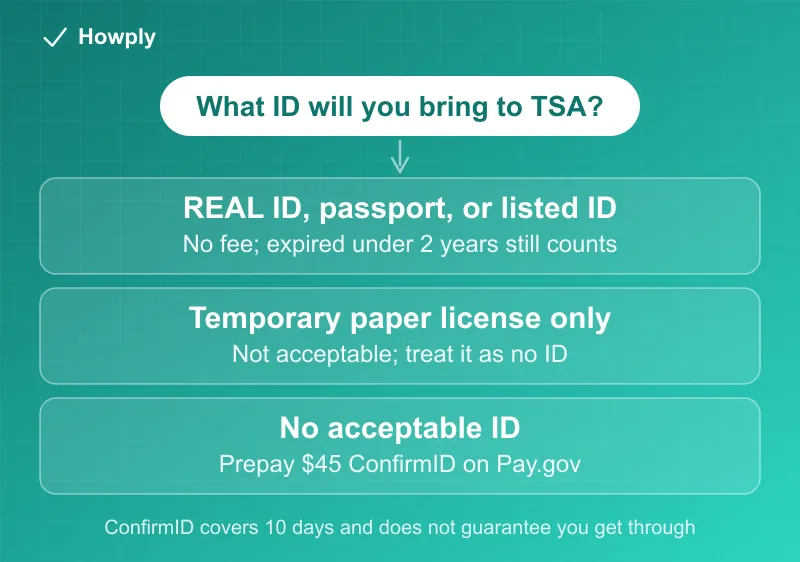
- You probably do not need it if you have a US passport or passport card, a Global Entry or other trusted traveler card, an Enhanced Driver’s License, a military ID, or a permanent resident card. Expired IDs on the list are accepted up to two years past expiration.
- Children under 18 do not need ID for domestic flights.
Key facts at a glance
| Question | Answer |
|---|---|
| Fee | $45 per adult without an acceptable ID |
| Start date | Travel on or after February 1, 2026 |
| Where to pay | Pay.gov only |
| Payment types | Bank account (ACH), debit card, credit card, Venmo, PayPal |
| Cash | Not accepted, including at the airport |
| Valid for | 10 days from the travel date entered |
| Pay for someone else | Yes; the card name does not need to match the traveler |
| Proof at the checkpoint | Printed or on-screen Pay.gov confirmation; lose it and you may pay again |
| What you will be asked | Legal name, address, date of birth |
| Guarantee | None; TSA may still be unable to verify you |
| Expired ID | Accepted up to two years after expiration, for IDs on TSA’s list |
| Temporary paper license | Not acceptable |
What TSA ConfirmID is
TSA’s ConfirmID page describes it as an option for travelers who cannot show the required ID: “If you are unable to provide the required acceptable ID, such as a passport or REAL ID, you can pay a $45 fee to use TSA ConfirmID.” Paying does not clear you. It lets a TSA officer try to verify who you are, using your legal name, address, and date of birth. The same page warns about the alternative: “If you choose not to use it and don’t have an acceptable ID, you may not be allowed through security and may miss your flight.”
Using ConfirmID is voluntary, but for a traveler with no accepted ID, it is the only path TSA offers short of turning back.
How to pay, step by step
- Go to the Pay.gov form linked from TSA’s ConfirmID page. TSA says “The $45 fee can only be paid through Pay.gov.”
- Enter the traveler’s legal name and the travel start date. The payment covers 10 days from that date.
- Pay by bank account, debit card, credit card, Venmo, or PayPal.
- Save the confirmation email from Pay.gov, and print it or take a screenshot.
- At the checkpoint, show the receipt to a TSA officer to begin the identity check.
Three rules from TSA’s ConfirmID FAQs matter in practice:
- Each adult pays separately. TSA states that each adult 18 or older without an acceptable ID must complete the process on their own.
- Someone else can pay. “The name on the card does not have to match the traveler’s name,” as long as the traveler’s name and dates are entered correctly.
- The receipt is the ticket. “If a traveler is unable to produce a confirmation email at the checkpoint, you may need to pay again.”
Why paying at the airport costs time
You can pay on your phone at the airport, but TSA recommends paying ahead, and its FAQ explains why: if you reach the checkpoint without an acceptable ID and without having paid, “you must leave the line to pay. After you finish the process, you must go to the end of the line for security screening and be prepared to present your receipt.” On a busy morning, that second wait is the real cost.
The IDs that make the fee unnecessary
TSA’s acceptable ID list is longer than most travelers realize. Any of these, valid or expired less than two years, avoids ConfirmID:
- A state-issued REAL ID-compliant driver’s license or ID card
- A state Enhanced Driver’s License or Enhanced ID card
- An approved state mobile driver’s license based on a REAL ID, EDL, or EID
- A US passport or US passport card
- A DHS trusted traveler card: Global Entry, NEXUS, SENTRI, or FAST
- A Department of Defense ID, including dependent IDs
- A permanent resident card or border crossing card
- An acceptable photo ID from a federally recognized Tribal Nation, including Enhanced Tribal Cards
- An HSPD-12 PIV card, a TWIC, a Merchant Mariner Credential, a Veteran Health Identification Card, or a USCIS Employment Authorization Card
- A foreign government-issued passport, or a Canadian provincial driver’s license or Indian and Northern Affairs Canada card
TSA is also accepting Apple Digital ID, Clear ID, and Google ID pass as part of its testing. One catch for digital IDs: TSA’s FAQ says “You must also bring your physical ID to the TSA checkpoint.”
Two items on that page trip people up. On expired IDs: “TSA currently accepts expired ID up to two years after expiration.” On the paper license many DMVs hand out while the new card is mailed: “A temporary driver’s license is not an acceptable form of identification.”
Where the documents disagree
Asked whether a passport is the only other option, TSA’s ConfirmID FAQ says no and points to REAL ID-compliant mobile licenses and digital passports from Apple, Google, and CLEAR. The acceptable ID page describes those same digital IDs more cautiously, as accepted “as a part of our ongoing testing efforts,” and a separate FAQ still requires the physical ID alongside them. Treat a digital ID as a convenience, not a replacement, and carry the card.
Children and families
TSA does not require ID from children under 18 on domestic flights. One exception from TSA’s FAQ: an unaccompanied minor with TSA PreCheck needs acceptable ID to get PreCheck screening. Airlines can set their own rules for unaccompanied minors, so check with the carrier.
The cheaper fix is permanent
A passport book renewal is $130 and a passport card is $30, and either one is an accepted ID for ten years; our passport renewal guide covers who can renew online. A Global Entry card also works at the checkpoint, and the Global Entry vs PreCheck vs CLEAR+ guide compares what each program costs. For a REAL ID itself, TSA’s REAL ID page links to each state’s DMV.
Bottom line
If you have a REAL ID, a passport or passport card, a trusted traveler card, or any other ID on TSA’s list, even one expired less than two years ago, you do not need ConfirmID. If you have none of them, pay the $45 on Pay.gov before you leave home, keep the receipt, and know that TSA may still be unable to verify you. Every adult in the party without ID pays separately, the payment covers 10 days from the travel date, and cash is never accepted. A temporary paper license will not get you through. Checking a bag too? Current first and second bag fees on American, Delta, and Southwest are in our checked bag fee comparison.
Rules and fees verified against TSA’s ConfirmID, ConfirmID FAQ, acceptable ID, and REAL ID pages as of October 12, 2026. TSA says its ID list can change without notice; check tsa.gov before you travel. This is general information, not legal advice.