Download Your Data From 11 Social Apps: Where to Click, How Long It Takes
Facebook, Instagram, X, Snapchat, TikTok, Pinterest, Discord, Reddit, LinkedIn, Telegram, WhatsApp: export path, wait from minutes to 30 days, and how long files stay.
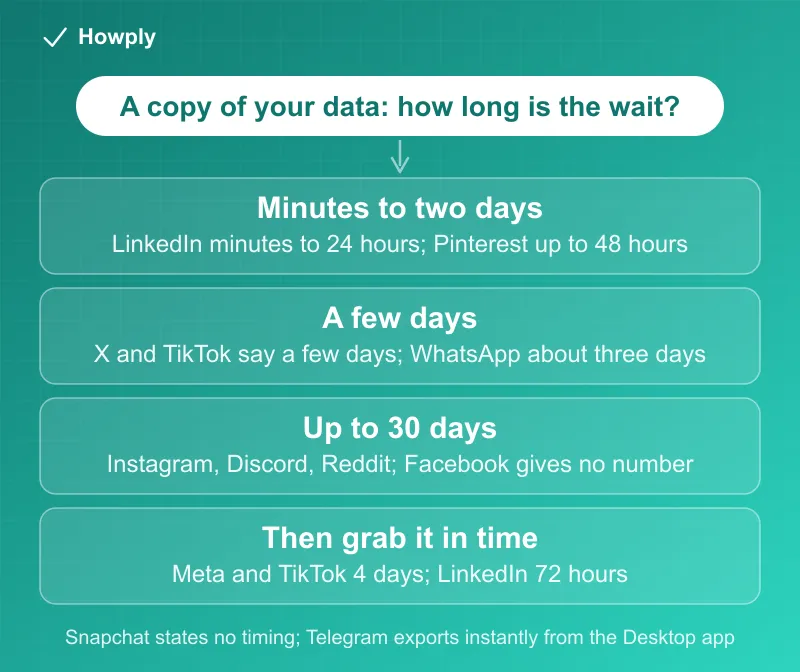
Every major social app will hand you a copy of what it holds on you, but the wait ranges from minutes to a month and the file does not sit there forever. LinkedIn emails a small download “within minutes” and a full one within 24 hours; Pinterest takes up to 48 hours; X and TikTok say “a few days”; WhatsApp about three; Instagram, Discord, and Reddit may take up to 30 days. Once ready, Meta and TikTok keep the file for 4 days and LinkedIn for 72 hours. This guide gives the click path, the wait, the download window, and what the file leaves out for eleven apps, from their own help pages read on October 7, 2026. It is the natural first step before the delete-or-deactivate decision.
The quick answer
- Fastest: LinkedIn (“within minutes” for one category, “within 24 hours” for the full download), Pinterest (up to 48 hours)
- A few days: X and TikTok say “a few days”; WhatsApp’s account report is “available in about three days”
- Up to 30 days: Instagram (“up to 30 days” to email the link), Discord and Reddit (“up to 30 days” to prepare)
- No time given: Facebook (same tool as Instagram but no estimate on its page), Snapchat (“Your selections and how much data we have about you may impact the amount of time”), Telegram (an on-device export, instant)
- Download windows: Facebook and Instagram 4 days, TikTok “up to 4 days”, LinkedIn “72 hours”, WhatsApp “a limited time”
- What is missing: WhatsApp’s report excludes your messages; TikTok skips the last 24 to 48 hours; LinkedIn omits contacts’ emails they chose to hide; Instagram leaves out recently deleted items; X includes inferred “interest and demographic information”
Key facts at a glance
| App | Where | Wait | File stays | Format and notes |
|---|---|---|---|---|
| Settings > Meta Account > Your information and permissions > Export your information | Not stated | 4 days | Device or external service; choose info, date range, format, media quality | |
| Accounts Center > Your information and permissions > Export your information | Up to 30 days | 4 days | Same tool; deleted items may not appear | |
| X | Settings and privacy > Download an archive (code to email or phone) | “a few days” | Not stated | .zip of HTML and JSON; includes DMs and inferred interests |
| Snapchat | accounts.snapchat.com > My Data (or Settings > My Data) | Not stated | Not stated | Zip; pick categories and date range; Memories-only option |
| TikTok | Settings and privacy > Download your data | ”a few days” | Up to 4 days | Choose data and file format; last 24 to 48 hours may be missing |
| Settings > Privacy and data > Request your data | Up to 48 hours | Not stated | Link emailed via a third-party provider | |
| Discord | User Settings > Data & Privacy > Request all of my data | Up to 30 days | Not stated | Link to the account email; one request at a time |
| reddit.com/settings/data-request | Up to 30 days | Not stated | Link to your Reddit inbox, sometimes email | |
| Settings & Privacy > Data Privacy > Get a copy of your data | Minutes to 24 hours | 72 hours | Some connections’ emails hidden by their settings | |
| Telegram | Telegram Desktop > Settings > Export Telegram data | Immediate, on your computer | Yours to keep | JSON or HTML, with media; Desktop only |
| Settings > Account > Request account info | About three days | ”a limited time” | ZIP of account info and settings; no messages |
Facebook and Instagram: one Meta tool, two different promises
Both run through the same export tool. On Facebook the path is “Click Meta Account, then click Your information and permissions.” then “Click Export your information.” and “Click Create export.” You pick a profile and either “Export to device” or an external service, and “From here, you can choose specific info to export, select a date range, format, the notification email and media quality.” Once ready, “you’ll have 4 days to export your information in the Available downloads section”, and “Exporting your files is a password-protected process that only you have access to.”
Instagram’s page describes the same steps from Accounts Center and adds two things Facebook’s page does not. A wait: “It may take up to 30 days for us to email you an export link.” And a gap in the file: “Some information you have deleted may be stored temporarily for safety and security purposes, but will not appear when you access or download your information.” Both pages warn that high-quality video makes the file large, so check storage before choosing a device download.
X: an archive with your inferred interests inside
X’s page sends you to Settings and privacy, where you confirm your identity with a code to your email or phone. Then: “It may take a few days for us to prepare the download”. When it is ready you get an email and a push notification, and you download “a .zip file” while logged in on the same browser. The archive is “in HTML and JSON files” and covers profile, posts, Direct Messages, media, followers and following, your address book, Lists, and “interest and demographic information that we have inferred about you”. That last category is the one most people have never seen.
Snapchat: pick categories, no time promised
Snapchat’s My Data lives at accounts.snapchat.com or in the app under Settings. You select categories, “Choose the date range of data you’d like to receive or toggle this off if you want to receive all data”, and confirm an email. The zip can include login history, profiles, Snap history, saved chats, Memories, purchases, friends, location, and search history, with a separate “Request Only Memories” option. Snapchat gives no turnaround figure, only “Your selections and how much data we have about you may impact the amount of time it takes to prepare your data for download.” It also notes that retention differs by data type, so the file may not go back to your first day.
TikTok: a few days to make, four days to take
TikTok builds the file from Settings and privacy: “Choose which information you want to include in your file to download and select a file format.” Then “it may take a few days to prepare the file.” and once ready, “Your file will be available for up to 4 days.” Two caveats on the page: “the last 24 to 48 hours of some data categories may not be included in your file”, and some data about other people is withheld. EEA and UK users can authorize a transfer to another service instead.
Pinterest: the shortest page, a 48-hour wait
Pinterest: Settings, Privacy and data, “Under Request your data, click Start request”. Then “It may take up to 48 hours for us to email you a download link.” The link comes through a third-party provider to the account’s email address.
Discord and Reddit: up to a month
Discord requires a verified email, then User Settings > Data & Privacy > “Request all of my data”. “The data request process can take up to 30 days to complete.” Three rules follow: “You must wait for your current request to finish before submitting a new one.”; “Changing your email address later will not redirect the download link.”; and “Your request will be canceled if you disable or delete your account before receiving the download link.” In other words, request first, delete later.
Reddit takes the request at reddit.com/settings/data-request on a computer browser, and “it may take up to 30 days to prepare your data.” The link arrives in your Reddit inbox, or sometimes by email. Posts, comments, votes, recent IP addresses, and authorized apps are viewable in the account at any time without waiting.
LinkedIn: minutes for a slice, a day for everything, 72 hours to grab it
LinkedIn is the fastest of the eleven. From Settings & Privacy, Data Privacy: “If you select a specific type of data, we’ll email you within minutes. If you select the larger download, you’ll receive an email within 24 hours.” Then the clock turns against you: “The data will be available for download for 72 hours.” Expect holes in the connections file, because “members choose in their privacy settings whether to allow others to download their email address,” and do it before closing the account: “If you close your account, you’ll no longer have access to your LinkedIn account data.”
Telegram: export from the desktop app, keep it forever
Telegram’s export is not a request but a tool. Its announcement says that on Telegram Desktop you “click Settings > Export Telegram data” and can “export some (or all) of your chats, including photos and other media they contain”, with the result “accessible offline in JSON-format” or as formatted HTML. There is no server queue and no expiry: the files land on your computer. The limit is the platform: the tool lives in the Desktop app, not the phone apps.
WhatsApp: a report without your messages
WhatsApp separates two things. The account information report (Settings > Account > Request account info) covers your account details and settings, and “Account information reports don’t include your personal messages or information about channels or ads.” It is “available in about three days”, comes as a ZIP, and “You have a limited time to download the report before it’s deleted from WhatsApp’s servers.” You cannot request it from the Windows or Mac apps. Your conversations are a different path: WhatsApp’s data page tells you to “create a backup or export your chat history” before deleting, because once deleted “your message history can’t be restored.”
Where the documents disagree or leave gaps
Meta’s two pages, one tool, one estimate. Instagram’s page says the link may take up to 30 days; Facebook’s page for the same Export your information tool gives no time at all. Plan for Instagram’s number on both.
“A few days” is not a number. X and TikTok use the phrase; TikTok at least adds a 4-day download window and a 24 to 48 hour lag. Snapchat gives neither a wait nor a window.
Delivery channels differ. LinkedIn, Pinterest, Discord, and X email a link; Reddit uses your Reddit inbox; TikTok and WhatsApp notify inside the app; Meta does both. Discord warns the link follows the email you had at request time.
Not everything you expect is inside. WhatsApp’s report has no messages. TikTok trims the last day or two. Instagram drops recently deleted content. LinkedIn hides connections’ emails they chose to protect. Only X’s page volunteers that the archive includes what the company has inferred about you.
Before you request
This is a sequence, not a recommendation:
- Request before you delete or deactivate. Discord cancels a pending request if you disable the account; LinkedIn’s data is gone once the account is closed
- Confirm the email on file first. X requires a confirmed email; Discord sends the link only to the address you had when you asked
- Start the long ones early. Instagram, Discord, and Reddit may take up to 30 days; LinkedIn and Pinterest come back within two days
- Watch the pickup window. 4 days at Meta and TikTok, 72 hours at LinkedIn, “a limited time” at WhatsApp
- Save messages separately where the report excludes them. WhatsApp chats need a backup or export; Telegram’s export is the chat tool itself
- Store the file like a password list. Meta calls the process password-protected and WhatsApp says the report “contains your private information”
Quick answers to what people search
How long does Instagram take to send your data? The page says “up to 30 days” to email the link, then 4 days to download it.
How long does Facebook take to download your information? Facebook’s page gives no estimate; the file is available for 4 days once ready.
How long does the X archive take? “a few days”, then a .zip of HTML and JSON files by email and notification.
How long does TikTok take to prepare your data? “a few days”; the file is downloadable for up to 4 days and may omit the last 24 to 48 hours.
How long does a Discord data request take? Up to 30 days, one request at a time, to the email on the account when you asked.
How long does LinkedIn take to send your data? Minutes for one category, within 24 hours for the full download; the link lives 72 hours.
Does the WhatsApp account report include my chats? No. Export or back up chats separately; the report covers account information and settings.
Bottom line
As of October 7, 2026, getting your data back ranges from a minutes-long LinkedIn email to a 30-day wait at Instagram, Discord, and Reddit, and most files expire within days of arriving. Ask before you leave, confirm your email, start the slow ones first, and collect the file inside its window. The help pages linked above are the authority and change without notice.
Wording quoted from the help pages and the Telegram blog post linked above, read on October 7, 2026. Export options and timings differ by region and change often, so check the page before you request. This is general information, not legal advice.
Official sources
- Facebook Help Center: Export a copy of your Facebook information, read October 7, 2026
- Instagram Help Center: Review and export a copy of your Instagram information, read October 7, 2026
- X Help Center: How to download your X archive, read October 7, 2026
- Snapchat Support: How do I download my data from Snapchat?, read October 7, 2026
- TikTok Support: Requesting your data (download, transfer, cancel), read October 7, 2026
- Pinterest Help: Download your Pinterest data, read October 7, 2026
- Discord Support: Requesting a Copy of your Data, read October 7, 2026
- Reddit Help: How do I request a copy of my Reddit data and information?, read October 7, 2026
- LinkedIn Help: Download your data, read October 7, 2026
- Telegram blog: Chat Export Tool, Better Notifications and More (Telegram Desktop export), read October 7, 2026
- WhatsApp Help Center: How to request account information, read October 7, 2026
- WhatsApp Help Center: Access, manage and delete your information (chat backup and export before deletion), read October 7, 2026